Radio Thermostat Company of America
CT32
CT32 RTZW-02
Thermostat - HVAC
HW: 250
ZM5202
6.51.00
0x0098 (152)
0x2002 (8194)
0x0100 (256)
ZC10-14060001
2014-06-13 14:42:17.337409
N/A
Enhanced 232 Slave
Always On Slave
The Z-Wave enabled CT32 thermostat is a compact, easy-to-use thermostat that is packed with functionality.
The Z-Wave enabled CT32 thermostat is a compact, easy-to-use thermostat that is packed with functionality. The CT32 has a responsive touchscreen interface, easy-to-read backlight display, and 7-day programmability. It features a system lock to avoid unintentional changes for maximum efficiency, a filter change indicator to keep your HVAC system running efficiently, wide temperature operation range, and room temperature calibration for precise control.
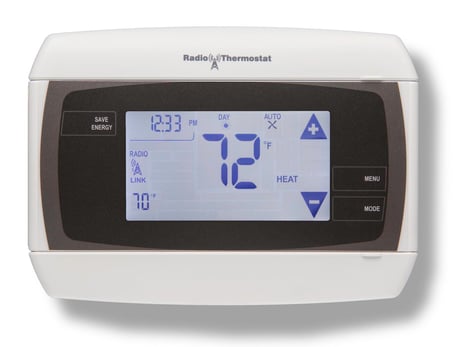
Product Picture


1 - Temperature Reporting Threshold
The Temperature Reporting Threshold parameter the reporting threshold for changes in the ambient temperature as detected by the thermostat.Size: 1 byte
Default: 2
Minimum: 0
Maximum: 0
Possible values
| From | To | Desription |
|---|---|---|
| 0 | 4 | 0 = Disabled: 1 = 0.5ºF: 2 = 1.0ºF: 3 = 1.5ºF: 4 = 2.0ºF |
2 - HVAC Settings
The HVAC Settings Parameter is a read-only value that reports the current HVAC configuration. The HVAC settings must be fixed before the thermostat is joined to the Z-Wave network.Size: 4 bytes
Default: 0
Minimum: 0
Maximum: 0
Possible values
| From | To | Desription |
|---|---|---|
| 1 | 2147483647 | Byte 1: normal (1) or heat pump (2). Byte 2, Bits 7-4: Gas (1) or Electric (2). Byte 2, Bits 3-0: # of Auxiliary Stages. Byte 3: # of Heat Pump Stages. Byte 4: # of Cool Stages. |
3 - Utility Lock
The Utility Lock parameter enables or disables the utility lock. If the utility lock is enabled, the setpoint cannot be modified directly via the thermostat screen.Size: 1 byte
Default: 0
Minimum: 0
Maximum: 0
Possible values
| From | To | Desription |
|---|---|---|
| 0 | 255 | 0 = Disabled, 1 - 255 = Enabled |
4 - C-Wire/Battery
The C-Wire / Battery Status Configuration parameter reports the status of the thermostat power source. The power state is fixed when the thermostat joins the network.Size: 1 byte
Default: 0
Minimum: 0
Maximum: 0
Possible values
| From | To | Desription |
|---|---|---|
| 1 | 2 | 1=C-Wire, 2=Battery |
5 - Humidity Reporting Threshold
The Humidity Threshold Configuration parameter sets the reporting threshold for changes in the relative humidity as detected by the thermostat.Size: 1 byte
Default: 2
Minimum: 0
Maximum: 0
Possible values
| From | To | Desription |
|---|---|---|
| 0 | 3 | 0 = Disabled, 1 = 3% RH, 2 = 5% RH, 3 = 10% RH |
6 - Auxiliary/Emergency Mode
The Auxiliary/Emergency parameter enables or disables auxiliary / emergency heating in the thermostat. Auxiliary / emergency heating is only available if the thermostat is configured in heat pump mode and with at least one stage of auxiliary heating. This command enables auxiliary / emergency heating when the thermostat is in Auto mode. The Thermostat Set Mode command with mode Auxiliary/Emergency Heat (see 1.6.1) will enable emergency heating but only if the thermostat is in Heat mode. This command should only be used on thermostats that support Auxiliary/Emergency Heat thermostat mode.Size: 1 byte
Default: 0
Minimum: 0
Maximum: 0
Possible values
| From | To | Desription |
|---|---|---|
| 0 | 1 | 0 = Disabled, 1 = Enabled |
7 - Thermostat Swing Temperature
The Thermostat Swing Temperature parameter swing temperature on the thermostat. The swing temperature is applied to the setpoint to determine when the thermostat will turn on the HVAC system. If the thermostat is heating, the swing temperature is subtracted from the heat setpoint. If the thermostat is cooling, the swing temperature is added to the cool setpoint.Size: 1 byte
Default: 2
Minimum: 0
Maximum: 0
Possible values
| From | To | Desription |
|---|---|---|
| 1 | 8 | 1 = 0.5ºF, 2 = 1.0ºF, 3 = 1.5ºF, 4 = 2.0ºF, 5 = 2.5ºF, 6 = 3.0ºF, 7 = 3.5ºF, 8 = 4.0ºF |
8 - Thermostat Differential Temperature
The Thermostat Differential Temperature configuration command sets the differential temperature for multi-stage HVAC systems. The differential temperature delta defines when the thermostat will turn on additional stages. There are two differential temperatures, one for multistage cool systems and one for multistage heat systems. If the thermostat is not configured for multistage HVAC systems then these parameters have no effect.Size: 2 bytes
Default: 4
Minimum: 0
Maximum: 0
Possible values
| From | To | Desription |
|---|---|---|
| 4 | 3084 | Byte 1: 4 - 12 (heat diff temp), Byte 2: 4 - 12 (cool diff temp) |
9 - Thermostat Recovery Mode
The Thermostat Recovery Mode configuration command sets the HVAC recovery mode type. The recovery mode determines when additional HVAC stages are turned off as the ambient temperature returns to the target temperature. If the recovery mode is set to economy, the thermostat will turn off additional HVAC stages when the ambient temperature reaches the target temperature plus/minus the differential temperature. If the recovery mode is set to fast, the thermostat will leave all stages on (assuming they were already on) until the ambient temperature reaches the target temperature.Size: 1 byte
Default: 2
Minimum: 0
Maximum: 0
Possible values
| From | To | Desription |
|---|---|---|
| 1 | 2 | 1 = Fast, 2 = Economy |
10 - Temperature Reporting Filter
The Temperature Reporting Filter parameter controls upper and lower bounds of the ambient temperature reporting. The thermostat will not report ambient temperature changes if the ambient temperature falls between these bounds. For example, if the upper bound is 80F and the lower bound is 60F, the thermostat will not send SENSOR_MULTI_LEVEL_REPORTS for ambient temperature values between 60F and 80F. The thermostat will only send ambient temperature changes if the thermostat has been added to an association group (see Command Class Association) and the temperature reporting threshold is non-zero (see Temperature Reporting Threshold).Size: 2 bytes
Default: 3200
Minimum: 0
Maximum: 0
Possible values
| From | To | Desription |
|---|---|---|
| 0 | 31868 | Byte 1: 0 -124ºF (lower bound), Byte 2: 0-124ºF (upper bound) |
11 - Simple UI Mode
The Simple UI Mode parameter controls whether the thermostats UI is in Simple or Normal mode.Size: 1 byte
Default: 1
Minimum: 0
Maximum: 0
Possible values
| From | To | Desription |
|---|---|---|
| 0 | 1 | 0 = Normal Mode, 1 = Simple Mode |
12 - Multicast
The Multicast Enalbe/Disable parameter controls how the thermostat sends unsolicited reports. For this parameter to have an effect, node ids must be set to association group 1 (see section 1.14). When this parameter is set to 0 (multicast is disabled), for each unsolicited report, the thermostat will send the report as single cast messages to all node ids in association group 1. When this parameter is set to 1 (multicast is enabled), for each unsolicited report, the thermostat will send the report as a multi cast message to all nodes in association group 1 followed by single cast messages to each of those nodes.Size: 1 byte
Default: 0
Minimum: 0
Maximum: 0
Possible values
| From | To | Desription |
|---|---|---|
| 0 | 1 | 0 = Disabled, 1 = Enabled |
| 0 | 1 | 0=disabled ,1=enabled |
| 0 | 65535 | 0=disabled, 1=enabled. |
| 0 | 1 | 0=disabled, 1=enabled. |
| 0 | 2 | 0=nothing, 1=hail CC, 2=basic CC report. |
| 0 | 1 | 0=disabled, 1=enabled. |
| 0 | 60000 | The threshold can be set from 0 to 60000 watt. |
| 0 | 100 | The threshold can be set from 0 to 100 percent. |
| 0 | 15 | When value==1, which means the Voltage report is configured to be sent in Report Group 1. When value==2, which means the Current report is configured to be sent in Report Group 1. When value==4, which means the Wattage report is configured to be sent in Report Group 1. When value==8, which means the KWH report is configured to be sent in Report Group 1. When value==15, which means the Voltage , Current , Wattage and KWH report are all configured to be sent in Report Group 1. The other values will be reserved. |
| 0 | 15 | When value==1, which means the Voltage report is configured to be sent in Report Group 2. When value==2, which means the Current report is configured to be sent in Report Group 2. When value==4, which means the Wattage report is configured to be sent in Report Group 2. When value==8, which means the KWH report is configured to be sent in Report Group 2. When value==15, which means the Voltage , Current , Wattage and KWH report are all configured to be sent in Report Group 2. The other values will be reserved. |
| 0 | 15 | When value==1, which means the Voltage report is configured to be sent in Report Group 3. When value==2, which means the Current report is configured to be sent in Report Group 3. When value==4, which means the Wattage report is configured to be sent in Report Group 3. When value==8, which means the KWH report is configured to be sent in Report Group 2. When value==15, which means the Voltage , Current , Wattage and KWH report are all configured to be sent in Report Group 3. The other values will be reserved. |
| 0 | 268435456 | You have a wide range to set the interval time that can be set from 0 to 268435456 seconds. |
| 0 | 268435456 | You have a wide range to set the interval time that can be set from 0 to 268435456 seconds. |
| 0 | 268435456 | You have a wide range to set the interval time that can be set from 0 to 268435456 seconds. |
| 0 | 255 | There are 255 different partners can be configured. |
| 0 | 1 | When value==0, all configuration parameters are configurable. When value==1, all configuration parameters are not configurable.(Locked) |
Go to Menu screen, and press MATE icon.
Go to Menu screen, and press MATE/LINK icon.
When included into a Z-Wave network on battery power, this device is a FLiRS device. The Thermostat will wake up for communication when it receives a valid Z-Wave beam.
In Main menu, put thermostat in OFF mode. Press and hold center digits.