NodOn
Z-Wave+ Smart Plug ON/OFF (Type E)
ASP-3-1-00
On/Off Power Switch
01
ZM5202
6.51.02
0x0165 (357)
0x0001 (1)
0x0001 (1)
ZC10-15030002
2015-03-06 06:08:03.26
N/A
Enhanced 232 Slave
Always On Slave
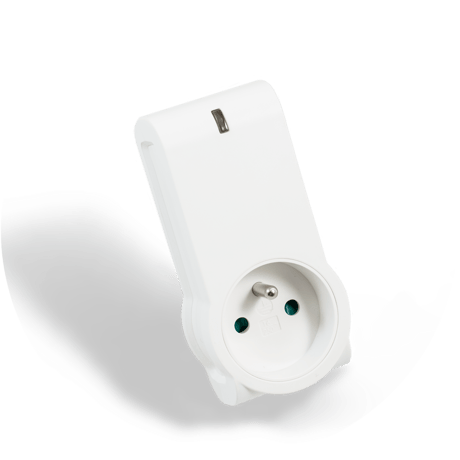
Smart Plug Z-Wave Plus® compliant for ON/OFF switching. Can control a load up to 3500W (resistive) and notify gateway in case of Power outage.
The NodOn Smart Plug can be controlled by any kind of Z-Wave® (or Z-Wave Plus®) gateway or other Z-Wave® controller (standalone mode) such as the NodOn® Soft Remote or Octan Remote. In both standard, Type E (French) or Schuko (German), the plug can be mounted in both side (head up or head down). Combined to its ultra-thin design, these both specificities allow an easy integration, without obstructing nearby power holes on a power strip. Equipped with a very small super-capacitor, the NodOn Smart Plug is able to send an emergency frame to the gateway in case of power outage. The NodOn Smart Plug is based on brand new 500 series Z-Wave® module from Sigma Designs®, and support all the new features of Z-Wave Plus® standard: Longer range (up to 40m), lower power consumption, higher data rate transmission, and many more new features.


1 - DEFAULT STATE
This parameter defines the status of the Smart Plug after a Power Failure or after being plugged.Size: 1 byte
Default: 2
Minimum: 0
Maximum: 0
Possible values
| From | To | Desription |
|---|---|---|
| 0 | 0 | ON |
| 1 | 1 | OFF |
| 2 | 2 | Status before power outage |
2 - POWER FAILURE
This parameter is to set-up the Power Failure / Recover notification and the associated group (Groups 4, 5, 6, 7, 8). The value may be the sum of available values. For example, if you want to activate Power Failure and enable group 4 & 5, the parameter value is 1+2+4=7.Size: 1 byte
Default: 0
Minimum: 0
Maximum: 0
Possible values
| From | To | Desription |
|---|---|---|
| 0 | 0 | Power Failure detection disable |
| 1 | 1 | Power Failure enable (report to Lifeline only) |
| 2 | 2 | Enable group 4 |
| 4 | 4 | Enable group 5 |
| 8 | 8 | Enable group 6 |
| 16 | 16 | Enable group 7 |
| 32 | 32 | Enable group 8 |
3 - FOLLOW STATE
This parameter allows to enable or deactivate Group 2 & Group 3. The value may be the sum of available values. For example, if you want to enable Group 2 & 3, the parameter value is 1+2=3.Size: 1 byte
Default: 3
Minimum: 0
Maximum: 0
Possible values
| From | To | Desription |
|---|---|---|
| 0 | 0 | Group 2 and Group3 Disable |
| 1 | 1 | Group 2 Enable |
| 2 | 2 | Group 3 Enable |
4 - ALWAYS ON
This parameter forces the Smart Plug status to be ON. While enable it is not possible to switch OFF the plug (local or wireless).Size: 1 byte
Default: 0
Minimum: 0
Maximum: 0
Possible values
| From | To | Desription |
|---|---|---|
| 0 | 0 | Always ON disable |
| 1 | 1 | Always ON enable |
5 - Alarm 1 Type Configuration
This parameter is to set the Alarm 1 Type Configuration. Use the Home Automation Gateway interface or our Alarm set-up form to define the value corresponding to your need. (Notification type, Event type, Priority, Lock device, Group 2 Enable, Group 3 Enable, Alarm Action, LED behavior, Alarm duration)Size: 2 bytes
Default: 0
Minimum: 0
Maximum: 0
Possible values
| From | To | Desription |
|---|---|---|
| 0 | 65535 | To set-up your values please follow this link : www.nodon.fr/support/asp3/alarm |
6 - Alarm 1 Specifications
This parameter is to set the Alarm 1 Specifications. Use the Home Automation Gateway interface or our Alarm set-up form to define the value corresponding to your need.Size: 4 bytes
Default: 0
Minimum: 0
Maximum: 0
Possible values
| From | To | Desription |
|---|---|---|
| 0 | 2097151999 | To set-up your values please follow this link : www.nodon.fr/support/asp3/alarm |
7 - Alarm 2 Type Configuration
This parameter is to set the Alarm 2 Type Configuration. Use the Home Automation Gateway interface or our Alarm set-up form to define the value corresponding to your need. (Notification type, Event type, Priority, Lock device, Group 2 Enable, Group 3 Enable, Alarm Action, LED behavior, Alarm duration)Size: 2 bytes
Default: 0
Minimum: 0
Maximum: 0
Possible values
| From | To | Desription |
|---|---|---|
| 0 | 65535 | To set-up your values please follow this link : www.nodon.fr/support/asp3/alarm |
8 - Alarm 2 Specifications
This parameter is to set the Alarm 2 Specifications. Use the Home Automation Gateway interface or our Alarm set-up form to define the value corresponding to your need.Size: 4 bytes
Default: 0
Minimum: 0
Maximum: 0
Possible values
| From | To | Desription |
|---|---|---|
| 0 | 2097151999 | To set-up your values please follow this link : www.nodon.fr/support/asp3/alarm |
9 - Alarm 3 Type Configuration
This parameter is to set the Alarm 3 Type Configuration. Use the Home Automation Gateway interface or our Alarm set-up form to define the value corresponding to your need. (Notification type, Event type, Priority, Lock device, Group 2 Enable, Group 3 Enable, Alarm Action, LED behavior, Alarm duration)Size: 2 bytes
Default: 0
Minimum: 0
Maximum: 0
Possible values
| From | To | Desription |
|---|---|---|
| 0 | 65535 | To set-up your values please follow this link : www.nodon.fr/support/asp3/alarm |
10 - Alarm 3 Specifications
This parameter is to set the Alarm 3 Specifications. Use the Home Automation Gateway interface or our Alarm set-up form to define the value corresponding to your need.Size: 4 bytes
Default: 0
Minimum: 0
Maximum: 0
Possible values
| From | To | Desription |
|---|---|---|
| 0 | 2097151999 | To set-up your values please follow this link : www.nodon.fr/support/asp3/alarm |
11 - Alarm 4 Type Configuration
This parameter is to set the Alarm 4 Type Configuration. Use the Home Automation Gateway interface or our Alarm set-up form to define the value corresponding to your need. (Notification type, Event type, Priority, Lock device, Group 2 Enable, Group 3 Enable, Alarm Action, LED behavior, Alarm duration)Size: 2 bytes
Default: 0
Minimum: 0
Maximum: 0
Possible values
| From | To | Desription |
|---|---|---|
| 0 | 65535 | To set-up your values please follow this link : www.nodon.fr/support/asp3/alarm |
12 - Alarm 4 Specifications
This parameter is to set the Alarm 4 Specifications. Use the Home Automation Gateway interface or our Alarm set-up form to define the value corresponding to your need.Size: 4 bytes
Default: 0
Minimum: 0
Maximum: 0
Possible values
| From | To | Desription |
|---|---|---|
| 0 | 2097151999 | To set-up your values please follow this link : www.nodon.fr/support/asp3/alarm |
13 - Alarm 5 Type Configuration
This parameter is to set the Alarm 5 Type Configuration. Use the Home Automation Gateway interface or our Alarm set-up form to define the value corresponding to your need. (Notification type, Event type, Priority, Lock device, Group 2 Enable, Group 3 Enable, Alarm Action, LED behavior, Alarm duration)Size: 2 bytes
Default: 0
Minimum: 0
Maximum: 0
Possible values
| From | To | Desription |
|---|---|---|
| 0 | 65535 | To set-up your values please follow this link : www.nodon.fr/support/asp3/alarm |
14 - Alarm 5 Specifications
This parameter is to set the Alarm 5 Specifications. Use the Home Automation Gateway interface or our Alarm set-up form to define the value corresponding to your need.Size: 4 bytes
Default: 0
Minimum: 0
Maximum: 0
Possible values
| From | To | Desription |
|---|---|---|
| 0 | 2097151999 | To set-up your values please follow this link : www.nodon.fr/support/asp3/alarm |
15 - Alarm 6 Type Configuration
This parameter is to set the Alarm 6 Type Configuration. Use the Home Automation Gateway interface or our Alarm set-up form to define the value corresponding to your need. (Notification type, Event type, Priority, Lock device, Group 2 Enable, Group 3 Enable, Alarm Action, LED behavior, Alarm duration)Size: 2 bytes
Default: 0
Minimum: 0
Maximum: 0
Possible values
| From | To | Desription |
|---|---|---|
| 0 | 65535 | To set-up your values please follow this link : www.nodon.fr/support/asp3/alarm |
16 - Alarm 6 Specifications
This parameter is to set the Alarm 6 Specifications. Use the Home Automation Gateway interface or our Alarm set-up form to define the value corresponding to your need.Size: 4 bytes
Default: 0
Minimum: 0
Maximum: 0
Possible values
| From | To | Desription |
|---|---|---|
| 0 | 2097151999 | To set-up your values please follow this link : www.nodon.fr/support/asp3/alarm |
17 - Alarm 7 Type Configuration
This parameter is to set the Alarm 7 Type Configuration. Use the Home Automation Gateway interface or our Alarm set-up form to define the value corresponding to your need. (Notification type, Event type, Priority, Lock device, Group 2 Enable, Group 3 Enable, Alarm Action, LED behavior, Alarm duration)Size: 2 bytes
Default: 0
Minimum: 0
Maximum: 0
Possible values
| From | To | Desription |
|---|---|---|
| 0 | 65535 | To set-up your values please follow this link : www.nodon.fr/support/asp3/alarm |
18 - Alarm 7 Specifications
This parameter is to set the Alarm 7 Specifications. Use the Home Automation Gateway interface or our Alarm set-up form to define the value corresponding to your need.Size: 4 bytes
Default: 0
Minimum: 0
Maximum: 0
Possible values
| From | To | Desription |
|---|---|---|
| 0 | 2097151999 | To set-up your values please follow this link : www.nodon.fr/support/asp3/alarm |
19 - Alarm 8 Type Configuration
This parameter is to set the Alarm 8 Type Configuration. Use the Home Automation Gateway interface or our Alarm set-up form to define the value corresponding to your need. (Notification type, Event type, Priority, Lock device, Group 2 Enable, Group 3 Enable, Alarm Action, LED behavior, Alarm duration)Size: 2 bytes
Default: 0
Minimum: 0
Maximum: 0
Possible values
| From | To | Desription |
|---|---|---|
| 0 | 65535 | To set-up your values please follow this link : www.nodon.fr/support/asp3/alarm |
20 - Alarm 8 Specifications
This parameter is to set the Alarm 8 Specifications. Use the Home Automation Gateway interface or our Alarm set-up form to define the value corresponding to your need.Size: 4 bytes
Default: 0
Minimum: 0
Maximum: 0
Possible values
| From | To | Desription |
|---|---|---|
| 0 | 2097151999 | To set-up your values please follow this link : www.nodon.fr/support/asp3/alarm |
Long press during 2 seconds to send several NIF during 30 seconds or a triple press to send a single NIF
Long press during 2 seconds to send several NIF during 30 seconds or a triple press to send a single NIF
Long press during more than 5 seconds then release. Please use this procedure only when the primary controller is missing or otherwise inoperable.
Power outage / Power recover detection: The product is equipped with a small super-capacitor, allow to send an emergency frame in case of power outage Alarm priority management (check user guide for full details)