Dragon Tech Industrial, Ltd.
Z-Wave Plug-In On/Off Appliance Module
PA-100
On/Off Power Switch
HW: 255
ZM5202
6.51.02
0x0184 (388)
0x4447 (17479)
0x3031 (12337)
ZC10-14090001
2014-08-31 14:14:50.468171
N/A
Enhanced 232 Slave
Always On Slave
The PA-100 is plug-in non-dimming switch which can turn On or Off lights and appliances. The PA-100 also acts as a Z-Wave signal repeater. Key Specifications: 120VAC/60Hz Incandescent: 900Watts, CFL/LED: 200Watts Motor: 1/2HP Resistive Load: 15Amps
The PA-100 plug-in is a non-dimming switch which plugs into a standard AC outlet, and allows remote control of On, Off lights and AC operated appliances. Compact design allows second wall AC outlet to remain free. Serves as a node to repeat the signal in the network, extending the overall Z-Wave mesh wireless network range The PA-100 uses the latest 500 series Z-Wave chip for longer range, over-air-firmware update, and easier inclusion process, providing these features are also supported by the gateway or controller.
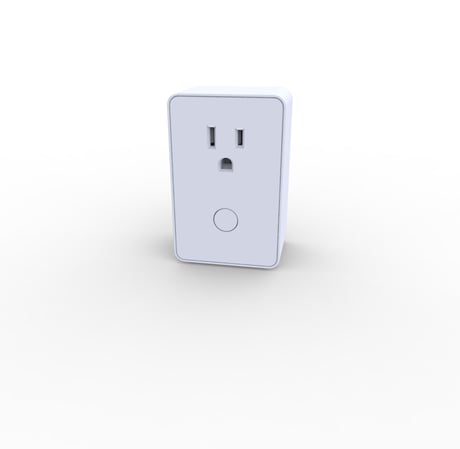
Product Picture


3 - LED Configuration
This parameter controls the state of the LED indicator in response to the state of the switch module.Size: 1 byte
Default: 0
Minimum: 0
Maximum: 0
Possible values
| From | To | Desription |
|---|---|---|
| 0 | 0 | The LED indicator will be OFF when the connected appliance is ON, and the LED indicator will be ON when the connected appliance is OFF. |
| 1 | 1 | The LED indicator will be ON when the connected appliance is ON and the LED indicator will be OFF when the connected appliance is OFF. |
| 2 | 2 | The LED indicator will always be OFF, regardless of connected appliance being ON or OFF. |
1. Put your network controller into inclusion mode following the instructions from your controller manufacturer 2. When the controller is ready, single click the button on the front of PA-100 3. The controller should indicate that the new device was added successfully
1. Put your network controller into exclusion mode following the instructions from your controller manufacturer 2. When the controller is ready, single click the button on the front of PA-100 3. The controller should indicate that the device was excluded successfully
Use this procedure only in the event that the network primary controller is lost or otherwise inoperable. a. Unplug PA-100 from the AC outlet and also unplug the power plug of the appliance from the module(if plugged in) b. Press and hold the button on the PA-100 module c. Plug the PA-100 back into the AC outlet with the button pressed d. After 3 seconds, release the button. If you see the button blinks, that means the module has been reset successfully