Express Controls LLC
EZMultiPli
EZMultiPli
Notification Sensor
1
ZM5202
6.51.03
0x001E (30)
0x0004 (4)
0x0001 (1)
ZC10-14090018
2014-08-25 20:28:20.282674
N/A
Enhanced 232 Slave
Always On Slave
Z-Wave Plug-In Multi-Sensor • Motion Sensor • Temperature Sensor • Light Level Sensor • Color Indicator/Night Light • Wall Powered • Z-Wave Range Extender
EZMultiPli Multi-Sensor is a motion sensor, temperature sensor, light level sensor, color indicator/night light and Z-Wave range extender all in one! Installation is as easy - just plug it into any wall outlet! Notify caregivers when a loved one does not get up at their usual time or gets up multiple times during the night. Easily installed in a kitchen, bathroom, bedroom or hallway - just plug it in! The wide angle motion sensor detects motion when placed at floor level in a normal wall outlet or at counter height in a kitchen or bath. Never needs batteries! Receive an email or text when motion is detected or the temperature is dangerously low while you are away. Turn on lights and sirens automatically. Save energy by automatically turning off lights in unoccupied rooms or hallways. Set the color LED night light to inform you that your garage door is open, there is a severe weather alert or any indicator you can imagine! Operates as a Z-Wave range extender utilizing fifth generation Z-Wave technology to enhance the reliability and speed of every device on a Z-Wave network
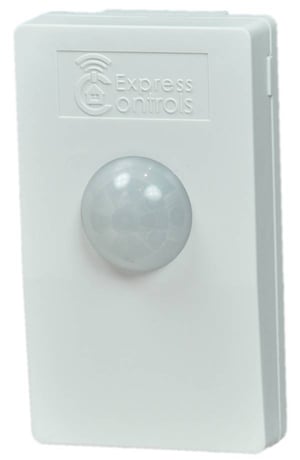
Product Picture


1 - OnTime
OnTime sets the number of minutes that the lights stay on when motion has not been detected. A value of 0 is a special mode where the lights are constantly sent a command to turn them on whenever motion is detected. EZMultiPli will NOT turn the lights off in this mode. Recommended values: 5 min for hallways 20 min for an office environment 60 min for a library, office or other room where someone may be sitting still for a long timeSize: 1 byte
Default: 10
Minimum: 0
Maximum: 0
Possible values
| From | To | Desription |
|---|---|---|
| 0 | 0 | Send only ON every time motion is detected |
| 1 | 127 | Minutes of No Motion before OFF sent |
2 - OnLevel
OnLevel is the value sent by the Z-Wave BASIC_SET command to all Group 2 nodes when motion is detected. A value of 0 will turn the lights off (not recommended). A value between 1 and 99 will set the dim level to between 1% and 99% (99% is full on). A value of -1 will turn the light “on” which depends on the device but most will set the dim level to the last dim setting.Size: 1 byte
Default: -1
Minimum: 0
Maximum: 0
Possible values
| From | To | Desription |
|---|---|---|
| 1 | 99 | Dim level |
| -1 | -1 | ON |
3 - LiteMin
A Luminance report is sent to the system controller every LiteMin minutes if the value has changed by more than 5% since the last reading. A value of zero turns this mode off. Luminance values can still be obtained at any time by the home-control application in this mode.Size: 1 byte
Default: 60
Minimum: 0
Maximum: 0
Possible values
| From | To | Desription |
|---|---|---|
| 0 | 0 | Disable |
| 1 | 127 | Minutes between light level reports |
4 - TempMin
A Temperature report is sent to the system controller every TempMin minutes if the value has changed by more than 0.5F since the last reading. A value of zero turns this mode off. Temperature values can still be obtained at any time by the home-control application in this mode.Size: 1 byte
Default: 60
Minimum: 0
Maximum: 0
Possible values
| From | To | Desription |
|---|---|---|
| 0 | 0 | Disable |
| 1 | 127 | Minutes between temperature reports |
5 - TempAdj
TempAdj is a twos-complement number that is used to adjust the temperature reading to make it more accurate. The value is in tenths of degree Fahrenheit. The temperature reading can be adjusted up to +12.7F to -12.8F. A value of 1 will adjust the temperature reading by +0.1F. A value of -1 will adjust the temperature by -0.1F. A value of 123 will adjust the temperature by +12.3F.Size: 1 byte
Default: 0
Minimum: 0
Maximum: 0
Possible values
| From | To | Desription |
|---|---|---|
| -127 | 128 | Temperature adjust by 1/10th this value |
When EZMultiPli has not yet been joined to a Z-Wave network, the LED blinks aqua. To Include: Put the controller into learn mode, then press and release the push button on the side of EZMultiPli. The LED will blink blue while EZMultiPli is trying to join the Z-Wave network. Once joined to the network, EZMultiPli enters a motion sensor test mode and the LED will blink white each time motion is detected. This mode lasts for about 5 minutes and then the LED will go out. If EZMultiPli is unable to join the network, it will return to blinking aqua.
There are two methods for exclusion: 1) Put the controller into exclusion mode, then press and release the push button on the side of EZMultiPli. The LED will blink aqua when no longer joined to the network. 2) Press and hold the push button. The LED will blink blue faster and faster and then shift to yellow and continue to blink faster and faster. Once the LED goes out, EZMultiPli is reset to the factory defaults and will blink aqua. Method 1 is recommended. Method 2 should only to be used in the event that the primary controller is missing or otherwise inoperable.
Excluding from a Z-Wave network will return the device to factory defaults. See the Product Exclusion Description for details.