Aeotec
Siren Gen5
ZW080-B21
Siren
HW: 50 FW: 3.25
ZM5202
6.51.01
0x0086 (134)
0x0204 (516)
0x0050 (80)
ZC10-14090017
2014-09-12 18:11:06.158859
N/A
Enhanced 232 Slave
Always On Slave
Siren Gen5 is an siren Z-Wave device that when an emergency is happening it lets you know.
Aeon Labs Siren Gen5 is an siren Z-Wave device that when an emergency is happening it lets you know. Its 105dB Speaker System is always heard. Its super-bright LED system lights your path even when it’s dark. Siren provides a smart home with the perfect security and safety features that it needs. Those security and safety features are matched by smart features. Siren’s speaker system can access 5 different audio alerts, allowing your smart home to pick the alert best suited to the emergency. The speaker system’s volume can also be adjusted so that Siren is perfect for every space in every home. It also act as a repeater that forward Z-Wave command messages to destination nodes if the originating controller is out of range from the destination node. By taking advantage of the Z-Wave mesh network, commands can be routed to their destination via intermediary “listening” Z-Wave products. Products that are Z-Wave certified can be used and communicate with other Z-Wave certified devices. Also a tool that can be programmed, scheduled, controlled and communicated with from anywhere in the world.
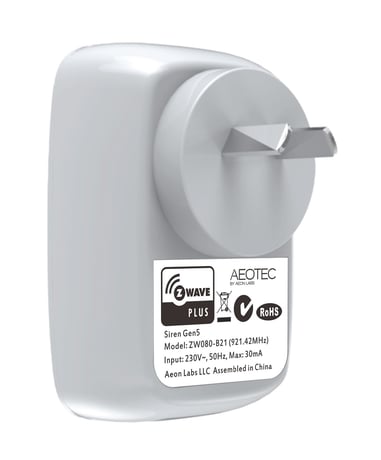
Product Picture


37 - Configure the Siren sound and its volume
This parameter is used to configure the sIren sound and volume as the default setting.Size: 2 bytes
Default: 259
Minimum: 0
Maximum: 0
Possible values
| From | To | Desription |
|---|---|---|
| 256 | 256 | The siren sound 1 is selected |
| 512 | 512 | The siren sound 2 is selected |
| 3 | 3 | Set the volume to 105 dB |
| 2 | 2 | Set the volume to 100 dB |
| 768 | 768 | The siren sound 3 is selected |
| 1024 | 1024 | The siren sound 4 is selected |
| 1280 | 1280 | The siren sound 5 is selected |
| 1 | 1 | Set the volume to 88 dB |
80 - Enable/Disable to send notifications to associated devices to associated devices.
This parameter is used to Enable/Disable to send notifications to associated devices (in Group 1) when the state of Siren Gen5’s load is changed. (0=Send nothing, 1=Send hail CC, 2=Send basic report CC).Size: 1 byte
Default: 0
Minimum: 0
Maximum: 0
Possible values
| From | To | Desription |
|---|---|---|
| 2 | 2 | Send BASIC Report Command |
| 0 | 0 | Send Nothing (Disabled) |
| 1 | 1 | Send HAIL Command |
200 - Partner ID
This parameter is used to configure the partner ID. (0== Aeon Labs Standard Product, 1~255== others).Size: 1 byte
Default: 0
Minimum: 0
Maximum: 0
Possible values
| From | To | Desription |
|---|---|---|
| 0 | 0 | Aeon Labs Standard Product |
| 1 | 255 | Partner ID of Partner Product |
252 - Enable/Disable Lock Configuration
This parameter is used to enable/disable Lock all configuration parameters. (0 =disable, 1 = enable)Size: 1 byte
Default: 0
Minimum: 0
Maximum: 0
Possible values
| From | To | Desription |
|---|---|---|
| 0 | 0 | All configuration parameters are configurable. |
| 1 | 1 | All configuration parameters are not configurable (Locked). |
255 - Reset to default factory setting
This parameter is used to reset product to default factory setting. (There are just 2 values can be used).Size: 4 bytes
Default: 0
Minimum: 0
Maximum: 0
Possible values
| From | To | Desription |
|---|---|---|
| 1431655765 | 1431655765 | Reset the product to default factory setting and be excluded from the Z-wave network. |
| 1 | 1 | Resets all configuration parameters to default setting. |
Turn the primary controller of Z-Wave network into inclusion mode, short press the product’s Action button that you can find on the product's housing.
Turn the primary controller of Z-Wave network into exclusion mode, short press the product’s Action button that you can find on the product's housing.
N/A
N/A
Press and hold the Action button that you can find on the product's housing for 20 seconds and then release. This procedure should only be used when the primary controller is inoperable.
Support ""Over the Air Firmware Updating"" and “Z-Wave Security”.