Aeotec
Key Fob Gen5
ZW088-C
Remote Control - Multi Purpose
HW: 58 FW: 1.03
ZM5202
6.51.00
0x0086 (134)
0x0001 (1)
0x0058 (88)
ZC10-14120007
2014-11-17 18:12:32.71247
N/A
Portable Controller
Portable Controller
Key Fob Gen5 is a fully functional Z-wave remote controller, which can include, exclude and control the other Z-Wave certified devices.
Key Fob Gen5 is a fully functional Z-wave remote controller, which can include, exclude and control the other Z-Wave certified devices. It also can be acted a secondary controller in a network. It is a four buttons design. You can use each button to control your home’s Z-Wave devices and build a Z-Wave network for them. Products that are Z-Wave certified can be used and communicate with other Z-Wave certified devices.
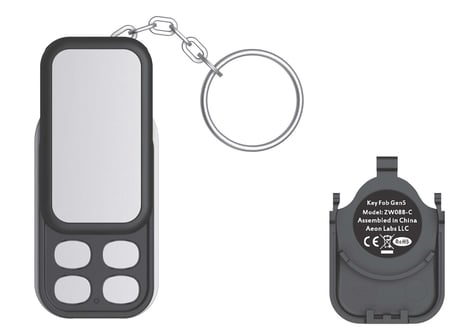
Product Picture


250 - Switching Group mode or Scene mode.
This parameter is used to configure that the current mode is Group Mode or Scene Mode. (0== Group Mode, 1== Scene Mode).Size: 1 byte
Default: 0
Minimum: 0
Maximum: 0
Possible values
| From | To | Desription |
|---|---|---|
| 0 | 0 | Set the current mode to Group Mode. |
| 1 | 1 | Set the current mode to Scene Mode. |
255 - Reset the configuration parameter to default factory setting
This parameter is used to reset all configuration parameter to default factory setting.Size: 1 byte
Default: 0
Minimum: 0
Maximum: 0
Possible values
| From | To | Desription |
|---|---|---|
| 1 | 1 | Resets all configuration parameters to default setting. |
Short press the “Learn” button on the back of the Key Fob.
Press and hold the ""Learn"" for 3 seconds will trigger sending the Wake up notification command.
Use this procedure only in the event that the primary controller is missing or otherwise inoperable. Press and hold the “Mode” button and “Learn” button for 20 seconds and then release.
It can also activate 8 Z-Wave Scenes.
Short press the “Include” button on the Key Fob, it will go into inclusion state and its blue LED will blink slowly to wait including other slave Z-Wave devices.
Short press the “Exclude” button on the Key Fob, it will go into exclusion state and its red LED will blink slowly to wait excluding other slave Z-Wave devices from its network.