Philio
In Wall Dual relay(1 way) switch module
PAN06-1A
On/Off Power Switch
01
SD3502
6.51.02
0x013C (316)
0x0001 (1)
0x0013 (19)
ZC10-14120009
2014-12-12 12:35:24.893345
N/A
Enhanced 232 Slave
Always On Slave
This in-wall switch module is a transceiver which is a Z-Wave PlusTM enabled device and is fully compatible with any Z-WaveTM enabled network. Mini size design let the module can easily hide itself into the wall box and that will be good for the house decoration. There are many kind of application by using the module to switch Load On and Off , one main application is the light control.
This in-wall switch module is a transceiver which is a Z-Wave PlusTM enabled device and is fully compatible with any Z-WaveTM enabled network. Mini size design let the module can easily hide itself into the wall box and that will be good for the house decoration. There are many kind of application by using the module to switch Load On and Off , one main application is the light control. If connect the com port directly to AC Line terminal ,the new smart relay calibration technology can reduce the inrush current caused by the load and let the module work perfectly with many kind of light like incandescent, fluorescent and LED light. This module can also connect to alternative power supply like DC 12V to switch on/off 12V MR-16 light.
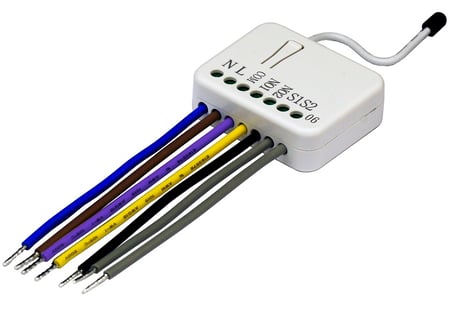
Product Picture


1 - Selected Relay
If Controller not using Multi_Channel command class to access the relay of PAN06, you may configure the select value to react the Basic Command Class or Binary Switch Command Class.Size: 1 byte
Default: 3
Minimum: 0
Maximum: 0
Possible values
| From | To | Desription |
|---|---|---|
| 1 | 1 | Select relay1 : Only relay1 can be controlled and report. |
| 2 | 2 | Select relay2 : Only relay2 can be controlled and report. |
| 3 | 3 | Select relay1 & relay2 :Relay1 and relay2 can be controlled and report at the same time. |
2 - Edge / Pulse / Edge-Toggle mode
Manual switch S1 and S2 can set to Edge mode or Pulse mode or Edge-Toggle mode, default value is Edge mode.Size: 1 byte
Default: 1
Minimum: 0
Maximum: 0
Possible values
| From | To | Desription |
|---|---|---|
| 1 | 1 | Edge mode: this mode is suitable for the bi stable wall switch that has indicator point on the switch, and the same position correspond to same state of relay1 and relay2. if the PAN06 relay change the state because of receiving Z-Wave RF command, it may need two times of change (switch on to off or switch off to on) to let relay back to the correspond state. |
| 2 | 2 | Pulse mode: this mode is suitable for the toggle type wall switch to swap the state of Relay1 or Relay2. |
| 3 | 3 | Edge-Toggle mode: this mode is suitable for the normal bi-stable switch, every time when change the state of the wall switch will also swap the state of Relay1 or Relay2 |
3 - Restore switch state mode
Whenever the AC power return from lost, PAN06 will restore the switch state which could be SWITCH OFF、LAST SWITCH STATE、SWITCH ON. The default setting is LAST SWITCH STATE.Size: 1 byte
Default: 1
Minimum: 0
Maximum: 0
Possible values
| From | To | Desription |
|---|---|---|
| 0 | 0 | SWITCH OFF |
| 1 | 1 | LAST SWITCH STATE |
| 2 | 2 | SWITCH ON |
4 - Auto off timer
Whenever PAN06 switches to on, the auto off timer begin to count down. After the timer decrease to zero, it will switch to off automatically. However if Auto off timer is set as 0, the auto off function will be disabled. The default setting is 0.Size: 2 bytes
Default: 0
Minimum: 0
Maximum: 0
Possible values
| From | To | Desription |
|---|---|---|
| 0 | 0 | Disable auto off function |
| 1 | 32767 | 1s ~ 32767s |
5 - RF off command mode
Whenever a switch off command, BASIC_SET、BINARY_SWITCH_SET、SWITCH_ALL_OFF, is received, it could be interpreted as 4 variety of commands.Size: 1 byte
Default: 0
Minimum: 0
Maximum: 0
Possible values
| From | To | Desription |
|---|---|---|
| 0 | 0 | Switch Off : It switches to OFF state. The default setting is Switch Off. |
| 1 | 1 | Ignore : The switch off command will be ignored. |
| 2 | 2 | Switch Toggle : It switches to the inverse of current state. |
| 3 | 3 | Switch On : It switches to ON state. |
6 - Existence of Endpoint3
The endpoint3 of Multi-Channel Command Class is related to relay1 and relay2. It may be redundant for the need to control relay1 or relay2 individually. When the Existence of Endpoint3 is set as 0, the endpoint3 of Multi-Channel Command Class will be disabled. The default value is 1.Size: 1 byte
Default: 1
Minimum: 0
Maximum: 0
Possible values
| From | To | Desription |
|---|---|---|
| 1 | 1 | Endpoint3 exist |
| 2 | 2 | No Endpoint3 |
1. Put your Z-Wave controller into inclusion mode by following the instructions provided by the controller manufacturer. 2. Pressing Include button of PAN06 three times within 2 seconds will enter inclusion mode.
1. Put your Z-Wave controller into exclusion mode by following the instructions provided by the controller manufacturer. 2. Pressing Include button of PAN06 three times within 2 seconds will enter exclusion mode.
Use this procedure only in the event that the primary controller is lost or otherwise inoperable. 1. Pressing Include button of PAN06 three times within 2 seconds will enter inclusion mode. 2. Within 1 second, press Include button of PAN06 again for 5 seconds.