Aeotec
Recessed Door Sensor Gen5
ZW089-B
Notification Sensor
HW: 59 FW: 1.13
ZM5202
6.51.01
0x0086 (134)
0x0202 (514)
0x0059 (89)
ZC10-14120010
2014-12-12 12:36:06.112121
N/A
Enhanced 232 Slave
Reporting Sleeping Slave
Aeon Labs Recessed Door Sensor Gen5 is a door sensor that can detect the state of the door's open/close.
The Aeotec by Aeon Labs Recessed Door Sensor Gen5 is a door sensor that can detect the state of the door's open/close. It will report the door state to your controller/ gateway/associated nodes in real time when the state of your door has a change. It’s a security Z-Wave device that supports security encryption. Also it supports the “Over the Air Firmware Updating” that allows you wirelessly update its firmware if needs. It can be included and operated in any Z-Wave network with other Z-Wave certified devices from manufacturers and/or other applications.
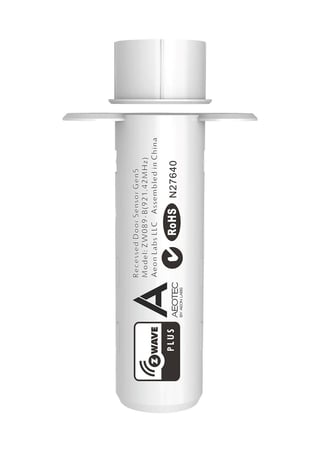
Product Picture


1 - Which value of the Sensor Binary Report will be sent when the magnet switch to open/close.
This parameter is used to set the Sensor binary report value when the magnet switch to open/close.Size: 1 byte
Default: 0
Minimum: 0
Maximum: 0
Possible values
| From | To | Desription |
|---|---|---|
| 0 | 0 | When the magnet switch to open, Sensor Binary Report=0xFF. When the magnet switch to close, Sensor Binary Report=0x00. |
| 1 | 1 | When the magnet switch to open, Sensor Binary Report=0x00. When the magnet switch to close, Sensor Binary Report=0xFF. |
3 - Which value of the Basic Set will be sent when the magnet switch to open/close.
This parameter is used to set the Basic Set value when the magnet switch to open/close.Size: 1 byte
Default: 0
Minimum: 0
Maximum: 0
Possible values
| From | To | Desription |
|---|---|---|
| 1 | 1 | When the magnet switch to open, Basic Set=0x00. When the magnet switch to close, Basic Set=0xFF. |
| 0 | 0 | When the magnet switch to open, Basic Set=0xFF. When the magnet switch to close, Basic Set=0x00. |
101 - Enable/disable the function of low battery checking
This parameter is used to configure to enable/disable the function of low battery checking.(00==Disable, 1==Enable).Size: 1 byte
Default: 0
Minimum: 0
Maximum: 0
Possible values
| From | To | Desription |
|---|---|---|
| 0 | 0 | Disable low battery checking. |
| 1 | 1 | Enable low battery checking. |
111 - The interval time of low battery checking.
This parameter is used to configure the interval time of low battery checking. Note: 1. The minimum unit of interval time is 4 minutes(240). If the value is set to 1 minute, the interval time will be 4 minutes. The same is if the value is set to 7 minutes, the interval time will be 8 minutes. 2. The possible values are unsigned value, so its range is 0 to 2147483647.Size: 4 bytes
Default: 86640
Minimum: 0
Maximum: 0
Possible values
| From | To | Desription |
|---|---|---|
| 0 | 2147483647 | The range of interval time is 0 to 2147483647. |
121 - To set which command will be sent to the associated nodes when the magnet switch is triggered.
This parameter is used to set which command will be sent to the associated nodes when the magnet switch is triggered.Size: 4 bytes
Default: 256
Minimum: 0
Maximum: 0
Possible values
| From | To | Desription |
|---|---|---|
| 16 | 16 | Send Sensor Binary Report to associated nodes when magnet switch is triggered. |
| 256 | 256 | Send Basic Set to associated nodes when magnet switch is triggered. |
| 272 | 272 | Send the Sensor Binary Report and Basic Set to associated nodes when magnet switch is triggered. |
252 - Enable/disable all configuration parameters to be locked
This parameter is used to enable/disable all configuration parameters to be locked. (0 =disable, 1 = enable)Size: 1 byte
Default: 0
Minimum: 0
Maximum: 0
Possible values
| From | To | Desription |
|---|---|---|
| 0 | 0 | Disable all configuration parameters to be locked. |
| 1 | 1 | Enable all configuration parameters to be locked. |
254 - Device Tag
This parameter is used to set the device tag. Note: The possible values are unsigned value, its range is 0 to 65535.Size: 2 bytes
Default: 0
Minimum: 0
Maximum: 0
Possible values
| From | To | Desription |
|---|---|---|
| 0 | 65535 | The range of device tag is 65535. |
Turn the primary controller of Z-Wave network into inclusion mode, short press the product’s Z-Wave button that you can find in the back of the product.
Turn the primary controller of Z-Wave network into exclusion mode, short press the product’s Z-Wave button that you can find in back of the product.
N/A
Press and hold the Z-Wave button for 5 seconds will trigger sending the Wake up notification command and then keep waking up for 10 seconds after release the Z-Wave button.
Press and hold the Z-Wave button that you can find in back of the product for 20 seconds and then release. This procedure should only be used when the primary controller is inoperable.
Support ""Over the Air Firmware Updating"" and “Z-Wave Security”.