Danalock
Danalock
DanalockBTZU100Square
Door Lock Keypad
81
ZM5202
6.51.03
0x010E (270)
0x0008 (8)
0x0001 (1)
ZC10-15010004
2015-01-20 12:18:00.7924
N/A
Enhanced 232 Slave
Listening Sleeping Slave
Z-Wave Controlled door lock with keypad, and Bluetooth Smart.
Z-Wave Controlled door lock with keypad, and Bluetooth Smart. Operated by Z-Wave. Connect Danalock to your Z-Wave gateway - Danalock interfaces with your existing Z-Wave network through the Danalock smartphone app. Operate Danalock remotely by accessing your Z-Wave network from anywhere in the world with internet access.
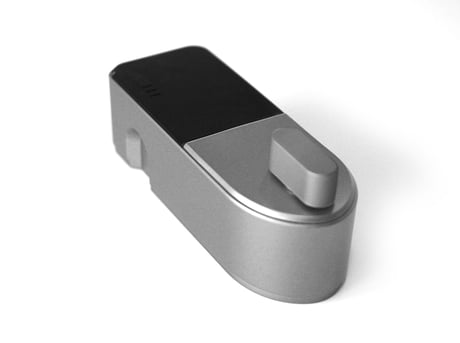
Product Picture


1 - Direction
0 = The motor goes clockwise when latched 1 = The motor goes counterclockwise when latchedSize: 1 byte
Default: 0
Minimum: 0
Maximum: 0
Possible values
| From | To | Desription |
|---|---|---|
| 0 | 0 | The motor goes clockwise when latched |
| 1 | 1 | The motor goes counterclockwise when latched |
2 - Speed (Torque)
1 = Slowest 2 = Slow 3 = Normal 4 = Fast 5 = FastestSize: 1 byte
Default: 3
Minimum: 0
Maximum: 0
Possible values
| From | To | Desription |
|---|---|---|
| 2 | 2 | Slow |
| 1 | 1 | Slowest |
| 3 | 3 | Normal |
| 4 | 4 | Fast |
| 5 | 5 | Fastest |
3 - Mode
0 = Stepper motor mode wave drive(power saving) 1 = Stepper motor mode full drive(Normal) 2 = Relay modeSize: 1 byte
Default: 1
Minimum: 0
Maximum: 0
Possible values
| From | To | Desription |
|---|---|---|
| 1 | 1 | Stepper motor mode full drive(Normal) |
| 0 | 0 | Stepper motor mode wave drive(power saving) |
| 2 | 2 | Relay mode |
4 - Turn degrees
Factor 10 turn degrees ( 1 = 10 degrees, 9 = 90 degrees etc.)Size: 1 byte
Default: 9
Minimum: 0
Maximum: 0
Possible values
| From | To | Desription |
|---|---|---|
| 1 | 100 | Factor 10 turn degrees ( 1 = 10 degrees, 9 = 90 degrees etc.) |
5 - Auto Latch time
How many seconds from the lock has been unlatched to it automatically should close again. If 0 then it is disabled.Size: 1 byte
Default: 0
Minimum: 0
Maximum: 0
Possible values
| From | To | Desription |
|---|---|---|
| 0 | 60 | How many seconds from the lock has been unlatched to it automatically should close again. If 0 then it is disabled. |
6 - Sound
Disable or enable the beep sound from latch or unlatch operations(0 = Disable, 1 = Enable.)Size: 1 byte
Default: 1
Minimum: 0
Maximum: 0
Possible values
| From | To | Desription |
|---|---|---|
| 0 | 0 | Disable the beep sound from latch or unlatch operations |
| 1 | 1 | Enable the beep sound from latch or unlatch operations |
7 - Battery Type
Set the type of battery that powers the device. This affects the returned battery state. 0 = 3,6 Volt battery, 1 = 3.0 Volt battery. 2 = Mains power, changing from and to mains power requires the Danalock to be excluded and included.Size: 1 byte
Default: 1
Minimum: 0
Maximum: 0
Possible values
| From | To | Desription |
|---|---|---|
| 0 | 0 | 3,6 Volt battery |
| 1 | 1 | 3.0 Volt battery. |
| 2 | 2 | Mains power, changing from and to mains power requires the Danalock to be excluded and included. |
8 - Battery alarm value
When the battery level is equal to or under this value, the device will notify user with a beep sound after latch or unlatch.Size: 1 byte
Default: 0
Minimum: 0
Maximum: 0
Possible values
| From | To | Desription |
|---|---|---|
| 0 | 100 | When the battery level is equal to or under this value, the device will notify user with a beep sound after latch or unlatch. |
9 - TurnAndGo
0 = Turn&Go off, 1 = Turn&Go on. Used if the lock is using a optional rotation sensor. Latch&Go on will turn automatically when manual turn is detected.Size: 1 byte
Default: 0
Minimum: 0
Maximum: 0
Possible values
| From | To | Desription |
|---|---|---|
| 0 | 0 | TurnAndGo off |
| 1 | 1 | TurnAndGo on will turn automatically when manual turn is detected. |
10 - BrakeAndGoBack
0 = Disabled. 1-15 Seconds to brake. When used the lock will brake for x amount of seconds and then turn 75 degrees back. Made for special doors without door lever.(Only when unlatching).Size: 1 byte
Default: 0
Minimum: 0
Maximum: 0
Possible values
| From | To | Desription |
|---|---|---|
| 0 | 0 | Disabled |
| 1 | 15 | Seconds to brake. When used the lock will brake for x amount of seconds and then turn 75 degrees back. Made for special doors without door lever.(Only when unlatching). |
11 - Async
0 = Async off, 1 = Async on. Used if the lock is using an optional rotation sensor. When async is enabled the lock will auto calibrate if already unlatched and asked to Unlatch again (used for special door locks where the key turn is asynced from the inside nob.)Size: 1 byte
Default: 0
Minimum: 0
Maximum: 0
Possible values
| From | To | Desription |
|---|---|---|
| 0 | 0 | Async off |
| 1 | 1 | Async on. Used if the lock is using an optional rotation sensor. When async is enabled the lock will auto calibrate if already unlatched and asked to Unlatch again (used for special door locks where the key turn is asynced from the inside nob.) |
12 - Door lock operation report type
0 = Simple supported by all controllers that support door locks. 1 = Advanced, more specific reports through notification Command Class. 2 = No Door lock operation reports are sent unsolicited.Size: 1 byte
Default: 0
Minimum: 0
Maximum: 0
Possible values
| From | To | Desription |
|---|---|---|
| 0 | 0 | Simple supported by all controllers that support door locks. |
| 1 | 1 | Advanced, more specific reports through notification Command Class. |
| 2 | 2 | No Door lock operation reports are sent unsolicited. |
To add or include the danalock into a Z-Wave network Set the controller in inclusion mode Touch the User Button until you hear two beeps.
To remove or exclude the danalock into a Z-Wave network Set the controller in exclusion mode Touch the User Button until you hear two beeps.
The danalock can be set to factory settings by holding the User Button for ten beeps. Please use this procedure only when the primary controller is missing or otherwise inoperable.