HomeSeer
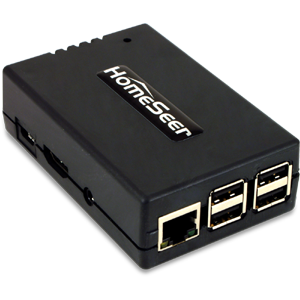
HomeSeer Z-NET
Z-NET
Central Controller
N/A
ZM5202
6.51.06
0x001E (30)
0x0005 (5)
0x0002 (2)
ZC10-15020004
2015-02-12 12:39:09.8084
N/A
Static Controller
Central Static Controller
The HomeSeer Z-NET allows for control of Z-Wave over Ethernet connections.
Z-NET is a remote network-based Z-Wave interface for use with HomeSeer home automation systems. Since Z-NET is IP-enabled, it may be installed anywhere a network connection is available. Z-NET supports Network Wide Inclusion (NWI) for easy pairing of Z-Wave products. Multiple Z-NETs may be used together with any HomeSeer system for a centrally managed, muti-network installation; ideal for home owners with secondary residences or outbuildings (pool houses, barns, workshops, servants quarters, etc). Main Features: * Remote Z-Wave Interface for use with HomeSeer Software and HomeTrollers * Supports Z-Wave Plus (and older) Products * Ethernet (and optional WiFi) Connections Allow of Optimal Positioning in Home * Supports Network Wide Inclusion (NWI) for Easy Product Inclusion * May be Used with Other Z-NETs in Larger Homes or for Secondary Residences or Outbuildings * Includes Highly Optimized Antenna for Superior Range and Performance * Includes Easy to Use Web-Based Management Features * Provides Easy Upgrade Path from Z-Trollers, Z-Sticks, SmartSticks and Most Other Z-Wave Interfaces * Case Includes Keyhole slots for wall mounting (with your hardware) * Optional USB > WiFi adapter is Available
From the Z-Wave Plug-In menu, choose ""Controller Management"". Under the options for the interface that is using the Z-Net controller, choose ""Receive Network from Another Controller"", and follow the system prompts.
Please do this only after removing all nodes from the network. From the Z-Wave Plug-In menu, choose ""Controller Management"". Under the options for the interface that is using the Z-Net controller, choose ""ERASE this Interface and Create A New Network"", and follow the system prompts.
From the Z-Wave Plug-In menu, choose ""Controller Management"". Under the options for the interface that is using the Z-Net controller, choose ""Add/Include a Node"", and follow the system prompts.
From the Z-Wave Plug-In menu, choose ""Controller Management"". Under the options for the interface that is using the Z-Net controller, choose ""Remove/Exclude a Node"", and follow the system prompts.