Secure Controls
Secure Smart Plug 302
SSP 302 ANZ
On/Off Power Switch
02
ZM5202
6.51.02
0x0059 (89)
0x0011 (17)
0x0002 (2)
ZC10-15030012
2015-03-24 05:41:01.8884
N/A
Routing Slave
Always On Slave
SSP 302 ANZ variant is a mains-powered, plug-in device that supports energy monitoring. It is suitable for switching loads up to 2.3KW at 230V AC. It can measure voltage, current, power, energy etc.
SSP 302 ANZ variant is a mains-powered, plug-in device that supports energy monitoring. It is suitable for switching loads up to 2.3KW at 230V AC. It can measure voltage, current, power, energy etc. The SSP 302 acts as a repeater in a Z-Wave network by helping messages from other devices reach there destinations, without losing a plug socket.
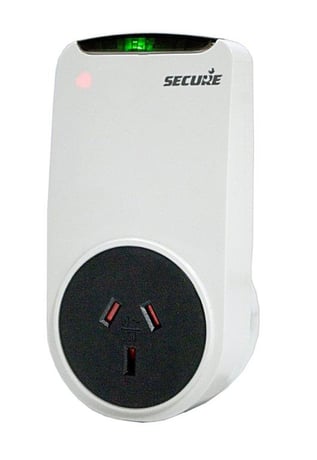
Product Picture


1 - Switch Status delta based configuration
This configuration Parameter will be used to enable/disable the delta base switch status reporting.Size: 1 byte
Default: 1
Minimum: 0
Maximum: 0
Possible values
| From | To | Desription |
|---|---|---|
| 0 | 1 |
2 - Voltage delta based configuration
This configuration Parameter will be used to enable/disable the delta base voltage reporting. Resolution of this parameter is 100 mV. if user wants to set 10V delta then it should be 10/0.1 = 100.Size: 2 bytes
Default: 0
Minimum: 0
Maximum: 0
Possible values
| From | To | Desription |
|---|---|---|
| 0 | 600 |
3 - Current delta based configuration
This configuration Parameter will be used to enable/disable the delta base curenrt reporting. Resolution of this parameter is 10 mA. if user wants to set 1A delta then it should be 1/0.01 = 100.Size: 1 byte
Default: 0
Minimum: 0
Maximum: 0
Possible values
| From | To | Desription |
|---|---|---|
| 0 | 1500 |
4 - Power Factor delta based configuration
This configuration Parameter will be used to enable/disable the delta base Power Factor reporting in 0.1% resolution. if user wants to set Power Factor 10% = 10/0.1 = 100Size: 2 bytes
Default: 0
Minimum: 0
Maximum: 0
Possible values
| From | To | Desription |
|---|---|---|
| 0 | 1000 | |
| 0 | 0 |
5 - Active Power delta based configuration
This configuration Parameter will be used to enable/disable the delta base Active Power reporting in 1 W resolution.Size: 2 bytes
Default: 0
Minimum: 0
Maximum: 0
Possible values
| From | To | Desription |
|---|---|---|
| 0 | 4000 |
6 - Active Energy delta based configuration
This configuration Parameter will be used to enable/disable the delta base Active Energy reporting in 1 Wh resolution.Size: 2 bytes
Default: 0
Minimum: 0
Maximum: 0
Possible values
| From | To | Desription |
|---|---|---|
| 0 | 32000 |
7 - Apparent Energy delta based configuration
This configuration Parameter will be used to enable/disable the delta base Apparent Energy reporting in 1 VAh resolution.Size: 2 bytes
Default: 0
Minimum: 0
Maximum: 0
Possible values
| From | To | Desription |
|---|---|---|
| 0 | 32000 |
8 - Switch Status time interval based
This configuration Parameter will be used to set the time interval base reporting of switch status in 1 second resolution. Please see the user's manual for information on entering values greater than 32767.Size: 2 bytes
Default: 0
Minimum: 0
Maximum: 0
Possible values
| From | To | Desription |
|---|---|---|
| 0 | 65520 |
9 - Voltage time interval based
This configuration Parameter will be used to set the time interval base reporting of voltage in 1 second resolution. Please see the user's manual for information on entering values greater than 32767.Size: 2 bytes
Default: 0
Minimum: 0
Maximum: 0
Possible values
| From | To | Desription |
|---|---|---|
| 0 | 65520 |
10 - Current time interval based
This configuration Parameter will be used to set the time interval base reporting of current in 1 second resolution. Please see the user's manual for information on entering values greater than 32767.Size: 2 bytes
Default: 0
Minimum: 0
Maximum: 0
Possible values
| From | To | Desription |
|---|---|---|
| 0 | 65520 |
11 - Power Factor time interval based
This configuration Parameter will be used to set the time interval base reporting of Power Factor in 1 second resolution. Please see the user's manual for information on entering values greater than 32767.Size: 2 bytes
Default: 0
Minimum: 0
Maximum: 0
Possible values
| From | To | Desription |
|---|---|---|
| 0 | 65520 |
12 - Active Power time interval based
This configuration Parameter will be used to set the time interval base reporting of Active Power in 1 second resolution. Please see the user's manual for information on entering values greater than 32767.Size: 2 bytes
Default: 0
Minimum: 0
Maximum: 0
Possible values
| From | To | Desription |
|---|---|---|
| 0 | 65520 |
13 - Active Energy time interval based
This configuration Parameter will be used to set the time interval base reporting of Active Energy in 1 second resolution. Please see the user's manual for information on entering values greater than 32767.Size: 2 bytes
Default: 0
Minimum: 0
Maximum: 0
Possible values
| From | To | Desription |
|---|---|---|
| 0 | 65520 |
14 - Apparent Energy time interval based
This configuration Parameter will be used to set the time interval base reporting of Apparent Energy in 1 second resolution. Please see the user's manual for information on entering values greater than 32767.Size: 2 bytes
Default: 0
Minimum: 0
Maximum: 0
Possible values
| From | To | Desription |
|---|---|---|
| 0 | 65520 |
15 - Relay and LED configuration
This configuration is used to change the relay LED status when relay is open/close and also enable to whether to retain the last relay status over power cycle.Size: 1 byte
Default: 0
Minimum: 0
Maximum: 0
Possible values
| From | To | Desription |
|---|---|---|
| 0 | 0 | Relay status will not be retain over power cycle, and Relay status LED will lit when relay ON and relay status LED will off when relay OFF. |
| 1 | 1 | Relay status will be retain over power cycle, and Relay status LED will lit when relay ON and relay status LED will off when relay OFF. |
| 2 | 2 | Relay status will not be retain over power cycle, and Relay status LED will off when relay ON and relay status LED will lit when relay OFF. |
| 3 | 3 | Relay status will be retain over power cycle, and Relay status LED will off when relay ON and relay status LED will lit when relay OFF. |
16 - Sleep Current Configuration
This configuration is used to disconnect the load if the device current is less the configured sleep current for more than 30 seconds, this configuration has the resolution of 0.001 A .Size: 1 byte
Default: 0
Minimum: 0
Maximum: 0
Possible values
| From | To | Desription |
|---|---|---|
| 0 | 1000 |
To include the SSP 302 onto a network, put the controller into inclusion mode. Now, press and hold the button on SSP 302 for 4 to 7 seconds then release. The network status LED will start flashing (twice per second) on successful start of inclusion process. On successful inclusion the LED will turn off.
To exclude the SSP 302 from a network, put the controller into exclusion mode. Now, press and hold the button on SSP 302 for 4 to 7 seconds then release. The network status LED will start flashing (twice per second) on successful start of exclusion process. After successful exclusion the network status LED will start flashing once per second, and the device will reset to factory default.
NA
NA
Please use this procedure only when the primary controller is missing or otherwise inoperable. Power cycle the device and press and hold the button for more than 11 seconds and less than 15 seconds within the 60 seconds of power cycle to put the device in factory default, that include setting all the configuration, Association to factory default and removing the device from Z-Wave network.
NA