Quby
Energy Meter Reader
6500-1400-6000
Whole Home Meter - Simple
01
ZM5202
6.51.06
0x0130 (304)
0x0002 (2)
0x0000 (0)
ZC10-15040005
2015-04-13 07:12:10.8528
N/A
Enhanced 232 Slave
Always On Slave
The Energy Meter Reader retrieves the electricity, gas and heat usage from analog and digital energy meters and sends this to the Quby Energy Display.
The Energy Meter Reader measures electricity, gas and heat usage of analog and digital energy meters. Analog meters are read by means of optical sensors that can be placed on the energymeter to monitor the rotating disc or the blinking LED. In case of a digital meter, the meter adapter can be connected to the digital meter by means of a P1 digital communication interface. The meter adapter measures the cumulative and instantaneous gas and electricity consumption and sends this information to a Z-Wave enabled display (Quby Energy Display).
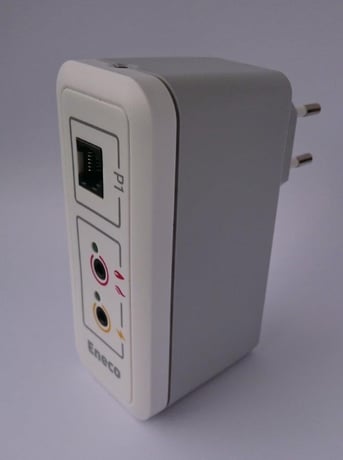
Product Picture


1 - Analog gas/heat port mode
0 = Disabled 1 = Gas enabled 2 = Heat enabledSize: 1 byte
Default: 1
Minimum: 0
Maximum: 0
Possible values
| From | To | Desription |
|---|---|---|
| 0 | 2 |
2 - Analog gas/heat port resolution
pulses per cubic meter / pulses per MJ; in Q14.2 notationSize: 4 bytes
Default: 400
Minimum: 0
Maximum: 0
Possible values
| From | To | Desription |
|---|---|---|
| 120 | 40000 |
3 - Analog electricity port mode
0 = disabled 1 = Electricity import enabled 2 = Electricity export enabledSize: 1 byte
Default: 1
Minimum: 0
Maximum: 0
Possible values
| From | To | Desription |
|---|---|---|
| 0 | 2 |
4 - Analog electricity port resolution
pulses per kWh; in Q14.2 notationSize: 4 bytes
Default: 400
Minimum: 0
Maximum: 0
Possible values
| From | To | Desription |
|---|---|---|
| 120 | 40000 |
255 - Restart device
1 = Restart entire device 2 = Restart metering chipSize: 1 byte
Default: 0
Minimum: 0
Maximum: 0
Possible values
| From | To | Desription |
|---|---|---|
| 0 | 2 |
To add the Energy Meter Reader into a Z-Wave network, the inclu-sion process should be started on the controller. In factory default mode, the Energy Meter Reader will try to join a Z-Wave network automatically after being plugged into a power socket. If the Energy Meter Reader was previously included in a Z-Wave network, or was not just plugged into a power socket, one needs to triple-press the button (quickly).
To remove the Energy Meter Reader from a Z-wave network, the exclusion process should be started on the controller. The button on the Energy Meter Reader should then be triple-pressed (quickly).
N/A
N/A
The Energy Meter Reader can be reset to factory default by pressing and holding the button for approximately 10 seconds. This will reset the entire device to factory default, also removing the Z-Wave set-tings. After the reset is complete, both LEDs will blink a single time (indicating startup). If the device was connected to a Z-Wave net-work, it will no longer be connected after reset. Please use this procedure only in the event that the primary controller is missing or otherwise inoperable.
N/A