Aeotec
Home Energy Meter Gen5
ZW095-A
Sub Energy Meter
HW: 95 FW: 1.33
ZM5202
6.51.02
0x0086 (134)
0x0102 (258)
0x005F (95)
ZC10-15040002
2015-04-03 08:02:18.6182
N/A
Enhanced 232 Slave
Always On Slave
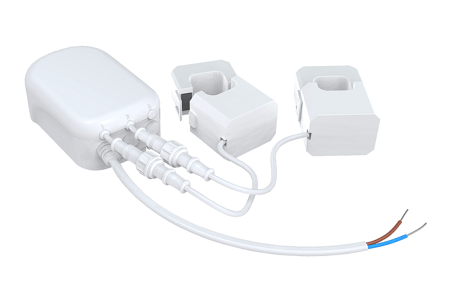
Aeon Labs Home Energy Meter Gen5 is a smart energy meter, which can monitor the total amount of electricity of your home.
Aeon Labs Home Energy Meter Gen5 is a Z-Wave device that can monitor the total amount of electricity of your home. It can report the wattage energy usage and KWH usage to a Z-Wave Controller (especially a gateway). In near real-time you’ll have a full understanding of how much electricity you use and when you use it. Products that are Z-Wave certified can be used and communicate with other Z-Wave certified devices. Also a tool that can be programmed, scheduled, controlled and communicated with from anywhere in the world.


2 - Energy detection mode configuration.
This parameter is used to configure the energy detection mode when the parameter 101~103 have been configured: 0 = report Wattage and the absolute KWH value; 1 = report positive/negative Wattage and the algebraic sum KWH value; 2 = report positive/negative Wattage and the positive KWH value (consuming electricity); 3 = report positive/negative Wattage and the negative KWH value (generating electricity).Size: 1 byte
Default: 0
Minimum: 0
Maximum: 0
Possible values
| From | To | Desription |
|---|---|---|
| 1 | 1 | report positive/negative Wattage and the algebraic sum KWH value; |
| 0 | 0 | report Wattage and the absolute KWH value; |
| 2 | 2 | report positive/negative Wattage and the positive KWH value (consuming electricity); |
| 3 | 3 | report positive/negative Wattage and the negative KWH value (generating electricity). |
3 - Enable/Disable the function of parameter 4 and 11.
This parameter is used to enable/disable the function of parameter 4 and 10. (0 == disable, 1 == enable)Size: 1 byte
Default: 1
Minimum: 0
Maximum: 0
Possible values
| From | To | Desription |
|---|---|---|
| 0 | 0 | Disable the function of parameter 4 and 11. |
| 1 | 1 | Enable the function of parameter 4 and 11. |
4 - Induce a automatic report of whole HEM.
This parameter is used to induce an automatic report (total wattage) when the change of the current power is more/less than the threshold in wattage.Size: 2 bytes
Default: 50
Minimum: 0
Maximum: 0
Possible values
| From | To | Desription |
|---|---|---|
| 0 | 32767 | The threshold can be set from 0 to 32767 watt. |
5 - Induce a automatic report of Channel 1.
This parameter is used to induce an automatic report (Channel 1) when the change of the power is more/less than the threshold in wattage.Size: 2 bytes
Default: 50
Minimum: 0
Maximum: 0
Possible values
| From | To | Desription |
|---|---|---|
| 0 | 32767 | The threshold can be set from 0 to 32767 watt. |
6 - Induce an automatic report of Channel 2.
This parameter is used to induce an automatic report (Channel 2) when the change of the power is more/less than the threshold in wattage.Size: 2 bytes
Default: 50
Minimum: 0
Maximum: 0
Possible values
| From | To | Desription |
|---|---|---|
| 0 | 32767 | The threshold can be set from 0 to 32767 watt. |
8 - Induce an automatic report of whole HEM.
This parameter is used to induce an automatic report (total wattage) when the change of the current power is more/less than the threshold in percentage.Size: 1 byte
Default: 10
Minimum: 0
Maximum: 0
Possible values
| From | To | Desription |
|---|---|---|
| 0 | 100 | The threshold can be set from 0 to 100 percent. |
9 - Induce an automatic report of Channel 1.
This parameter is used to induce an automatic report (Channel 1) when the change of the current power is more/less than the threshold in percentage.Size: 1 byte
Default: 10
Minimum: 0
Maximum: 0
Possible values
| From | To | Desription |
|---|---|---|
| 0 | 100 | The threshold can be set from 0 to 100 percent. |
10 - Induce an automatic report of Channel 2.
This parameter is used to induce an automatic report (Channel 2) when the change of the current power is more/less than the threshold in percentage.Size: 1 byte
Default: 10
Minimum: 0
Maximum: 0
Possible values
| From | To | Desription |
|---|---|---|
| 0 | 100 | The threshold can be set from 0 to 100 percent. |
13 - Enable /disable CRC-16 Encapsulation.
Enable /disable reporting CRC-16 Encapsulation Command. (0 = disable, 1 = enable)Size: 1 byte
Default: 0
Minimum: 0
Maximum: 0
Possible values
| From | To | Desription |
|---|---|---|
| 0 | 0 | Disable CRC-16 Encapsulation. |
| 1 | 1 | Enable CRC-16 Encapsulation. |
101 - To set which report need to be sent.
This parameter is used to configure which reports need to be sent in Report Group 1. The values corresponding to the first four bits of the parameter value may be combined to create different combinations of reports that you wish to have sent. For example, instantaneous Current is the value 8 and instantaneous Watts is the value 2, so setting parameter 101 to a value of 10 will result in both instantaneous Current and instantaneous Watts to be reported. See the full description of the parameter values for other possible settings.Size: 4 bytes
Default: 2
Minimum: 0
Maximum: 0
Possible values
| From | To | Desription |
|---|---|---|
| 4 | 4 | Report Instantaneous Voltage of whole HEM. |
| 8 | 8 | Report Instantaneous Current (Amperes) of whole HEM. |
| 2 | 2 | Report Instantaneous Watts of whole HEM. |
| 1 | 1 | Report Accumulated kWh of whole HEM. |
| 256 | 256 | Report Instantaneous Watts of Channel 1. |
| 768 | 768 | Report Instantaneous Watts of Channel 2. |
| 2048 | 2048 | Report Accumulated kWh of Channel 1. |
| 4096 | 4096 | Report Accumulated kWh of Channel 2. |
| 65536 | 65536 | Report Instantaneous Voltage of Channel 1. |
| 196608 | 196608 | Report Instantaneous Voltage of Channel 2. |
| 524288 | 524288 | Report Instantaneous Current (Amperes) of Channel 1. |
| 1048576 | 1048576 | Report Instantaneous Current (Amperes) of Channel 2. |
102 - To set which report need to be sent.
This parameter is used to configure which reports need to be sent in Report Group 2. The values corresponding to the first four bits of the parameter value may be combined to create different combinations of reports that you wish to have sent. For example, instantaneous Current is the value 8 and instantaneous Watts is the value 2, so setting parameter 102 to a value of 10 will result in both instantaneous Current and instantaneous Watts to be reported. See the full description of the parameter values for other possible settings.Size: 4 bytes
Default: 1
Minimum: 0
Maximum: 0
Possible values
| From | To | Desription |
|---|---|---|
| 1 | 1 | Report Accumulated kWh of whole HEM. |
| 2 | 2 | Report Instantaneous Watts of whole HEM. |
| 4 | 4 | Report Instantaneous Voltage of whole HEM. |
| 8 | 8 | Report Instantaneous Current (Amperes) of whole HEM. |
| 256 | 256 | Report Instantaneous Watts of Channel 1. |
| 768 | 768 | Report Instantaneous Watts of Channel 2. |
| 2048 | 2048 | Report Accumulated kWh of Channel 1. |
| 4096 | 4096 | Report Accumulated kWh of Channel 2. |
| 65536 | 65536 | Report Instantaneous Voltage of Channel 1. |
| 196608 | 196608 | Report Instantaneous Voltage of Channel 2. |
| 524288 | 524288 | Report Instantaneous Current (Amperes) of Channel 1. |
| 1048576 | 1048576 | Report Instantaneous Current (Amperes) of Channel 2. |
103 - To set which report need to be sent.
This parameter is used to configure which reports need to be sent in Report Group 3. The values corresponding to the first four bits of the parameter value may be combined to create different combinations of reports that you wish to have sent. For example, instantaneous Current is the value 8 and instantaneous Watts is the value 2, so setting parameter 103 to a value of 10 will result in both instantaneous Current and instantaneous Watts to be reported. See the full description of the parameter values for other possible settings.Size: 4 bytes
Default: 0
Minimum: 0
Maximum: 0
Possible values
| From | To | Desription |
|---|---|---|
| 1 | 1 | Report Accumulated kWh of whole HEM. |
| 2 | 2 | Report Instantaneous Watts of whole HEM. |
| 4 | 4 | Report Instantaneous Voltage of whole HEM. |
| 256 | 256 | Report Instantaneous Watts of Channel 1. |
| 768 | 768 | Report Instantaneous Watts of Channel 2. |
| 2048 | 2048 | Report Accumulated kWh of Channel 1. |
| 4096 | 4096 | Report Accumulated kWh of Channel 2. |
| 65536 | 65536 | Report Instantaneous Voltage of Channel 1. |
| 196608 | 196608 | Report Instantaneous Voltage of Channel 2. |
| 524288 | 524288 | Report Instantaneous Current (Amperes) of Channel 1. |
| 1048576 | 1048576 | Report Instantaneous Current (Amperes) of Channel 2. |
| 8 | 8 | Report Instantaneous Current (Amperes) of whole HEM. |
111 - Set the interval time of sending report.
This parameter is used to set the interval time of sending report in Report Group 1. (The unit of time is second).Size: 4 bytes
Default: 60
Minimum: 0
Maximum: 0
Possible values
| From | To | Desription |
|---|---|---|
| 0 | 268435456 | Interval Seconds |
112 - Set the interval time of sending report.
This parameter is used to set the interval time of sending report in Report Group 2. (The unit of time is second).Size: 4 bytes
Default: 120
Minimum: 0
Maximum: 0
Possible values
| From | To | Desription |
|---|---|---|
| 0 | 268435456 | Interval Seconds |
113 - Set the interval time of sending report.
This parameter is used to set the interval time of sending report in Report Group 3. (The unit of time is second).Size: 4 bytes
Default: 120
Minimum: 0
Maximum: 0
Possible values
| From | To | Desription |
|---|---|---|
| 0 | 268435456 | Interval Seconds |
200 - Partner ID
This parameter is used to configure the partner ID. (0== Aeon Labs Standard Product, 1~255== others).Size: 1 byte
Default: 0
Minimum: 0
Maximum: 0
Possible values
| From | To | Desription |
|---|---|---|
| 0 | 0 | Aeon Labs Standard Product |
| 1 | 255 | Partner ID of Partner Product |
252 - Enable/Disable Lock Configuration
This parameter is used to enable/disable Lock all configuration parameters. (0 =disable, 1 = enable)Size: 1 byte
Default: 0
Minimum: 0
Maximum: 0
Possible values
| From | To | Desription |
|---|---|---|
| 0 | 0 | All configuration parameters are configurable. |
| 1 | 1 | All configuration parameters are not configurable (Locked). |
255 - Reset to default factory setting
This parameter is used to reset product to default factory setting. (There are just 2 values can be used).Size: 4 bytes
Default: 0
Minimum: 0
Maximum: 0
Possible values
| From | To | Desription |
|---|---|---|
| 1431655765 | 1431655765 | Reset the product to default factory setting and be excluded from the Z-wave network. |
| 1 | 1 | Resets all configuration parameters to default setting. |
Turn the primary controller of Z-Wave network into inclusion mode, short press the product’s Action button that you can find on the product's housing.
Turn the primary controller of Z-Wave network into exclusion mode, short press the product’s Action button that you can find on the product's housing.
N/A
N/A
Press and hold the Action button that you can find on the product's housing for 10 seconds and then release. This procedure should only be used when the primary controller is inoperable.
Support ""Over the Air Firmware Updating"" and “Z-Wave Security”.