Aeotec
Doorbell Gen5
ZW056-A
Siren
HW: 38 FW: 1.11
ZM5101
6.51.06
0x0086 (134)
0x0104 (260)
0x0038 (56)
ZC10-15060002
2015-06-04 07:02:36.7452
N/A
Enhanced 232 Slave
Always On Slave
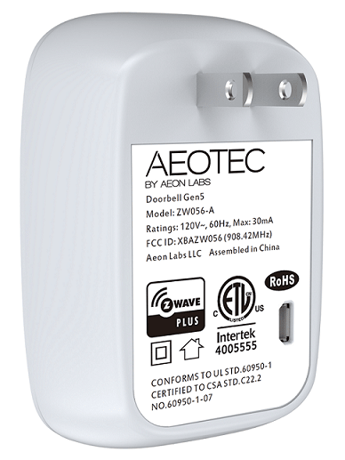
Doorbell Gen5 is a doorbell Z-Wave wireless device that when heard the doorbell music is playing it lets you know someone is knocking at the door.
Aeon Labs Doorbell supports playing MP3 music files with a press of this doorbell. It has a 128MB flash memory that can store up to 800 ringtones. The volume can be adjusted manually via short press on the Volume Button, also you can switch the doorbell sound to the next via long press on the Volume Button. You may change/update your doorbell ringtone at any point in time you want by connecting your Doorbell to your PC to update the sound track on your Doorbell’s flash memory. There is a small Wireless Button, which can trigger the doorbell on the other side of the wall to play the selected doorbell music when pressed. It also act as a repeater that forward Z-Wave command messages to destination nodes if the originating controller is out of range from the destination node. By taking advantage of the Z-Wave mesh network, commands can be routed to their destination via intermediary “listening” Z-Wave products. Products that are Z-Wave certified can be used and communicate with other Z-Wave certified devices. Also a tool that can be programmed, scheduled, controlled and communicated with from anywhere in the world.


2 - Set the repetitions for playing doorbell ringtone.
This parameter is used to set the repetitions for playing doorbell ringtone. Note: If the time of playing doorbell ringtone is more than 20 seconds, the volume of ringtone will reduce to silence no matter how many repetitions of doorbell ringtone are set.Size: 1 byte
Default: 2
Minimum: 0
Maximum: 0
Possible values
| From | To | Desription |
|---|---|---|
| 1 | 100 | the range of repetition is 1 to 100. |
5 - Set the default doorbell ringtone.
This parameter is used to set the default doorbell ringtone.Size: 1 byte
Default: 1
Minimum: 0
Maximum: 0
Possible values
| From | To | Desription |
|---|---|---|
| 1 | 100 | To set which ringtone number is the default ringtone. |
6 - Select a ringtone to play.
This parameter is used to select a ringtone to play, which is only for customer testing the doorbell ringtone.Size: 1 byte
Default: 1
Minimum: 0
Maximum: 0
Possible values
| From | To | Desription |
|---|---|---|
| 1 | 100 | Play the specified ringtone. |
| 0 | 0 | Stop playing. |
7 - Control items
This parameter is used to implement the control items.Size: 1 byte
Default: 0
Minimum: 0
Maximum: 0
Possible values
| From | To | Desription |
|---|---|---|
| 1 | 1 | Implement the control item of Play. |
| 2 | 2 | Implement the control item of Stop. |
| 3 | 3 | Implement the control item of Pause. |
| 4 | 4 | Implement the control item of Next. |
| 5 | 5 | Implement the control item of Previous. |
8 - Set the volume of ringtone.
This parameter is used to set the volume of ringtone. The volume has 10 levels can be set. Value=10, which is the max volume. Value=0, which is the min volume.Size: 1 byte
Default: 10
Minimum: 0
Maximum: 0
Possible values
| From | To | Desription |
|---|---|---|
| 0 | 10 | The max volume is 10, the min volume is 0. |
10 - Define the function of Button- or Button+.
This parameter is used to define the function of Button- or Button+.Size: 1 byte
Default: 0
Minimum: 0
Maximum: 0
Possible values
| From | To | Desription |
|---|---|---|
| 0 | 0 | Button- is defined to be the control item of Previous. Button+ is defined to be the control item of Next. |
| 1 | 1 | Button- is defined to be the control item of Next. Button+ is defined to be the control item of Previous. |
11 - Define the function of Button- and Button+ when pressing it once and long pressing it.
This parameter is used to define the function of Button- and Button+ when pressing it once and long pressing it.Size: 1 byte
Default: 0
Minimum: 0
Maximum: 0
Possible values
| From | To | Desription |
|---|---|---|
| 0 | 0 | Pressing it once, which will change the volume. Long pressing it, which will change the default ringtone. |
| 1 | 1 | Pressing it once, which will change the default ringtone. Long pressing it, which will change the the volume. |
42 - Get the battery status of Wireless Button.
This parameter is used to get the battery status of Wireless Button. Note: Just need to send the configuration parameter 42 Get command to Doorbell. The configuration report value will be the status of battery.Size: 1 byte
Default: 0
Minimum: 0
Maximum: 0
Possible values
| From | To | Desription |
|---|---|---|
| 0 | 0 | The current battery status is normal battery level. |
| 255 | 255 | The current battery status is low battery level. |
80 - Enable/Disable to send notifications to associated devices to associated devices.
This parameter is used to enable/disable to send notifications to associated devices (in Group 1) when the state of Doorbell Gen5’s load is changed. (0=Send nothing, 1=Send hail CC, 2=Send basic report CC).Size: 1 byte
Default: 0
Minimum: 0
Maximum: 0
Possible values
| From | To | Desription |
|---|---|---|
| 2 | 2 | Send BASIC Report Command |
| 0 | 0 | Send Nothing (Disabled) |
| 1 | 1 | Send HAIL Command |
81 - Enable/disable to send notification to associated devices.
This parameter is used to enable/disable to send notification to associated devices (In group 1) just only when the Wireless Button's battery is in low battery status.Size: 1 byte
Default: 0
Minimum: 0
Maximum: 0
Possible values
| From | To | Desription |
|---|---|---|
| 0 | 0 | Disable |
| 1 | 1 | Enable |
241 - Pair the Wireless Button with Doorbell
This parameter is used to pair the Wireless Button with Doorbell. Note: 1. This procedure should only be used when the complimentary Wireless Button is missing or inoperable and you have another new Wireless Button that would be paired with your Doorbell. 2. When the pairing is started, the blue led will blink slowly, at this time, you just need to press the Wireless Button once. If the blue led change to be solid, which means the pairing is successful. Otherwise, repeat the steps.Size: 4 bytes
Default: 0
Minimum: 0
Maximum: 0
Possible values
| From | To | Desription |
|---|---|---|
| 1431655765 | 1431655765 | Start the Wireless Button pairing mode. |
252 - Enable/Disable Lock Configuration
This parameter is used to enable/disable Lock all configuration parameters. (0 =disable, 1 = enable)Size: 1 byte
Default: 0
Minimum: 0
Maximum: 0
Possible values
| From | To | Desription |
|---|---|---|
| 0 | 0 | All configuration parameters are configurable. |
| 1 | 1 | All configuration parameters are not configurable (Locked). |
255 - Reset to default factory setting
This parameter is used to reset product to default factory setting. (There are just 2 values can be used).Size: 4 bytes
Default: 0
Minimum: 0
Maximum: 0
Possible values
| From | To | Desription |
|---|---|---|
| 1431655765 | 1431655765 | Reset the product to default factory setting and be excluded from the Z-wave network. |
| 1 | 1 | Resets all configuration parameters to default setting. |
Turn the primary controller of Z-Wave network into inclusion mode, short press the product’s Action button that you can find on the product's housing.
Turn the primary controller of Z-Wave network into exclusion mode, short press the product’s Action button that you can find on the product's housing.
N/A
N/A
Press and hold the Action button that you can find on the product's housing for 20 seconds and then release. This procedure should only be used when the primary controller is missing or inoperable.
1. Support ""Over the Air Firmware Updating"" and “Z-Wave Security”. 2. Support doorbell music updating.