Radio Thermostat Company of America
CT32
CT32
Thermostat - HVAC
HW: 250
ZM5202
6.51.02
0x0098 (152)
0x2002 (8194)
0x0100 (256)
ZC10-15060004
2015-06-12 06:14:39.0764
N/A
Enhanced 232 Slave
Always On Slave
The Z-Wave enabled CT32 thermostat is a touchscreen thermostat that is packed with functionality.
The Z-Wave enabled CT32 thermostat is a compact, easy-to-use thermostat that is packed with functionality. The CT32 has a responsive touchscreen interface, easy-to-read backlight display, and 7-day programmability. It features a system lock to avoid unintentional changes for maximum efficiency, a filter change indicator to keep your HVAC system running efficiently, wide temperature operation range, and room temperature calibration for precise control.
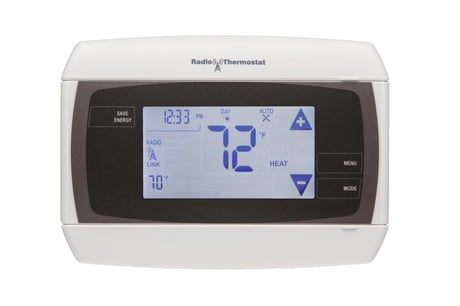
Product Picture


1 - Temperature Reporting Threshold
The Temperature Reporting Threshold Configuration Set Command sets the reporting threshold for changes in the ambient temperature as detected by the thermostat.Size: 1 byte
Default: 2
Minimum: 0
Maximum: 0
Possible values
| From | To | Desription |
|---|---|---|
| 0 | 4 |
2 - HVAC Settings
The HVAC Settings Configuration Report Command returns the current HVAC configuration. The HVAC settings must be fixed before the thermostat is joined to the Z-Wave network.Size: 4 bytes
Default: 0
Minimum: 0
Maximum: 0
Possible values
| From | To | Desription |
|---|---|---|
| 1 | 2147483647 | Byte 1: normal (1) or heat pump (2). Byte 2, Bits 7-4: Gas (1) or Electric (2). Byte 2, Bits 3-0: # of Auxiliary Stages. Byte 3: # of Heat Pump Stages. Byte 4: # of Cool Stages. |
3 - Utility Lock
The Utility Lock Configuration Set command enables or disables the utility lock. If the utility lock is enabled, the setpoint cannot be modified directly via the thermostat screen.Size: 1 byte
Default: 0
Minimum: 0
Maximum: 0
Possible values
| From | To | Desription |
|---|---|---|
| 0 | 255 | 0 = Disabled, 1 - 255 = Enabled |
4 - C-Wire/Battery
The C-Wire / Battery Status Configuration Report Command returns the status of the thermostat power source. The power state is fixed when the thermostat joins the network.Size: 1 byte
Default: 0
Minimum: 0
Maximum: 0
Possible values
| From | To | Desription |
|---|---|---|
| 1 | 2 | 1=C-Wire, 2=Battery |
5 - Humidity Reporting Threshold
The Humidity Threshold Configuration Set Command sets the reporting threshold for changes in the relative humidity as detected by the thermostat.Size: 1 byte
Default: 5
Minimum: 0
Maximum: 0
Possible values
| From | To | Desription |
|---|---|---|
| 0 | 3 | 0 = Disabled, 1 = 3% RH, 2 = 5% RH, 3 = 10% RH |
6 - Auxiliary/Emergency Mode
The Auxiliary/Emergency configuration command enables or disables auxiliary / emergency heating in the thermostat.Size: 1 byte
Default: 0
Minimum: 0
Maximum: 0
Possible values
| From | To | Desription |
|---|---|---|
| 0 | 1 | 0 = Disabled, 1 = Enabled |
7 - Thermostat Swing Temperature
The Thermostat Swing Temperature configuration command sets swing temperature on the thermostat.Size: 1 byte
Default: 2
Minimum: 0
Maximum: 0
Possible values
| From | To | Desription |
|---|---|---|
| 1 | 8 | 1 = 0.5ºF, 2 = 1.0ºF, 3 = 1.5ºF, 4 = 2.0ºF, 5 = 2.5ºF, 6 = 3.0ºF, 7 = 3.5ºF, 8 = 4.0ºF |
8 - Thermostat Differential Temperature
The Thermostat Differential Temperature configuration command sets the differential temperature for multi-stage HVAC systems.Size: 2 bytes
Default: 4
Minimum: 0
Maximum: 0
Possible values
| From | To | Desription |
|---|---|---|
| 0 | 1 | 0x00 (Heat) or Cool (0x01) |
| 2 | 6 | The thermostat differential temperature is in units of 0.5 degrees Fahrenheit. |
9 - Thermostat Recovery Mode
The Thermostat Recovery Mode configuration command sets the HVAC recovery mode type. The recovery mode determines when additional HVAC stages are turned off as the ambient temperature returns to the target temperature.Size: 1 byte
Default: 2
Minimum: 0
Maximum: 0
Possible values
| From | To | Desription |
|---|---|---|
| 1 | 2 | 1 = Fast, 2 = Economy |
10 - Temperature Reporting Filter
The Temperature Reporting Filter configuration command sets upper and lower bounds of the ambient temperature reporting.Size: 2 bytes
Default: 0
Minimum: 0
Maximum: 0
Possible values
| From | To | Desription |
|---|---|---|
| 0 | 31868 | Byte 1: 0 -124F (lower bound), Byte 2: 0-124F (upper bound) |
11 - Simple UI Mode
Enables or disables Simple UI mode on thermostat via RadioBus Read/Set UI command.Size: 1 byte
Default: 1
Minimum: 0
Maximum: 0
Possible values
| From | To | Desription |
|---|---|---|
| 0 | 1 | 0 = Normal Mode, 1 = Simple Mode |
12 - Multicast
This parameter controls how the thermostat sends unsolicited reports.Size: 1 byte
Default: 0
Minimum: 0
Maximum: 0
Possible values
| From | To | Desription |
|---|---|---|
| 0 | 1 | 0 = Disabled, 1 = Enabled |
Go to Menu screen, and press INCLUDE icon.
Go to Menu screen, and press EXCLUDE icon.
When included into a Z-Wave network on battery power, this device is a FLiRS device. The Thermostat will wake up for communication when it receives a valid Z-Wave beam.
In Main menu, put thermostat in OFF mode. Press and hold center digits. Use the reset procedure only when the primary controller is missing or inoperable.