SAMSUNG SDS
Door Lock
SHP-DP710
Door Lock Keypad
01
ZM5101
6.51.06
0x022E (558)
0x0001 (1)
0x0001 (1)
ZC10-15060015
2015-06-19 06:20:12.2628
N/A
Enhanced 232 Slave
Listening Sleeping Slave
Connected Door Lock
Touch Screen Type Push Pull Door Lock. The Samsung SDS Z-Wave Door Lock is a security enabled Z-Wave Plus product that is able to use encrypted Z-Wave Plus messages to communicate to other security enable Z-Wave Plus products.
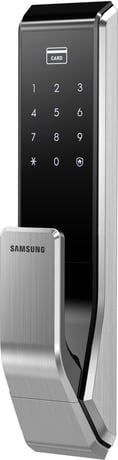
Product Picture
① Click [Add] icon in Z-Wave PC Conroller Program. ② Press the [REG] button for 3 seconds. (Ding dong -> Ding ding) ③ Press the [*] button after pressing the [00] button. (Ding dong dang)
After exclusion from Z-Wave Network, it will no longer be remotely-controlled via the controller. ① Click [Remove] icon in Z-Wave PC Controller Program. ② Press the [REG] button for 3 seconds. (Ding dong -> Ding ding)
Door lock always is "" wake up status.""
All registered Master/User data will be deleted, and Master PIN Code is set to ‘1234’. Also Z-Wave Door Lock is being removed from a network. Please use this procedure only in the event that the network primary controller is missing or otherwise inoperable. ① Press the [REG] button for 3 seconds. (Ding dong -> Ding ding) ② Press the [*] button after pressing the [4560852580] button. (Ding dong dang) ③ Press the [*] button after pressing the [00] button. (Ding dong dang)