Vision
Power Switch
ZL7434EU-5
On/Off Power Switch
02
ZM5202
6.51.06
0x0109 (265)
0x200C (8204)
0x0C06 (3078)
ZC10-15120003
2015-06-25 10:59:47.5936
N/A
Enhanced 232 Slave
Always On Slave
This module provides On/Off control for the appliance that is attached to this module by Z-Wave™. It also can control two appliances independently. When the device is secure included into Z-Wave network, Z-Wave™ communication will be encrypted.
This module provides On/Off control for the appliance that is attached to this module by Z-Wave™. It also can control two appliances independently. When the device is secure included into Z-Wave network, Z-Wave™ communication will be encrypted. * Size: 3.95 x 5.0 x 1.9 cm * Operating Range: Up to 100 feet line of sight * Operating Temp.: -10°C~ 60°C (14°F~140°F) * Operating Voltage: 90 VAC~240 VAC, 50/60 Hz * Max. Loading: 15A
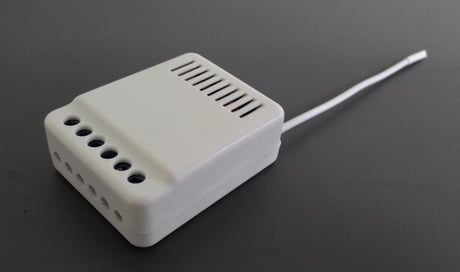
Product Picture


1 - Light type
To select the light type, 1 Wall Switch, 2 Wall Switches or wall switch with Light Indicator.Size: 1 byte
Default: 2
Minimum: 0
Maximum: 0
Possible values
| From | To | Desription |
|---|---|---|
| 1 | 1 | 1 or 2 Wall Switches |
| 2 | 2 | 1 Wall Switch with Light Indicator(factory default). |
2 - Switch button type
If customer chose 1 or 2 wall switches, then they have also select switch button type.Size: 1 byte
Default: 1
Minimum: 0
Maximum: 0
Possible values
| From | To | Desription |
|---|---|---|
| 1 | 1 | With common on/off type switch button used(factory default). |
| 2 | 2 | With momentary type switch button used. |
Put the Z-Wave™ Interface Controller into “inclusion” mode, and following its instruction to add the ZL 7434-5 to your controller. To get in the “inclusion” mode, the distance between module and controller is suggested to be in one meter. Press 3 times program switch within 2 seconds or turn on the wall switch 3 times within 2 seconds (or press toggle switch 3 times) to be included.
Put the Z-Wave™ Interface Controller into “exclusion” mode, and following its instruction to delete the ZL 7434-5 from your controller. Press 3 times program switch within 2 seconds or turn on the wall switch 3 times within 2 seconds (or press toggle switch 3 times) to be excluded.
Power off first, press Program Switch and power on, ZL7434-5 will send the “Device Reset Locally Notification” command and reset to the factory default. (Remark: This is to be used only in the case of primary controller being inoperable or otherwise unavailable.)