Philio
Remote
PSR03-A
Remote Control - AV
1.0
SD3502
6.51.06
0x013C (316)
0x0008 (8)
0x0026 (38)
ZC10-15070018
2015-07-14 08:08:39.731
N/A
Enhanced 232 Slave, No FLiRS, No MR
Portable Slave
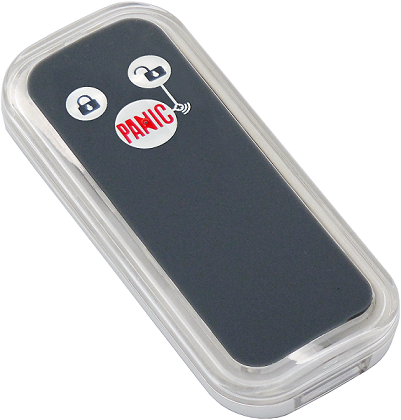
The Remote PSR03-A is a simple control can control AV device through Z-Wave-to-IR extender, and it can also controls 2 lighting groups ON/OFF via basic set, based on Z-Wave™ technology.
The Remote PSR03-A is a simple control can control AV device through Z-Wave-to-IR extender, and it can also controls 2 lighting groups ON/OFF via basic set, based on Z-Wave™ technology. It is a Z-Wave™ plus product, it supports the security, OTA... Those newest features of the Z-Wave™ technology. Z-Wave™ is a wireless communication protocol designed for home automation, specifically to remotely control applications in residential and light commercial environments. The technology uses a low-power RF radio embedded or retrofitted into home electronics devices and systems, such as lighting, home access control, entertainment systems and household appliances.


2 - Basic Set Level
Setting the BASIC command value to turn on the light. The 0xFF(-1) means turn on the light. For dimmer equipment 1 to 100 means the light strength. 0 means turn off the light.Size: 1 byte
Default: -1
Minimum: 0
Maximum: 0
Possible values
| From | To | Desription |
|---|---|---|
| -1 | -1 | -1 (0xFF) means turn the light on |
| 0 | 0 | Turn off the light |
| 1 | 99 | Set the light to level 1-99, 99 is full brightness |
7 - Customer Function
Customer function switch, using bit control. Bit0: Switch AV control/Lighting group control. (0: AV control, 1: lighting group control)Size: 1 byte
Default: 0
Minimum: 0
Maximum: 0
Possible values
| From | To | Desription |
|---|---|---|
| 0 | 0 | AV Control |
| 1 | 1 | Lighting Group Control |
10 - Auto Report Battery Time
The interval time for auto report the battery level. 0 means turn off auto report battery. The default value is 12. The value is in minutes.Size: 1 byte
Default: 12
Minimum: 0
Maximum: 0
Possible values
| From | To | Desription |
|---|---|---|
| 0 | 127 | The interval time for auto report the battery level. |
82 - Association Group 2 Basic Set Level
Setting the BASIC command value to turn on the light in the association group 2. 0 means using the value of configuration 2 to set.Size: 1 byte
Default: 0
Minimum: 0
Maximum: 0
Possible values
| From | To | Desription |
|---|---|---|
| -1 | -1 | BASIC Command On (0xFF) |
| 0 | 0 | Use the value set by configuration parameter 2. |
| 1 | 99 | Setting the BASIC command value to turn on the light in the association group 2. |
83 - Association Group 3 Basic Set Level
Setting the BASIC command value to turn on the light in the association group 3. 0 means using the value of configuration 2 to set.Size: 1 byte
Default: 0
Minimum: 0
Maximum: 0
Possible values
| From | To | Desription |
|---|---|---|
| -1 | -1 | BASIC Command On (0xFF) |
| 0 | 0 | Use the value set by configuration parameter 2. |
| 1 | 99 | Setting the BASIC command value to turn on the light in the association group 3. |
After the device adding to the network, it will wake-up once per day in default. When it wake-up it will broadcast the “Wake Up Notification” message to the network, and wake-up 10 seconds for receive the setting commands. The wake-up interval minimum setting is 30 minutes, and maximum setting is 120 hours. And the interval step is 30 minutes. If the user want to wake-up the device immediately, please press the button once. The device will wake-up 10 seconds.
Notice: Use this procedure only in the event that the primary controller is lost or otherwise inoperable. 1. Hold down the central key, then press the top-right key four times within 1.5 seconds and do not release the top-right key in the 4 th pressed, and the LED will light ON. 2. After 3 seconds the LED will turn OFF, after that within 2 seconds, release the keys. If successful, the LED will light ON one second. Otherwise, the LED will flash once. 3. IDs are remove and all settings will reset to factory default.
1. Have Z-Wave™ Controller entered add mode. 2. Hold down the central key, then press the top-right key three times within 1.5 seconds to enter the add mode. 3. After add successful, the device will wake to receive the setting command from Z-Wave ™ Controller about 20 seconds.
1. Have Z-Wave ™ Controller entered remove mode. 2. Hold down the central key, then press the top-right key three times within 1.5 seconds to enter the remove mode. Node ID has been excluded.