Z-Wave.Me
Z-Weather
ZWeather
Multilevel Sensor
1.00
ZM5202
6.51.06
0x0115 (277)
0x0100 (256)
0x0400 (1024)
ZC10-15080003
2015-08-04 22:46:36.8988
N/A
Enhanced 232 Slave
Reporting Sleeping Slave
Z-Weather is a multi sensor device monitoring outside weather and environmental conditions. Z-Weather is powered by a solar cell and stores energy on an internal capacitor, enabling continuous operation, even with no wind for a couple of days.
Z-Weather is a multisensor device monitoring outside weather and environmental conditions. It continually measures the wind speed and can, for example, trigger closing of the awning and blinds if it is too windy. It also measures the amount of rotation, enabling calculation of the wind yield per day or per year. In addition, Z-Weather includes sensors for humidity, temperature, pressure and dew point, essentially providing the core sensors of a weather station. Z-Weather is powered by a solar cell and stores energy on an internal capacitor, enabling continuous operation, even with no wind for a couple of days. It does not use any batteries and is completely maintenance free. Using the built-in solar cell it also measures the ambient light and the solar yield. This information can be used to turn on the outdoor light at dusk time and turn the light off in the morning. Z-Weather‘s wind yield and solar yield metering can be used as a calculation base for planning a wind generator or a solar panel on the roof of a house.
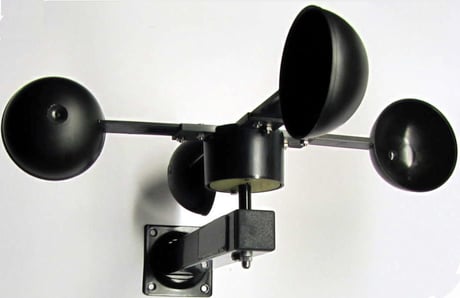
Product Picture


1 - Threshold for too much wind
Crossing this parameter on the rising edge, Z-Weather sends a basic set to the associated groups, serves the lifeline and sends a wake up notification.Size: 1 byte
Default: 6
Minimum: 0
Maximum: 0
Possible values
| From | To | Desription |
|---|---|---|
| 0 | 30 | m/s |
| 0 | 0 |
2 - Threshold for twilight
Crossing this parameter from night to day, association group 3 is informed. Crossing this parameter from day to night, association group 4 is informed.Size: 1 byte
Default: 37
Minimum: 0
Maximum: 0
Possible values
| From | To | Desription |
|---|---|---|
| 0 | 100 | % |
| 0 | 0 |
Push the button 3 times within 1.5 seconds. If the LED is not blinking after releasing the button, Z-Weather has not enough energy and must be charged for several hours in bright sunlight.
Push the button 3 times within 1.5 seconds.
Push the button 3 times within 1.5 seconds. The LED blinks once indicating that Z-Weather is. Z-Weather sends a Z-Wave Wakeup-Notification if has been added to the network. If Z-Weather has not yet been added to the network, no action is performed.
Hold the button longer than 1.5 seconds and then release. The LED blinks longer than when pressing the button once. Z-Weather performs a factory reset and all configuration parameters are reset to their default values. Use this procedure only when the network primary controller is missing or otherwise inoperable.