GATEMAN
A20-SH
GDA-A2E6B-K0
Door Lock Keypad
HW: 255
ZM5202
6.51.06
0x0212 (530)
0x1000 (4096)
0x1000 (4096)
ZC10-15080019
2015-08-20 23:26:35.2058
N/A
Enhanced 232 Slave
Listening Sleeping Slave
A Rim type Digital Door Lock for Smart Home services.
A Rim type Digital Door Lock for Smart Home services. 'A20-SH' is a security enabled Z-Wave Plus product for Korean domestic market. It can be included and operated in any Z-Wave network with other Z-Wave certified devices.
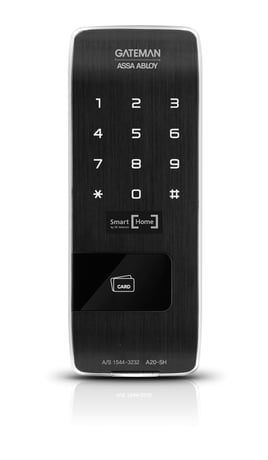
Product Picture


1 - Silent mode on/off
set the silent mode on or offSize: 1 byte
Default: 3
Minimum: 0
Maximum: 0
Possible values
| From | To | Desription |
|---|---|---|
| 1 | 1 | mute |
| 2 | 2 | volume low |
| 3 | 3 | volume high |
2 - Auto relock on/off
set the Auto relock on/offSize: 1 byte
Default: 0
Minimum: 0
Maximum: 0
Possible values
| From | To | Desription |
|---|---|---|
| 0 | 0 | disable auto relock |
| 255 | 255 | enable auto relock |
3 - relock time
set the relock timeSize: 1 byte
Default: 30
Minimum: 0
Maximum: 0
Possible values
| From | To | Desription |
|---|---|---|
| 10 | 180 | This value from 10 to 180 seconds means the time for lock to retain the unlocked state before doing the auto relock |
① Touch Keypad with palm. ② Enter User Code(Normal Mode only. Enter Master Code if operating Master Mode). ③ Press 'I' button [Registration] from the inside of battery cover. ④ Press 9, #, 1, # by sequence on the keypad(to Add). ⑤ Wait until ""Ding dong dang"" melody play, then press 'I' button [Registration] from the inside of battery cover.
① Touch Keypad with palm. ② Enter User Code(Normal Mode only. Enter Master Code if operating Master Mode). ③ Press 'I' button [Registration] from the inside of battery cover. ④ Press 9, #, 3, # on the keypad by sequence (to Delete). ⑤ Enter User Code(Normal Mode only. Enter Master Code if operating Master Mode), then press #. ⑤ Wait until ""Ding dong dang"" melody play, then press 'I' button [Registration] from the inside of battery cover.
The lock is always in ""wake up status"". However, touch keypad with palm to begin and end actions.
This product has no function to go back to the factory default.