GE
In-Wall Smart Dimmer
14294 (ZW3005)
Light Dimmer Switch
HW: 255
ZM5202
6.51.06
0x0063 (99)
0x4944 (18756)
0x3038 (12344)
ZC10-15080015
2015-08-18 14:56:34.9646
N/A
Enhanced 232 Slave
Always On Slave
Transform any home into a smart home with the GE Z-Wave Wireless Lighting Control In-Wall Smart Dimmer.
Transform any home into a smart home with the GE Z-Wave Wireless Lighting Control In-Wall Smart Dimmer. The dimmer enables wireless control of on/off and dim functions of hard-wired dimmable LED/CFL and incandescent lighting. The dimmer replaces your current light switch, uses your existing wiring, and provides Z-Wave wireless and in-wall control of overhead lighting. Use the dimmer feature to customize the lighting output and create the perfect ambiance for any room. Providing ultimate flexibility, the In-Wall Smart Dimmer allows you to operate the switch by itself or easily integrate the switch three-way or four-way wiring configurations by adding the GE Add-On Switch. Single Pole wiring configuration controls the light from one location. Three-way wiring configuration controls the light from two separate locations. Four-way wiring configuration controls the light from three separate locations. The GE Add-On Switch is required for three-way or four-way installations. The dimmer includes an LED indicator light to easily locate the switch in a dark room. Take control of your home lighting with GE Z-Wave Wireless Lighting Controls!
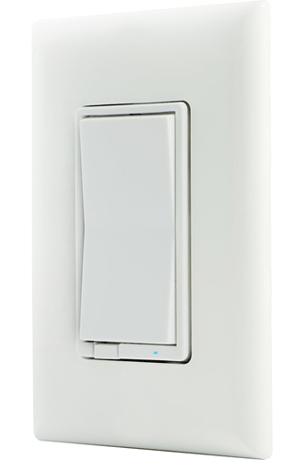
Product Picture


3 - LED Light
Size: 1 byte
Default: 0
Minimum: 0
Maximum: 0
Possible values
| From | To | Desription |
|---|---|---|
| 0 | 0 | LED Light on when Z-Wave turned OFF (Default) |
| 1 | 1 | LED Light on when Z-Wave turned On |
| 2 | 2 | LED Light always OFF |
4 - Invert Switch
Size: 1 byte
Default: 0
Minimum: 0
Maximum: 0
Possible values
| From | To | Desription |
|---|---|---|
| 0 | 0 | (Default) |
| 1 | 1 | Invert Switch |
7 - Dim Rate Adjustments (From Z-Wave Controller)
Size: 1 byte
Default: 1
Minimum: 0
Maximum: 0
Possible values
| From | To | Desription |
|---|---|---|
| 1 | 99 | number of steps or levels |
8 - Dim Rate Adjustments (From Z-Wave Controller)
Timing of the steps PLEASE NOTE: Values should be entered using their signed values only, which means for example that a configuration value of 1 byte in size must have values in the range -128 to 127. Values specified here above or below the range specified by the value's size need to be converted to their 2's compliment value, or if your controller supports it, may be entered using hexadecimal notation.Size: 1 byte
Default: 3
Minimum: 0
Maximum: 0
Possible values
| From | To | Desription |
|---|---|---|
| 1 | 255 | Timing of the steps |
9 - Dim Rate Adjustments (When manually Controlled)
Size: 1 byte
Default: 1
Minimum: 0
Maximum: 0
Possible values
| From | To | Desription |
|---|---|---|
| 1 | 99 | number of steps or levels |
10 - Dim Rate Adjustments (When manually controlled)
PLEASE NOTE: Values should be entered using their signed values only, which means for example that a configuration value of 1 byte in size must have values in the range -128 to 127. Values specified here above or below the range specified by the value's size need to be converted to their 2's compliment value, or if your controller supports it, may be entered using hexadecimal notation.Size: 1 byte
Default: 3
Minimum: 0
Maximum: 0
Possible values
| From | To | Desription |
|---|---|---|
| 1 | 255 | Timing of the steps |
11 - Dim Rate Adjustments (When receiving All-On/All-Off command)
Size: 1 byte
Default: 1
Minimum: 0
Maximum: 0
Possible values
| From | To | Desription |
|---|---|---|
| 1 | 99 | number of steps or levels |
12 - Dim Rate Adjustments (When receiving All-On/All-Off command)
Timing of the steps PLEASE NOTE: Values should be entered using their signed values only, which means for example that a configuration value of 1 byte in size must have values in the range -128 to 127. Values specified here above or below the range specified by the value's size need to be converted to their 2's compliment value, or if your controller supports it, may be entered using hexadecimal notation.Size: 1 byte
Default: 3
Minimum: 0
Maximum: 0
Possible values
| From | To | Desription |
|---|---|---|
| 1 | 255 | Timing of the steps |
1. Follow the instructions for your Z-wave certified controller to include a device to the Z-wave network. 2. Once the controller is ready to include your device, press and release the top or bottom of the wireless smart switch(rocker) to include it in the network.
1. Follow the instructions for your Z-wave certified controller to exclude a device from the Z-wave network. 2. Once the controller is ready to Exclude your device, press and release the top or bottom of the wireless smart switch(rocker) to exclude it from the network.
1. Quickly press ON (Top) button three (3) times then immediately press the OFF (Bottom) button three (3) times. The LED will flash ON/OFF 5 times when completed successfully. Note: This should only be used in the event your networks primary controller is missing or otherwise inoperable.