ID Lock
ID Lock Z-Wave module
01A
Door Lock Keypad
N/A
ZM5202
6.51.06
0x0230 (560)
0x0003 (3)
0x0001 (1)
ZC10-16090001
2016-09-06 11:35:03.263
N/A
Enhanced 232 Slave
N/A
Yes
Z-Wave Plus module compatible with ID Lock digital doorlock. www.idlock.no
UART console communication module turns your ID Lock digital doorlock into a Z-Wave Plus enabled digital doorlock. It enables your ID Lock to operate in a Z-Wave network with numerous access control funtions and notifications.
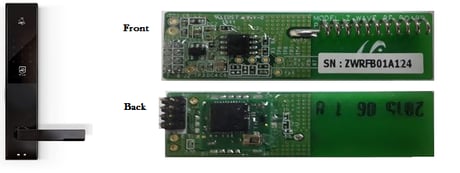
Product Picture


1 - Doorlock mode
Doorlock operational behaviourSize: 1 byte
Default: 0
Minimum: 0
Maximum: 0
Possible values
| From | To | Desription |
|---|---|---|
| 0 | 0 | Disabled Away mode and Manual locking mode |
| 1 | 1 | Disabled Away mode and Automatic locking mode |
| 2 | 2 | Away mode and Manual locking mode |
| 3 | 3 | Away mode and Automatic locking mode |
2 - RFID Configuration Set and Report
This parameter configures RFID cards to work with the door lock by setting the parameter to specific values. After setting an RFID card to the door lock, the result and configuration can be read.Size: 2 bytes
Default: 0
Minimum: 0
Maximum: 0
Possible values
| From | To | Desription |
|---|---|---|
| 2 | 2 | RFID Registration Failed |
| 3 | 3 | Successful RFID Card Registration - 2nd byte contains Index Number |
| 4 | 4 | RFID Card Registration Mode Finished |
| 1 | 1 | Begin RFID Card Registration |
| 5 | 5 | RFID Card Registration Mode was not started |
| 6 | 6 | RFID Card Registration Mode In Progress |
10 - Retrieve Registered User ID information
Configuration GET for retriving UID information Retrival of registered UIDs on parameter number 10 to 59 Parameter number is representing UID index Ex. UID index 1 = parameter 10 UID index 50 = parameter 59Size: 4 bytes
Default: 0
Minimum: 0
Maximum: 0
Possible values
| From | To | Desription |
|---|---|---|
| 10 | 59 | RFID Card Index Number + 9 |
Inclusion – (Puts your device in inclusion mode) • Push and hold button until all LEDs on keypad activates. (with ID Lock in an unlocked state) • Release button and press “8” on keypad. Inclusion mode starts immediately. LED indicator below logo signals this by flashing blue.
Exclusion – (Puts your device in exclusion mode) • Push and hold button until all LEDs on keypad activates. (with ID Lock in an unlocked state) • Release button and press “8” on keypad. Exclusion mode starts immediately. LED indicator below logo signals this by flashing blue.
Activate by touching numpad with two fingers or handpalm
Device reset – (This will reset RF interface module to factory default settings) Warning: Please do only proceed with the following reset procedure, if primary network controller is missing or otherwise inoperable. RESET Z-WAVE MODULE: Activate doorlock service menu, by holding inside push button for 5sec while door is in OPEN state. Outside touchpanel activates > Push ""0"" FACTORY RESET DOORLOCK FIRMWARE: 1. Push innside pushbutton continously for five Seconds after inserting batteries. 2. Receive reset sound 3. Receive confirmation sound
Notification parameter in COMMAND_CLASS_NOTIFICATION_V4 Events: - Manual Unlock Operation (0x02) - Remote Unlock Operation (0x04) - Keypad Unlock Operation (0x06) - Unlock Request by Unknown User Code (0x014) - Forced Open Alarm (0x03) - Fire Alarm (0x0A)
| Type | Value(s) |
|---|
| Sensor type |
|---|
| Air Temperature |
| General Purpose |