Oomi
Oomi MultiSensor
FT100-A
Multilevel Sensor
HW: 64 FW: 1.04
ZM5101
6.51.06
0x016A (362)
0x0102 (258)
0x0064 (100)
ZC10-15100014
2015-10-19 13:51:25.1156
N/A
Enhanced 232 Slave
Reporting Sleeping Slave
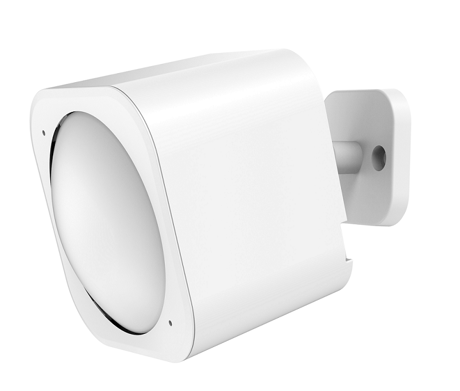
Oomi MultiSensor is a Z-Wave motion sensor, temperature sensor, humidity sensor, lighting sensor, ultraviolet sensor and vibration sensor, all in one package.
Oomi MultiSensor looks like a motion sensor and it acts like one too. But it’s also so much more. Installing this 1 piece of Z-Wave® technology is the same as installing 6 pieces of Z-Wave technology. Your home control network will immediately understand motion, temperature, humidity, light, Ultraviolet and Vibration readings wherever MultiSensor installed. Those intelligent readings will equate to intelligence automation. And intelligent automation will give you the perfect, smart home.


2 - Enable/Disable waking up for 10 minutes when re-power on (battery mode) the MultiSensor.
This parameter is used to enable/disable waking up for 10 minutes when re-power on (battery mode) the MultiSensor. 1. Value = 0, disable. 2. Value =others, enable.Size: 1 byte
Default: 0
Minimum: 0
Maximum: 0
Possible values
| From | To | Desription |
|---|---|---|
| 1 | 1 | Enable waking up for 10 minutes when re-power on (battery mode) the MultiSensor. |
| 0 | 0 | Disable waking up for 10 minutes when re-power on (battery mode) the MultiSensor. |
3 - Timeout of the motion sensor
This parameter is used to set the timeout for the motion sensor. Note: (1), The time unit is second if the value range is in 1 to 255. (2), If the value range is in 256 to 15300, the time unit will be minute and its value should follow the below rules: a), Interval time =Value/60, if the interval time can be divided by 60 and without remainder. b), Interval time= (Value/60) +1, if the interval time can be divided by 60 and has remainder. (3), Other values will be ignored.Size: 2 bytes
Default: 240
Minimum: 0
Maximum: 0
Possible values
| From | To | Desription |
|---|---|---|
| 1 | 255 | The unit of timeout is second. |
| 256 | 15300 | The unit of timeout is minute. |
4 - Enable/disable the function of motion sensor.
This parameter is used to enable/disable the function of motion sensor. 1. Value=0, disable. 2. Value=1, enable.Size: 1 byte
Default: 0
Minimum: 0
Maximum: 0
Possible values
| From | To | Desription |
|---|---|---|
| 1 | 1 | Enable the function of motion sensor. |
| 0 | 0 | Disable the function of motion sensor. |
5 - Which command would be sent when the motion sensor triggered.
This parameter is used to configure that which command would be sent when the motion sensor triggered. 1. Value=1, send Basic Set CC. 2. Value=2, send Sensor Binary Report CC.Size: 1 byte
Default: 1
Minimum: 0
Maximum: 0
Possible values
| From | To | Desription |
|---|---|---|
| 2 | 2 | Send Sensor Binary Report CC. |
| 1 | 1 | Send Basic Set CC. |
39 - Low battery value configuration.
This parameter is used to configure the low battery value. (10 is the minimum value (10%), 50 is the maximum (50%)).Size: 1 byte
Default: 20
Minimum: 0
Maximum: 0
Possible values
| From | To | Desription |
|---|---|---|
| 10 | 50 | The range of low battery value is 10% to 50%. |
40 - Enable/disable the selective reporting only when measurements reach a certain threshold or percentage set in 41-44 below.
This parameter is used to enable/disable the selective reporting only when measurements reach a certain threshold or percentage set in the parameter 41 to 44. This is used to reduce network traffic. (0 == disable, 1 == enable)Size: 1 byte
Default: 0
Minimum: 0
Maximum: 0
Possible values
| From | To | Desription |
|---|---|---|
| 1 | 1 | Enable the selective reporting. |
| 0 | 0 | Disable the selective reporting. |
41 - Threshold change in temperature to induce an automatic report.
Threshold change in temperature to induce an automatic report. Note: 1. When the unit is Celsius, threshold=Value. 2. When the unit is Fahrenheit, threshold=Value*1.8 The accuracy is 0.1.Size: 2 bytes
Default: 256
Minimum: 0
Maximum: 0
Possible values
| From | To | Desription |
|---|---|---|
| 0 | 65535 | Threshold of temperature. |
42 - Threshold change in humidity to induce an automatic report.
Threshold change in humidity to induce an automatic report.Size: 1 byte
Default: 10
Minimum: 0
Maximum: 0
Possible values
| From | To | Desription |
|---|---|---|
| 0 | 100 | Threshold of humidity |
44 - Threshold change in battery level to induce an automatic report.
Threshold change in battery level to induce an automatic report.Size: 1 byte
Default: 10
Minimum: 0
Maximum: 0
Possible values
| From | To | Desription |
|---|---|---|
| 0 | 1000 | Threshold of luminance |
| 0 | 100 | Threshold of battery level. |
45 - Threshold change in ultraviolet to induce an automatic report.
Threshold change in ultraviolet to induce an automatic report.Size: 1 byte
Default: 2
Minimum: 0
Maximum: 0
Possible values
| From | To | Desription |
|---|---|---|
| 0 | 11 | Threshold of ultraviolet. |
46 - Enable/disable to send the alarm report of low temperature
This parameter is used to enable/disable to send the alarm report of low temperature(<-15℃) 1, Value=0, disable. 2, Value=1, enable (Note: The MultiSensor will report the Multi Level Temperature CC with the value=0xFFFF to controller if the current temperature is less than -15℃).Size: 1 byte
Default: 0
Minimum: 0
Maximum: 0
Possible values
| From | To | Desription |
|---|---|---|
| 0 | 0 | Disable to send the alarm report of low temperature(&amp;amp;lt;-15℃) |
| 1 | 1 | Enable to send the alarm report of low temperature(&amp;amp;lt;-15℃) |
101 - Which report needs to be sent in Report group 1
This parameter is used to configure to send the Humidity sensor, thermometer, light sensor and battery reports automatically in Report group 1. Note: The values corresponding to the first four bits of the parameter value may be combined to create different combinations of reports that you wish to have sent. For example, the temperature sensor report is the value 32 and the battery report is the value 1, so setting parameter 101 to a value of 33 will result in both temperature sensor report and battery report to be reported. See the full description of the parameter values for other possible settings.Size: 4 bytes
Default: 241
Minimum: 0
Maximum: 0
Possible values
| From | To | Desription |
|---|---|---|
| 64 | 64 | The humidity sensor report is selected. |
| 128 | 128 | The light sensor report is selected. |
| 1 | 1 | The battery report is selected. |
| 32 | 32 | The temperature sensor report is selected. |
| 16 | 16 | The ultraviolet sensor report is selected. |
102 - Which report needs to be sent in Report group 2.
This parameter is used to configure to send the Humidity sensor, thermometer, light sensor and battery reports automatically in Report group 2. Note: The values corresponding to the first four bits of the parameter value may be combined to create different combinations of reports that you wish to have sent. For example, the temperature sensor report is the value 32 and the battery report is the value 1, so setting parameter 102 to a value of 33 will result in both temperature sensor report and battery report to be reported. See the full description of the parameter values for other possible settings.Size: 4 bytes
Default: 0
Minimum: 0
Maximum: 0
Possible values
| From | To | Desription |
|---|---|---|
| 128 | 128 | The light sensor report is selected. |
| 1 | 1 | The battery report is selected. |
| 16 | 16 | The ultraviolet sensor report is selected. |
| 32 | 32 | The temperature sensor report is selected. |
| 64 | 64 | The humidity sensor report is selected. |
103 - Which report needs to be sent in Report group 3.
This parameter is used to configure to send the Humidity sensor, thermometer, light sensor and battery reports automatically in Report group 3. Note: The values corresponding to the first four bits of the parameter value may be combined to create different combinations of reports that you wish to have sent. For example, the temperature sensor report is the value 32 and the battery report is the value 1, so setting parameter 103 to a value of 33 will result in both temperature sensor report and battery report to be reported. See the full description of the parameter values for other possible settings.Size: 4 bytes
Default: 0
Minimum: 0
Maximum: 0
Possible values
| From | To | Desription |
|---|---|---|
| 64 | 64 | The humidity sensor report is selected. |
| 128 | 128 | The light sensor report is selected. |
| 1 | 1 | The battery report is selected. |
| 16 | 16 | The ultraviolet sensor report is selected. |
| 32 | 32 | The temperature sensor report is selected. |
111 - The interval time of sending reports in Report group 1
This parameter is used to configure the interval time of the sensor report in Report group 1.Size: 4 bytes
Default: 3600
Minimum: 0
Maximum: 0
Possible values
| From | To | Desription |
|---|---|---|
| 5 | 2678400 | The range of interval time is 5 to 2678400. |
112 - The interval time of sending reports in Report group 2.
This parameter is used to configure the interval time of the sensor report in Report group 2.Size: 4 bytes
Default: 3600
Minimum: 0
Maximum: 0
Possible values
| From | To | Desription |
|---|---|---|
| 5 | 2678400 | The range of interval time is 5 to 2678400. |
113 - The interval time of sending reports in Report group 3
This parameter is used to configure the interval time of the sensor report in Report group 3.Size: 4 bytes
Default: 3600
Minimum: 0
Maximum: 0
Possible values
| From | To | Desription |
|---|---|---|
| 5 | 2678400 | The range of interval time is 5 to 2678400. |
201 - Temperature calibration.
The calibration value = standard value - measure value. E.g. If measure value =25.3℃ and the standard value = 23.2℃, so the calibration value= 23.2℃ - 25.3℃= -2.1℃ (0xFFEB). If the measure value =30.1℃ and the standard value = 33.2℃, so the calibration value= 33.2℃ - 30.1℃=3.1℃ (0x001F).Size: 1 byte
Default: 0
Minimum: 0
Maximum: 0
Possible values
| From | To | Desription |
|---|---|---|
| -32768 | 32767 | The range of calibration value is -32768 to 32767. |
202 - Humidity sensor calibration.
The calibration value = standard value - measure value. E.g. If measure value =80RH and the standard value = 75RH, so the calibration value= 75RH – 80RH= -5RH (0xFFFB). If the measure value =85RH and the standard value = 90RH, so the calibration value= 90RH – 85RH=5RH (0x0005).Size: 1 byte
Default: 0
Minimum: 0
Maximum: 0
Possible values
| From | To | Desription |
|---|---|---|
| -32768 | 32767 | The range of calibration value is -32768 to 32767. |
203 - Luminance sensor calibration.
The calibration value = standard value - measure value. E.g. If measure value =800Lux and the standard value = 750Lux, so the calibration value= 750 – 800= -50 (0xFFCE). If the measure value =850Lux and the standard value = 900Lux, so the calibration value= 900 – 850=50 (0x0032).Size: 2 bytes
Default: 0
Minimum: 0
Maximum: 0
Possible values
| From | To | Desription |
|---|---|---|
| -32768 | 32767 | The range of calibration value is -32768 to 32767. |
204 - Ultraviolet sensor calibration.
The calibration value = standard value - measure value. E.g. If measure value =9 and the standard value = 8, so the calibration value= 8 – 9= -1 (0xFE). If the measure value =7 and the standard value = 9, so the calibration value= 9 – 7=2 (0x02).Size: 1 byte
Default: 0
Minimum: 0
Maximum: 0
Possible values
| From | To | Desription |
|---|---|---|
| -11 | 11 | The range of calibration value is -11 to 11. |
252 - Enable/disable all configuration parameters to be locked
This parameter is used to enable/disable all configuration parameters to be locked. (0 =disable, 1 = enable)Size: 1 byte
Default: 0
Minimum: 0
Maximum: 0
Possible values
| From | To | Desription |
|---|---|---|
| 0 | 0 | Disable all configuration parameters to be locked. |
| 1 | 1 | Enable all configuration parameters to be locked. |
255 - Reset to default factory setting
This parameter is used to reset product to default factory setting. (There are just 2 values can be used).Size: 4 bytes
Default: 0
Minimum: 0
Maximum: 0
Possible values
| From | To | Desription |
|---|---|---|
| 1 | 1 | Resets all configuration parameters to default setting. |
| 1431655765 | 1431655765 | Reset the product to default factory setting and be excluded from the Z-wave network. |
Turn the primary controller of Z-Wave network into inclusion mode, short press the product’s Z-Wave button that you can find in the back of the product.
Turn the primary controller of Z-Wave network into exclusion mode, short press the product’s Z-Wave button that you can find in back of the product.
Pressing the Z-Wave button once will trigger sending the Wake up notification command. If press and hold the Z-Wave button for 3 seconds, the MultiSensor will wake up for 10 minutes.
Press and hold the Z-Wave button that you can find in back of the product for 20 seconds and then release. This procedure should only be used when the primary controller is inoperable.
Support ""Over the Air Firmware Updating"" and “Z-Wave Security”. Contain NFC feature.