Telldus
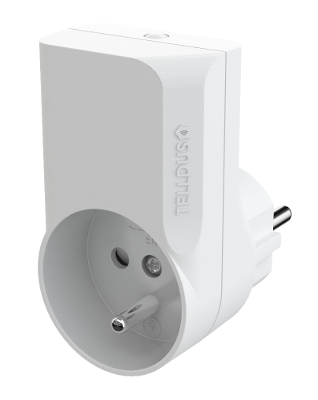
Plug-in Switch (French)
TZWP-101
On/Off Power Switch
HW: 1 FW: 1.00
ZM5202
6.51.06
0x0176 (374)
0x0003 (3)
0x0002 (2)
ZC10-16015003
2016-01-08 13:34:18.5332
N/A
Enhanced 232 Slave
Always On Slave
Plug-in Switch
The slim design makes this plugin switch fit almost everywhere. You can even have two switches connected into a standard 2-way wall outlet at the same time. It has a repeater function for the Z-Wave network so you can extend the range of your smart home system. Easy to install and to include in the powerful Telldus Live! system. Control lights and other electronic devices up to 2300 W (resistive load). Option to turn off indication LED. 500 chip, Z-Wave Plus.


1 - Countdown timer
Number of minutes before it auto-shuts down.Size: 1 byte
Default: 0
Minimum: 0
Maximum: 0
Possible values
| From | To | Desription |
|---|---|---|
| 0 | 0 | Disabled |
| 0 | 254 | Minutes |
2 - Remember device status after power failure.
Define how the plug will react after the power supply is back on.Size: 1 byte
Default: 1
Minimum: 0
Maximum: 0
Possible values
| From | To | Desription |
|---|---|---|
| 0 | 0 | Always off |
| 1 | 1 | Remember status |
| 2 | 2 | Always on |
3 - LED indicator intensity
Set the intensity of the LED indicatorSize: 1 byte
Default: 255
Minimum: 0
Maximum: 0
Possible values
| From | To | Desription |
|---|---|---|
| 0 | 255 | intensity |
| 0 | 0 |
Tripple click the button on the device
Tripple click the button on the device
Press and hold the button until the LED starts flashing white (approx. 6 seconds). Press the button once more, short. The device will now reset to factory defaults. The LED will now flash, indicating that it’s no longer added in any Z-Wave network. Please note! Only use the reset procedure when the primary controller is missing or inoperable.