Abilia AB
Gewa Andromeda Socket FR
419882.0
On/Off Power Switch
4.0
ZM5101
6.51.06
0x0117 (279)
0x0001 (1)
0x0080 (128)
ZC10-15100023
2015-10-26 12:49:50.337
N/A
Routing Slave
Always On Slave
Gewa Andromeda Socket is an ON/OFF plug. Can be controlled with Z-Wave and Infra-Red remote control. External wired switch can be connected as well. Maximum 3600 VA resistive load.
Independence Gewa Andromeda socket is specially adapted for disabled people who want to live a more independent life, such as wireless, can turn on/off lights, turn on/off various devices and can easily be moved between different outlets. Flexible control modes It can be controlled in three different ways, with an IR transmitter (GewaLink system), a radio transmitter (Z-Wave) or a connected control switch. Built-in on/off button Andromeda Socket also has a built-in on/off switch that makes you always can operate the device even if one has no IR/radio transmitter. It also has a blue indicator light that shows if the switch is on. Easy to program It is easy to program, as is done with the built-in on/off button. Andromeda socket available in different versions for different countries. Technical data Operating voltage: 230V AC, 50 Hz Maximum load: 3600VA 16A resistive load Programming Channels IR: GewaLink channels Radio: Z-wave Radio frequency: 868.42 MHz Socket for control switch: 3.5 mm (2-pole mono female) Operating environment: indoors (IP 21) Dimensions: 53 x 122 x 43mm (excluding connector plug)
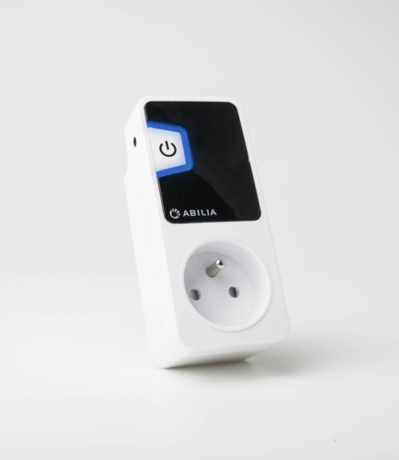
1. Put your system controller into inclusion mode by following the instructions provided by your controller manufacturer. 2. Press the push Off/On button located on the front of the device three times within 1.5 seconds.
1. Put your system controller into exclusion mode by following the instructions provided by your controller manufacturer. 2. Press the push Off/On button located on the front of the device three times within 1.5 seconds.
Note: Use this procedure only in the event that the network primary controller is missing or otherwise inoperable. 1. Press and hold the push button located on the front of the device for approx. 6 seconds until the LED's is steady. 2. Release the button and press ones again within 3 seconds.