Mercury
IoT hub
MC01-507L
Central Controller
01
ZM5202
6.51.06
0x022D (557)
0x0100 (256)
0x0001 (1)
ZC10-15110008
2015-11-10 09:58:40.7054
N/A
Bridge Controller
Central Static Controller
IoT hub is universal controller which can control several home control group devices.
IoT hub is universal controller which can control several home control group devices. It can control the gas valve, the digital door-lock, and the door sensor that are supported by the KT.
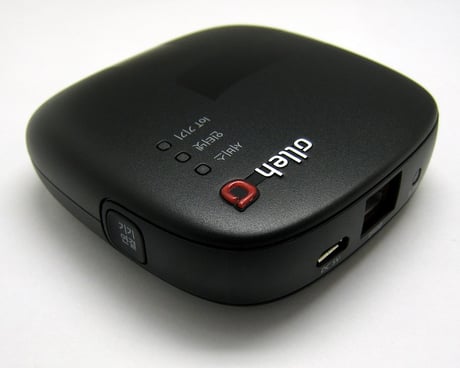
Product Picture
1. Select Controller Learn Mode Request command in the Emulator. 2. Click Kafka Send button. 3. Enter the parameter value. 4. Click Confirm button.
Press Reset button more than 5 seconds.
You can add the device ether hardware button or application. - Hard ware button : Press the Add/Remove button(Start Z-Wave LED blink) - Application : 1. Click Add the device button. 2. Click Start button. (Start blink Z-Wave LED) 3. MC01-507L put into inclusion mode and it is added the device. when finish the add device, the Z-Wave LED was green light ON.(Stop blink Z-Wave LED) 4. The home screen of the app shown the added device. 5. Click the device icon. the screen detail view about information of added-device and can control device on this screen.
You can remove the device by either hardware button or application. - Hardware button : Press the Add/Remove button(Start Z-Wave LED blink) - Application : 1. Click Menu button on the screen detail view. 2. Click Remove the device button. 3. Click Remove button. (Start blink Z-Wave LED) 4. MC01-507L put into exclusion mode and it will remove the device. When finished removing the device, the Z-Wave LED is green light OFF. (Stop blink Z-Wave LED) 5. The home screen of the app shows the removed device.