Secure Controls
SRT-321 (Thermostat-HVAC)
MAX10U-734
Thermostat - HVAC
HW: 1 FW: 1.00
ZM5202
6.51.06
0x0059 (89)
0x0001 (1)
0x0005 (5)
ZC10-16015001
2015-12-22 22:08:40.25
N/A
Portable Controller
Reporting Portable Controller
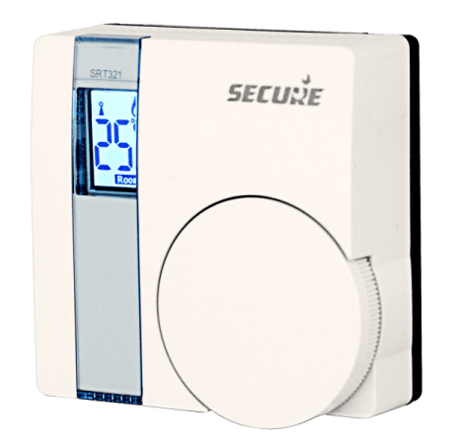
The SRT321 is a wireless electronic battery powered room thermostat that control central heating systems where the demand temperature can be set locally or remotely to a third party device. The SRT321 also has the capability to act as a temperature sensor.
The thermostat includes TPI software that optimises boiler firing to minimise overshooting of temperature in a heated environment. It has been proved that TPI controllers provide considerable energy savings over standard heating controllers. By using interoperable radio solutions the user can remotely change the set point, read the temperature or receive battery reports. It makes this device an ideal partner for use with a home gateway for web enabled apps allowing you to remotely control your heating while on the move. You no longer have to worry about returning to a cold house as long as you have a phone or tablet PC handy. By combining ease of use, ease of installation and intelligent control this thermostat is suitable for use in most heating systems.


1 - Enables Temperature Sensor
controls the use of the temperature sensor on the deviceSize: 1 byte
Default: 255
Minimum: 0
Maximum: 0
Possible values
| From | To | Desription |
|---|---|---|
| 0 | 127 | Disables the temperature sensor |
| 128 | 255 | Enables temperature sensor |
2 - Temperature Scale
Sensor will report temperature in this scaleSize: 1 byte
Default: 0
Minimum: 0
Maximum: 0
Possible values
| From | To | Desription |
|---|---|---|
| 0 | 127 | Celsius |
| 128 | 255 | Fahrenheit |
3 - Delta Temperature
defines the temperature steps of the heating control value is 0.1˚C. (e.g. to configure 2˚C delta temperature write 2*10 = 20)Size: 1 byte
Default: 10
Minimum: 0
Maximum: 0
Possible values
| From | To | Desription |
|---|---|---|
| 0 | 100 | Delta Temperature in 0.1˚C steps |
STEP 1: On the SRT321, set DIL switch 1 on the back of the unit to 'ON' position, scroll through the function menu by rotating the dial, select ""I"" and press the dial to activate Inclusion process. Now the character ""I"" starts flashing. STEP 2: On the 3rd party device, select Inclusion for adding a device into SRT321's network. After successful inclusion SRT321 displayed ""IP"" other wise displayed ""IF"" (Inclusion fail). Note: Once the character starts flashing the installer has 60 seconds to activate the 3rd party device. After successful Inclusion set DIL switch 1 to 'OFF' position to operate SRT321 in normal operation. If the inclusion process fails more than once, the 3rd party device may be already included in another network. So first exclude and then include the device.
STEP 1: On the SRT321, Set DIL switch 1 on the back of the unit to 'ON' position, scroll through the function menu by rotating the dial, select ""E"" and press the dial to activate Exclusion process. Now the character ""E"" starts flashing. STEP 2: On the 3rd party device, select Exclusion for removing device from SRT321's network. After successful Exclusion SRT321 displayed ""EP"" other wise displayed ""EF"" (Exclusion fail). Note: Once the character starts flashing the installer has 60 seconds to activate the 3rd party device. After successful Exclusion set DIL switch 1 to 'OFF' position to operate SRT321 in normal operation. If the Exclusion process has failed more than once, try moving the SRT321 to another position and repeat the Exclusion steps.
STEP 1: On the another Z-Wave controller, select Include for adding SRT321 to the network. STEP 2: On the SRT321, Set DIL switch 1 on the back of the unit to 'ON' position, scroll through the function menu by rotating the dial, select ""L"" and press the dial to start Learn process. Now the character ""L"" starts flashing. After successful operation SRT321 displayed ""LP"" other wise displayed ""LF"" (Learn fail). Note: Once the character starts flashing the installer has 20 seconds to activate the 3rd party controller unit (2 seconds classic inclusion, than after 3 retries for NWI inclusion). After successful Learn set DIL switch 1 to 'OFF' position to operate SRT321 in normal operation. If the Learn process has failed more than once, the SRT321 may be already included in another network. So first exclude and then include the SRT321.
SRT321 will wake-up regularly and announce the wakeup state by sending Wakeup Notification to the configured node ID if Wakeup Interval and valid node ID is set. To forcefully wake up the device to send Wakeup notification do the following steps: Set DIL switch 1 on the back of the unit to 'ON' position, and than back to the 'OFF' position. Note: It is possible to set the node ID to 255 to send wakeup notifications as broadcast. In this mode device takes more time to go to sleep and drains battery faster, but can notify all it's direct neighbors about a wakeup.
Please use this procedure only when the primary controller is missing or otherwise inoperable. To reset the thermostat Set DIL switch 1 on the back of the unit to 'ON' position, scroll through the function menu by rotating the dial, select ""P"" and press the dial twice on the target device to execute reset. Note: After successful operation device displayed ""PP"". It will put the device in factory default, that include setting all the configuration, Association to factory default and removing the device from Z-Wave network.