permundo
Smart Mini Plug
PSC132ZW
On/Off Power Switch
HW: 255
ZM5101
6.51.06
0x0245 (581)
0x0003 (3)
0x0002 (2)
ZC10-15120005
2015-12-04 15:50:32.1612
N/A
Enhanced 232 Slave
Always On Slave
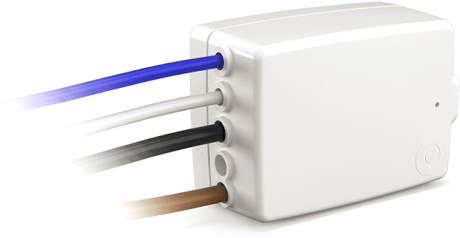
flush-mount 16A switching actuator with metering and overload & overtemperature safety switch-off
The wireless flush-mount switching actuator PSC132ZW allows you to remotely control electrical appliances. It features a metering function to measure the power consumption and the accumulated energy usage of connected equipment. The built-in metering unit is of high quality: it calculates the true-power and also works for small loads from 1W upwards. This feature is important to have a correct measurement value also for electronic loads like led lamps. The PSC132ZW has a built-in safety features that will switch-off the output in case of too high temperature or overload. Additionally the PSC132 has a feature to switch the load on at zero voltage and switch the load off at zero current. This leads to a very high number of possible switching cycles also for difficult loads like led-lamps or motors, e.g. pumps.


31 - Local Control Off
If „LocalControlOn“ is set (factory default state) the PSC132ZWs output can be switched manually by a mechanical rocker-switch or a pushbutton that is connected to the S1 input of the device. If „LocalControlOff“ is set, the PSC132ZWs output can only be switched through Z-wave telegrams. In both modes the operational state of the mechanical switch is reported to association group 2. LocalControlOff is ment for using the switch-input functionality and the relay functionality separately.Size: 1 byte
Default: 0
Minimum: 0
Maximum: 0
Possible values
| From | To | Desription |
|---|---|---|
| 0 | 0 | Local Control On |
| 1 | 1 | Local Control Off |
When a PS132ZW that is not associated to a Z-Wave network is inserted into the mains outlet, it will flash once red followed by 2 green flashes followed by steady red flashing. The PSC132ZW can now be added to (=inclusion) or removed from (=exclusion) a Z-Wave network: 1) start inclusion/exclusion on the primary controller 2) hold the touch button until the led shows green light 3) release the touch button The PSC234 will confirm successful addition to the network by 5 green flashes.
When a PS132ZW that is not associated to a Z-Wave network is inserted into the mains outlet, it will flash once red followed by 2 green flashes followed by steady red flashing. The PSC132ZW can now be added to (=inclusion) or removed from (=exclusion) a Z-Wave network: 1) start inclusion/exclusion on the primary controller 2) hold the touch button until the led shows green light 3) release the touch button The PSC234 will confirm successful removal/exclusion by steady red flashing. At the time of exclusion the device is factory reset.
Please use this procedure only if the primary controller is missing or inoperable: The device can be put into factory default state manually by the following procedure: 1) hold the touch-button until the led shows red light 2) release the touch-button and hold the touch-button again until the led starts to flash green The PSC132ZW confirms the successful completion of the factory reset procedure by steady red flashing.