Philio
Smart Energy In Wall Meter
PAB01-1
Whole Home Meter - Simple
01
SD3502
6.51.06
0x013C (316)
0x0006 (6)
0x001A (26)
ZC10-16010004
2015-12-11 13:53:17.3976
N/A
Enhanced 232 Slave
Always On Slave
This dual meter module is a transceiver which is a Z-WaveTM enabled device and it is able to detect Instant power wattage of connected light or appliances.
This dual meter module is a transceiver which is a Z-WaveTM enabled device and is fully compatible with any Z-WaveTM enabled network. This product can be included and operated in any Z-Wave network with other Z-Wave certified devices from other manufacturers and/or other applications. And it can act as repeaters within the network regardless of vendor to increase reliability of the network. Mini size design let the module can easily hide itself into the electricity distribution box and that will be good for the house decoration. This dual meter module is able to detect Instant power wattage (13800W/230Vac)(60 Amperes) of connected light or appliances.
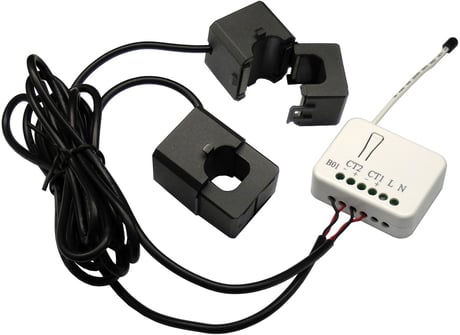
Product Picture


1 - Watt Meter Report Period
If the setting is configured for 1hour (set value =720), the PAB01 will report its instant power consumption every 1 hour to the node of correspond Group. The maximum interval to report its instant power consumption is 45 hours (5s*32767/3600=45hr).Size: 2 bytes
Default: 720
Minimum: 0
Maximum: 0
Possible values
| From | To | Desription |
|---|---|---|
| 1 | 32767 | 5*720s=3600s=1 hour |
2 - KWH Meter Report Period
If the setting is configured for 1hour (set value =720), the PAB01 will report its Accumulated Power Consumption (KW/h) every 1 hour to the node of correspond Group. The maximum interval to report its Accumulated Power Consumption (KW/h) is 45 hours (5s*32767/3600=45hr).Size: 2 bytes
Default: 720
Minimum: 0
Maximum: 0
Possible values
| From | To | Desription |
|---|---|---|
| 1 | 32767 | 5*720s=3600s=1 hour |
3 - Selected Endpoint
If Controller can't use Multi_Channel command class to access the endpoint of PAB01, you may configure the endpoint value to react the Basic Command Class 、Binary Switch Command Class or Meter Command Class V3.Size: 1 byte
Default: 3
Minimum: 0
Maximum: 0
Possible values
| From | To | Desription |
|---|---|---|
| 1 | 1 | 1:CT1 |
| 2 | 2 | 2:CT2 |
| 3 | 3 | 3:CT1 and CT2 |
4 - Threshold of Current for Load Caution
This is a warning when the current of load over the preset threshold value, If the setting value is 6000, when the load wattage of CT1 or CT2 over 60A, PAB01 will send current Meter Report command to the node of correspond Group.Size: 2 bytes
Default: 6000
Minimum: 0
Maximum: 0
Possible values
| From | To | Desription |
|---|---|---|
| 10 | 6000 | 6000*0.01A=60A |
5 - Threshold of KWh for Load Caution
This is a warning when the KWh of load over the preset threshold value, If the setting value is 10000, when the Accumulated Power Consumption of CT1 or CT2 over this value, PAB01 will send KWh Meter Report command to the node of correspond Guoup, minum value is 1KWh and default value is 10000 kWh.Size: 2 bytes
Default: 10000
Minimum: 0
Maximum: 0
Possible values
| From | To | Desription |
|---|---|---|
| 1 | 10000 | 10000*1KWH=10000KWH |
6 - Existence of Endpoint3
Multi-Channel Command is a good way to control relay1 and relay2 of PAB01 individually. The endpoint3 of PAB01 is related to both relay1 and relay2. In some condition it becomes redundant in Multi-Channel Command Class. When the Existence of Endpoint3 is set as 2, the endpoint3 will be disabled. The default value is 1. Endpoint1 and Endpoint2 are fixed, only Endpoint3 is dynamic.Size: 1 byte
Default: 1
Minimum: 0
Maximum: 0
Possible values
| From | To | Desription |
|---|---|---|
| 1 | 1 | 1 : Endpoint3 exist |
| 2 | 2 | 2 : No Endpoint3 |
1. Put your Z-Wave controller into inclusion mode by following the instructions provided by the controller manufacturer. 2. Pressing Include button three times within 2 seconds will enter inclusion mode.
1. Put your Z-Wave controller into exclusion mode by following the instructions provided by the controller manufacturer. 2. Pressing Include button three times within 2 seconds will enter exclusion mode. 3. Node ID has been excluded.
Use this procedure only in the event that the primary controller is lost or otherwise inoperable. 1. Pressing INCLUDE_BUTTON three times within 2 seconds will enter inclusion mode. 2. Within 1 second, press Include button again for 5 seconds. 3. IDs are excluded.