LG Uplus
IoT DoorCam
DCH-01
On/Off Power Switch
HW: 1 FW: 39.25
ZM5101
6.51.06
0x023D (573)
0x0043 (67)
0x0001 (1)
ZC10-16035021
2016-03-15 10:49:30.4556
N/A
Enhanced 232 Slave
Other
Remotely check my home's visitors
LG Uplus IoT DoorCam streams live video feed to your phone remotely. The app receives push notifications of different activities and record motion videos when visitors arrive. It also checks the battery life with the app and receives reminders when the battery is low.
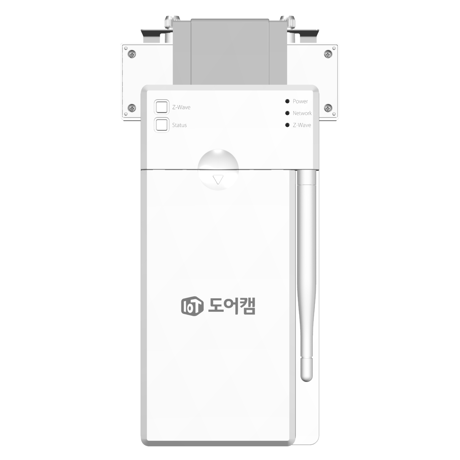
This must be done when DoorCam is exclusion status (Z-Wave LED remained on). After doing inclusion action on Controller, please do the followings. a. Press & hold ‘Z-Wave’ button for 5 seconds when DoorCam is exclusion status. b. When Z-Wave LED blinks with 250ms interval, release ‘Z-Wave’ button to try inclusion. c. DoorCam will try inclusion for 30sec. d. Z-Wave LED will be turned off if inclusion is successful.
This must be done when DoorCam is inclusion status (Z-Wave LED remained off). After doing exclusion action on Controller, please do the followings. a. Press & hold ‘Z-Wave’ button for 5 seconds when DoorCam is inclusion status. b. When Z-Wave LED blinks with 250ms interval, Release ‘Z-Wave’ button to try exclusion. c. DoorCam will try exclusion for 30sec. d. Z-Wave LED will be turned on if exclusion is successful.
a. Hold the ‘Z-Wave’ button for 10seconds. (Z-Wave LED will blink after 5 seconds with 250ms interval then Z-Wave LED will be turned off after another 5 seconds.) b. When Z-Wave LED stops blinking after 10 seconds, release Z-Wave button. c. When factory reset is successful, LED will be on. Please use this procedure only if the network primary controller is missing or inoperable.