Climax Technology
SRAC-23ZW
SRAC-23ZW
Siren
HW: 1 FW: 1.27
ZM5202
6.51.06
0x018E (398)
0x0002 (2)
0x0001 (1)
ZC10-16045042
2016-04-20 11:20:04.9696
N/A
Enhanced 232 Slave
Always On Slave
The SRAC-23ZW Series introduces AC-powered indoor sirens that plug into any standard power outlets.
The SRAC-23ZW Series introduces AC-powered indoor sirens that plug into any standard power outlets.The SRAC-23ZW and SRAC-23ZW models provide rechargeable battery backup. The SRAC-23ZW also functions as a Z-Wave repeater to extend a security system's wireless communication range
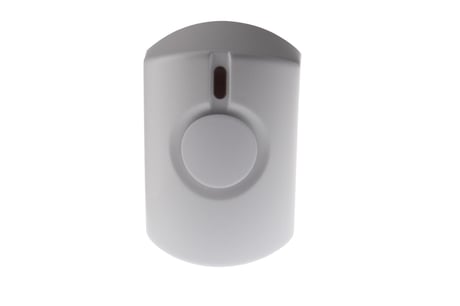
Product Picture
This product can be included and operated in any Z-Wave network with other Z-Wave certified devices from other manufactures and/or other applications. All non-battery operated nodes within the network will act as repeaters regardless of vendor to increase reliability of the network. -Plug the Siren into a power socket. -The LED indicator will flash twice. -Put the Z-Wave gateway or control panel into Inclusion or Learning mode (please refer to the Z-Wave gateway or control panel manual). -Within 1.5 seconds, press the Test Button 3 times. -Refer to the operation manual of the Z-Wave gateway or control panel to complete the learn-in process. -If the Siren was included successfully, it will emit 1 long beep and the LED will flash once. -If the device has already been included (learnt) into another Z-Wave Gateway/Control Panel, or if the device is unable to be learnt into the current Z-Wave Gateway/Control Panel, please exclude it first (see Exclusion) before attempting to include it into the current Z-Wave Gateway/Control Panel.
The Siren must be removed from existing Z-Wave network before being included into another. There are two methods available to exclude a device. Exclusion Mode -Put the Z-Wave gateway or control panel into Exclusion mode (please refer to the Z-Wave gateway or control panel manual). -Within 1.5 seconds, press the Test Button 3 times and the Siren will be removed from the Z-Wave network.
Factory Reset (Only use factory reset when network Control Panel/Gateway is missing or inoperable). -Press and hold the Test Button of the Siren for ~10 seconds until the LED starts to flash (twice) to factory reset. The siren will also emit 2 short beeps.