Villavent
Z-Wave to Systemair HVAC Adapter
29990.0
Thermostat - HVAC
HW: 2 FW: 0.01:00.80:36.80:16.00
ZM5202
6.51.06
0x0276 (630)
0x0139 (313)
0x0001 (1)
ZC10-16065101
2016-06-06 13:12:44.6744
N/A
Enhanced 232 Slave
Always On Slave
Z-Wave to Systemair HVAC Adapter is an Z-Wave Interface adapter, which connects the Z-Wave network with the Systemair Heat, Ventilation and Air Condition Unit.
Z-Wave to Systemair HVAC Adapter is an Z-Wave Interface adapter, which connects the Z-Wave network with the Systemair Heat Recovery Ventilation. The Systemair HVAC is a residential HRV system, which can be controlled locally by one or more UI, as well as remotely by a mobile App or a browser via Z-Wave network.
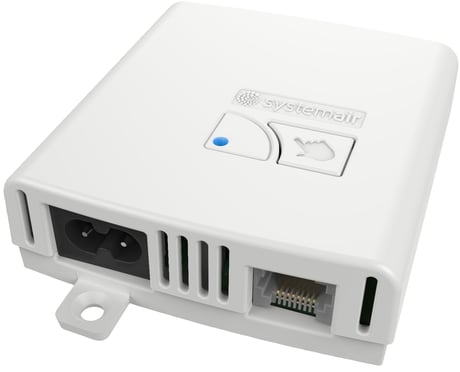
Product Picture


1 - System Type
Read Only Parameter, shows what is the Type of the Systemair HVAC Unit.Size: 2 bytes
Default: 0
Minimum: 0
Maximum: 0
Possible values
| From | To | Desription |
|---|---|---|
| 0 | 5 | See User Manual |
| 12 | 21 | See User Manual |
2 - Filter - Period
Read Only Parameter, shows how long the filter can be used in steps of 30 days. Example 6 = 180 days.Size: 2 bytes
Default: 12
Minimum: 0
Maximum: 0
Possible values
| From | To | Desription |
|---|---|---|
| 6 | 6 | x 30 = 180 days |
| 9 | 9 | x 30 = 270 days |
| 12 | 12 | x 30 = 360 days |
| 15 | 15 | x 30 = 450 days |
3 - Filter - Days Used
Read Only Parameter, shows how many days the filter has been used since the last change. The value can be used to calculate the Filter remaining time by the equation: Filter Remaining Days = (Parameter_2 x 30) - Parameter_3Size: 2 bytes
Default: 0
Minimum: 0
Maximum: 0
Possible values
| From | To | Desription |
|---|---|---|
| 0 | 500 | The counter stops on 500 |
4 - Boost Mode Remaining Time
Read Only Parameter, shows how many seconds are left for Boost mode.Size: 2 bytes
Default: 0
Minimum: 0
Maximum: 0
Possible values
| From | To | Desription |
|---|---|---|
| 240 | 0 | Counts down while Boost mode is active |
5 - Temperature Setpoint Step
Read Only Parameter, shows the min change available in degrees Celsius x 10. Example 25 = 2.5 degree Celsius.Size: 2 bytes
Default: 10
Minimum: 0
Maximum: 0
Possible values
| From | To | Desription |
|---|---|---|
| 10 | 10 | /10 = 1.0 degrees Celsius step |
| 25 | 25 | /10 = 2.5 degrees Celsius setp |
6 - CDx New Firmware Version Available
Shows the Firmware Version available in the Z-Wave adapter for the Firmware Target 2. This parameter must be written after successful uploading of the firmware image for the local UI. Example UI Version 5.02.03: MSB - x, don't care, Next - 05, Next - 02, LSB - 03.Size: 4 bytes
Default: 0
Minimum: 0
Maximum: 0
Possible values
| From | To | Desription |
|---|---|---|
| 0 | 16777215 | max version 255.255.255 |
7 - PCU-ECx New Firmware Version Available
Shows the Firmware Version available in the Z-Wave adapter for the Firmware Target 1. This parameter must be written after successful uploading of the firmware image for the Ventilation Unit. Example Ventilation Unit Version 6.07.08: MSB - x, don't care, Next - 06, Next - 07, LSB - 08.Size: 4 bytes
Default: 0
Minimum: 0
Maximum: 0
Possible values
| From | To | Desription |
|---|---|---|
| 0 | 16777215 | max version 255.255.255 |
When the device is not added to a Z-Wave network, then triple short clicks of the inclusion button will start the inclusion.
When the device is already included in a Z-Wave network, then triple short clicks of the inclusion button will exclude it from that Z-Wave network.
To do a Factory Reset the user must follow the following procedure: - Press and hold the inclusion button for 6 seconds, then - Release it, and then - Press it again and hold it for 3 seconds The Z-Wave Adapter is indicating each phase with a different LED pattern – see “Operational modes and indicators” in the User's Manual.
| Type | Value(s) |
|---|