Hank
Smart Plug
HKZW-SO01
On/Off Power Switch
HW: 1 FW: 1.03
ZM5202
6.51.07
0x0208 (520)
0x0101 (257)
0x0005 (5)
ZC10-16065124
2016-06-27 15:13:42.5876
N/A
Enhanced 232 Slave
Always On Slave
Smart Plug is a Z-Wave Switch plugin module specifically used to enable Z-Wave command and control (on/off) of any plug-in tool. It can report wattage consumption or kWh energy usage.
Smart Plug is a Z-Wave Switch plugin module specifically used to enable Z-Wave command and control (on/off) of any plug-in tool. It can report wattage consumption or kWh energy usage.Smart Plug is also a security Z-Wave device and supports the Over The Air (OTA) feature for the product’s firmware upgrade.
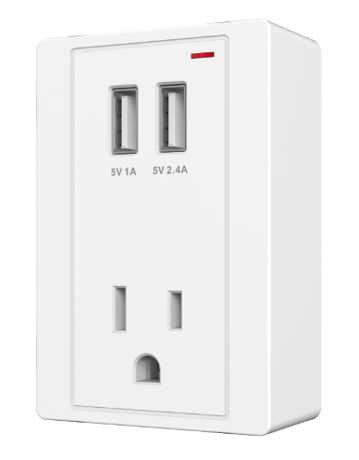
Product Picture


20 - Overcurrent protection
Smart Plug keep detecting the load current, once the current exceeds 16.5A for more than 5 seconds, smart plug's load will turn off.Size: 1 byte
Default: 1
Minimum: 0
Maximum: 0
Possible values
| From | To | Desription |
|---|---|---|
| 0 | 0 | The function is disabled |
| 1 | 1 | The function is enabled |
21 - Setting Smart Plug’s load status after re-power on
Define Smart Plug’s load status after re-power on.Size: 1 byte
Default: 0
Minimum: 0
Maximum: 0
Possible values
| From | To | Desription |
|---|---|---|
| 0 | 0 | last status |
| 1 | 1 | Always on |
| 2 | 2 | Always off |
24 - Notification when Load status changed
Smart Plug can send notifications to association device (Group Lifeline) when state of smart plug’s load changed.Size: 1 byte
Default: 1
Minimum: 0
Maximum: 0
Possible values
| From | To | Desription |
|---|---|---|
| 0 | 0 | The function is disabled. |
| 1 | 1 | Send BASIC REPORT |
| 2 | 2 | Send BASIC REPORT only when Load condition is changed not by Z-WAVE Command, such as short pressing. |
27 - Indicator modes
After Smart Plug being included into a Z-Wave network, the LED in the device will indicate the Smart Plug’s load status.Size: 1 byte
Default: 0
Minimum: 0
Maximum: 0
Possible values
| From | To | Desription |
|---|---|---|
| 0 | 0 | The LED will follow the status (on/off) of its load |
| 1 | 1 | When the state of Switch’s load changed, The LED will follow the status (on/off) of its load, but the red LED will turn off after 5 seconds if there is no any switch action. |
151 - Threshold of change in wattage
The value here represents minimum change in wattage (in terms of wattage) for sending a METER REPORT (for wattage) to the associated device (Group Lifeline).Size: 2 bytes
Default: 50
Minimum: 0
Maximum: 0
Possible values
| From | To | Desription |
|---|---|---|
| 0 | 0 | The function is disabled |
| 1 | 65535 | The minimum change value in wattage for sending a meter report to the associated device |
152 - Threshold of change in wattage percentage
The value here represents minimum change in wattage percent (in terms of percentage) for sending a METER REPORT (for wattage) to the associated device (Group Lifeline).Size: 1 byte
Default: 10
Minimum: 0
Maximum: 0
Possible values
| From | To | Desription |
|---|---|---|
| 0 | 0 | The function is disabled. |
| 1 | 255 | The minimum change value in wattage percent for sending a meter report to the associated device |
171 - Intervals of sending METER REPORT (for wattage)
The time interval of sending Meter Report (for wattage) to the associated device (Group Lifeline).Size: 4 bytes
Default: 30
Minimum: 0
Maximum: 0
Possible values
| From | To | Desription |
|---|---|---|
| 5 | 2678400 | The time for sending a meter report |
| 0 | 0 | The function is disabled. |
172 - Intervals of sending METER REPORT (for kWh)
The time interval of sending Meter Report (for kWh) to the associated device (Group Lifeline).Size: 4 bytes
Default: 300
Minimum: 0
Maximum: 0
Possible values
| From | To | Desription |
|---|---|---|
| 5 | 2678400 | The time for sending a meter report |
| 0 | 0 | The function is disabled. |
173 - Intervals of sending METER REPORT (for voltage).
The time interval of sending Meter Report (for voltage) to the associated device (Group Lifeline).Size: 4 bytes
Default: 0
Minimum: 0
Maximum: 0
Possible values
| From | To | Desription |
|---|---|---|
| 5 | 2678400 | The time for sending a meter report |
| 0 | 0 | The function is disabled |
174 - Intervals of sending METER REPORT (for current).
The time interval of sending Meter Report (for voltage) to the associated device (Group Lifeline).Size: 4 bytes
Default: 0
Minimum: 0
Maximum: 0
Possible values
| From | To | Desription |
|---|---|---|
| 0 | 0 | The function is disabled |
| 5 | 2678400 | The time for sending a meter report |
Set the Z-Wave network main controller into learning mode. Short press the Z-button, the LED will keep turning on or off, which indicates the inclusion is successful.
Set the Z-Wave network main controller into remove mode. Triple click the Z-button, the LED will blink slowly, which indicates the inclusion is successful.
Press and hold the Z-button for more than 20 seconds, the LED will blink faster and faster when the button is pressed. If holding time more than 20seconds, the LED indicator will be on for 3 seconds then it blinking slowly, which indicates the reseting is successful. Use this procedure only in the event that the network primary controller is missing or otherwise inoperable.
| Type | Value(s) |
|---|