Jasco Products Company
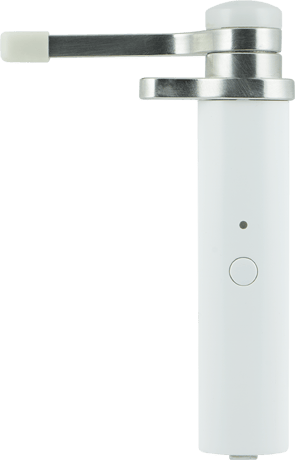
Hinge Pin Smart Door Sensor
32562 / ZW4001
Notification Sensor
HW: 255 FW: 5.14
ZM5202
6.51.07
0x0063 (99)
0x4953 (18771)
0x3031 (12337)
ZC10-16055085
2016-05-23 12:42:16.926
N/A
Enhanced 232 Slave
Reporting Sleeping Slave
Yes
Z-Wave Plus Hinge Pin Smart Door Sensor.
Transform any home into a smart home with the Jasco Hinge Pin Smart Door Sensor. This Smart Door Sensor is universal to fit any hinge size and is also reversible to allow it to work on a right or left opening door. With the adjustable zero pin position this will allow you to easily adjust for molding and when the sensor triggers. With the quick and easy installation, this sensor will notify you of when people enter or exit your home, you can also set the sensor to turn on a light or groups of lights.


20 - Change Open/Close Report Method
Change Open/Close Report Method 1. Notification 2. Basic Set 3. Basic ReportSize: 1 byte
Default: 1
Minimum: 0
Maximum: 0
Possible values
| From | To | Desription |
|---|---|---|
| 1 | 1 | Notification |
| 2 | 2 | Basic Set |
| 3 | 3 | Basic Report |
1. Follow the instructions for your Z-Wave certified controller to include the device to the Z-Wave network. 2. Once the controller is ready to include your Hinge Pin Smart Door Sensor press and release the manual/program button on the smart switch to include it in the network.
1. Follow the instructions for your Z-Wave certified controller to exclude a device from the Z-Wave network. 2. Once the controller is ready to exclude your device, press and release the manual/program button on the Hinge Pin Smart Door Sensor to exclude it from the network.
1. Press and hold the Z-wave Button for 6 seconds. It will be wake up and send “Wake Up Notification CC “ to HUB. 2 .It will sleep after timeout for 10 seconds, or sleep right away when received the “Wake Up No More Information CC”.
You may wish to reset all of your Hinge Pin Smart Door Sensor's settings to their factory defaults. To do this, press the program button 10 times within 6 seconds. If your Door Sensor has been successfully reset, its LED light will blink for 3 seconds. This should only be used in the event your network’s primary controller is missing or otherwise inoperable.
| Type | Value(s) |
|---|
| Sensor type |
|---|
| General Purpose |