Radio Thermostat Company of America
CT100 Plus
CT100
Thermostat - HVAC
HW: 4 FW: 10.07:00.01
ZM5202
6.51.07
0x0098 (152)
0x6402 (25602)
0x0001 (1)
ZC10-16085182
2016-05-26 10:32:25.902
N/A
Enhanced Slave
Listening Sleeping Slave
Yes
The CT100 Plus is a sleek, modern thermostat design for home automation systems.
The CT100 Plus is a sleek, modern thermostat design for home automation systems. It’s clean user interface compliments app-enabled systems. It features adjustable real-time alerts to enable cloud triggers, a robust data stream of HVAC information for cloud monitoring, and configurable comfort response settings to customize home control scenes. The CT100 Plus is compatible with all popular HVAC systems and is battery-operated without the need for a C-wire.
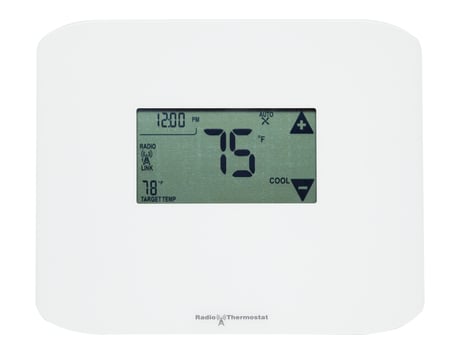
Product Picture


1 - Temperature Reporting Threshold
The Temperature Reporting Threshold Con!guration Set Command sets the reporting threshold for Reporting Threshold changes in the ambient temperature as detected by the thermostat.Size: 1 byte
Default: 2
Minimum: 0
Maximum: 0
Possible values
| From | To | Desription |
|---|---|---|
| 0 | 4 |
2 - HVAC Settings
The HVAC Settings Configuration Report Command returns the current HVAC con!guration. The HVAC settings must be !xed before the thermostat is joined to the Z-Wave network.Size: 4 bytes
Default: 0
Minimum: 0
Maximum: 0
Possible values
| From | To | Desription |
|---|---|---|
| 0 | 2147483647 | Byte 1: normal (1) or heat pump (2). Byte 2, Bits 7-4: Gas (1) or Electric (2). Byte 2, Bits 3-0: # of Auxiliary Stages. Byte 3: # of Heat Pump Stages. Byte 4: # of Cool Stages. |
3 - Utility Lock
The Utility Lock Con!guration Set command enables or disables the utility lock. If the utility lock is enabled, the setpoint cannot be modi!ed directly via the thermostat screen.Size: 1 byte
Default: 0
Minimum: 0
Maximum: 0
Possible values
| From | To | Desription |
|---|---|---|
| 0 | 255 | 0 = Disabled, 1 - 255 = Enabled |
4 - C-Wire/Battery
The C-Wire / Battery Status Con!guration Report Command returns the status of the thermostat power source. The power state is fixed when the thermostat joins the network.Size: 1 byte
Default: 0
Minimum: 0
Maximum: 0
Possible values
| From | To | Desription |
|---|---|---|
| 1 | 2 | 1=C-Wire, 2=Battery |
5 - Humidity Reporting Threshold
The Humidity Threshold Con!guration Set Command sets the reporting threshold for changes in the relative humidity as detected by the thermostat.Size: 1 byte
Default: 5
Minimum: 0
Maximum: 0
Possible values
| From | To | Desription |
|---|---|---|
| 0 | 3 | 0 = Disabled, 1 = 3% RH, 2 = 5% RH, 3 = 10% RH |
6 - Auxiliary/Emergency Mode
The Auxiliary/Emergency con!guration command enables or disables auxiliary / emergency heating in the thermostat.Size: 1 byte
Default: 0
Minimum: 0
Maximum: 0
Possible values
| From | To | Desription |
|---|---|---|
| 0 | 1 | 0 = Disabled, 1 = Enabled |
7 - Thermostat Swing Temperature
The Thermostat Swing Temperature configuration command sets swing temperature on the Temperature thermostat.Size: 1 byte
Default: 2
Minimum: 0
Maximum: 0
Possible values
| From | To | Desription |
|---|---|---|
| 1 | 8 | 1 = 0.5, 2 = 1.0, 3 = 1.5, 4 = 2.0, 5 = 2.5, 6 = 3.0, 7 = 3.5, 8 = 4.0 |
8 - Thermostat Differential Temperature
The Thermostat Differential Temperature configuration command sets the differential temperature for multi-stage HVAC systems.Size: 2 bytes
Default: 4
Minimum: 0
Maximum: 0
Possible values
| From | To | Desription |
|---|---|---|
| 2 | 6 | The thermostat differential temperature is in units of 0.5 degrees Fahrenheit. |
| 0 | 1 | 0x00 (Heat) or Cool (0x01) |
9 - Thermostat Recovery Mode
The Thermostat Recovery Mode configuration command sets the HVAC recovery mode type. The recovery mode determines when additional HVAC stages are turned of as the ambient temperature returns to the target temperature.Size: 1 byte
Default: 2
Minimum: 0
Maximum: 0
Possible values
| From | To | Desription |
|---|---|---|
| 1 | 2 | 1 = Fast, 2 = Economy |
10 - Temperature Reporting Filter
The Temperature Reporting Filter configuration command sets upper and lower bounds of the ambient temperature reporting.Size: 1 byte
Default: 0
Minimum: 0
Maximum: 0
Possible values
| From | To | Desription |
|---|---|---|
| 0 | 31868 | Byte 1: 0 -124 (lower bound), Byte 2: 0-124 (upper bound) |
12 - Multicast
This parameter controls how the thermostat sends unsolicited reports.Size: 1 byte
Default: 0
Minimum: 0
Maximum: 0
Possible values
| From | To | Desription |
|---|---|---|
| 0 | 1 | 0 = Disabled, 1 = Enabled |
14 - Save Energy Mode Type
This configuration value is used to read/white what behavior Save Energy Mode causes in the thermostat when the thermostat enters Save Energy Mode.Size: 1 byte
Default: 3
Minimum: 0
Maximum: 0
Possible values
| From | To | Desription |
|---|---|---|
| 1 | 255 | 1=Adjust by target delta, 2=Least consuming point in the running program, 3=Save energy absolute setpoint, 255=Save Energy not supported (read-only value) |
From the CT100’s Menu screen, touch MATE under the radio icon. The Network Include screen displays a large r1. Touch MATE again. This initiates the network inclusion process. The MATE icon and the status indicator LEDs will blink. When the CT100 has successfully included into a Z-Wave network, the MATE icon is replaced by the LINK icon under the radio tower.
Same process as inclusion. Similarly, when you are trying to exclude from a network, the LINK icon disappears when the node has successfully excluded the network.
When included into a Z-Wave network on battery power, this device is a FLiRS device. The Thermostat will wake up for communication when it receives a valid Z-Wave beam.
Switch the thermostat to Off Mode. Press and hold the lower left corner of touch screen for five (5) seconds. The thermostat then resets itself, displays its current firmware version, and restarts in Off Mode. Use this procedure only in the event that the network primary controller is missing or otherwise inoperable.
| Type | Value(s) |
|---|
| Sensor type |
|---|
| Air Temperature |
| Humidity |