Zooz
Z-Wave Power Strip
ZEN20
Power Strip
HW: 1 FW: 20.15
ZM5202
6.51.06
0x015D (349)
0x0621 (1569)
0xF51C (62748)
ZC10-16065094
2016-06-06 12:38:11.684
N/A
Routing Slave
Always On Slave
This five-outlet power strip is equipped with two USB charging ports (5V/2.1A). Include the device to your Z-Wave network and control small appliances and lamps remotely.
Product features: - Scene inclusion for custom automation scenarios when included to a Z-Wave gateway controller - Z-Wave Plus with improved 500 chip for faster and safer wireless communication - Signal repeater for a stronger, more reliable network - 2 USB charging ports for your smart phone or tablet (no Z-Wave functionality) - Built-in overload protection Specifications: Z-Wave Signal Frequency: 908.42 MHz Power: 110V Maximum Load: 15Amps TOTAL between 5 outlets USB Charging Port Power: 5V 1A each Cord Length: 3 ft Range: Up to 100 feet line of sight Installation and Use: Indoor only
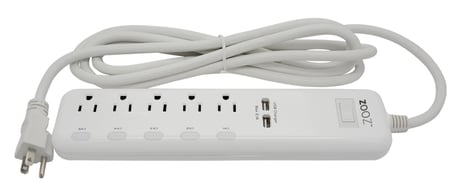
Product Picture
1. Plug the power strip into a grounded receptacle located within 3 feet from your Z-Wave gateway controller 2. Put your Z-Wave controller in inclusion mode 3. Press and release the power button on the strip 4. A new on / off device should appear on your controller's device list
1. Plug the power strip into a grounded receptacle located within 3 feet from your Z-Wave gateway controller 2. Put your Z-Wave controller in exclusion mode 3. Press and release the power button on the strip 4. The device should disappear from your controller's device list
When your network’s primary controller is missing or otherwise inoperable, you may need to reset the device to factory settings manually. In order to complete the process, plug the power strip into a grounded receptacle, then PRESS AND HOLD the power button for AT LEAST 3 SECONDS. NOTE: All previously recorded activity and custom settings will be erased from the device’s memory.
| Type | Value(s) |
|---|