Winytechnology
Smart Energy Multi tap
WTR-1221-111
On/Off Power Switch
HW: 1 FW: 1.00
ZM5101
6.51.06
0x0242 (578)
0x0003 (3)
0x0014 (20)
ZC10-16075152
2016-07-27 00:58:06.4578
N/A
Enhanced 232 Slave
Always On Slave
Smart Energy Multi Tap plugs in between any appliance and the AC outlet. It can control power on/off of the appliance using your smartphone.
Smart Energy Multi Tap plugs in between any appliance and the AC outlet. It can monitor and control power using your smartphone. It can also control the power source connected with appliance manually and remotely using your smartphone.
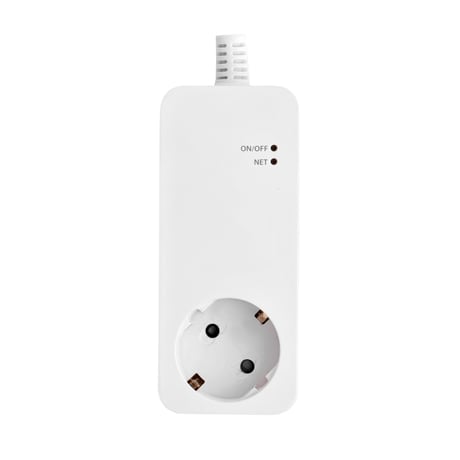
Product Picture


2 - Automatic Meter Reporting Cycle
Automatically meter report control (AMRC) is report mode setting of the Meter data. - 00b : Deactivate the meter report - 01b : In case Parameter 91~92 is bigger than setting value, report the event. Report interval is 31 seconds after trigger. - 10b : Automatic report by the set interval in the Parameter 111.Size: 1 byte
Default: 2
Minimum: 0
Maximum: 0
Possible values
| From | To | Desription |
|---|---|---|
| 0 | 0 | Deactivate the Meter data report |
| 0 | 1 | Trigger level event mode |
| 1 | 0 | Time Interval Mode |
3 - AKRC
Automatically key report control (AKRC) is report mode setting of the Key data. - 00b : Deactivate the button activation report - 01b : Button Activation reportSize: 1 byte
Default: 1
Minimum: 0
Maximum: 0
Possible values
| From | To | Desription |
|---|---|---|
| 0 | 0 | Deactivate the button activation report |
| 0 | 1 | Button Activation report |
91 - GMRTL_W
Group1 Watt Trigger level value Trigger value setting (0~65535) for Meter report of Parameter2.Size: 2 bytes
Default: 50
Minimum: 0
Maximum: 0
Possible values
| From | To | Desription |
|---|---|---|
| 0 | 65535 | Group1 Watt Trigger level value |
92 - GMRTL_kWh
Group1 kWh Trigger level value Trigger value setting (0~65535) for Meter report of Parameter2.Size: 2 bytes
Default: 50
Minimum: 0
Maximum: 0
Possible values
| From | To | Desription |
|---|---|---|
| 0 | 65535 | Group1 kWh Trigger level value |
101 - GRCCS
GRCCS – Group Report Command Class Setup 1. CRC – Group report crc16 enable/disable - 0x00 : Group report CRC16 Disable - 0x01 : Group report CRC16 Enable 2. MRSS – Select Scale of Meter report - 0x00 : Meter report command scale (kWh) - 0x02 : Meter report command scale (Watt)Size: 4 bytes
Default: 0
Minimum: 0
Maximum: 0
Possible values
| From | To | Desription |
|---|---|---|
| 0 | 1 | CRC – Group report crc16 enable/disable |
| 0 | 2 | MRSS – Select Scale of Meter report |
111 - GRIC
Interval time setting for (60~65535 second)Report groupSize: 4 bytes
Default: 720
Minimum: 0
Maximum: 0
Possible values
| From | To | Desription |
|---|---|---|
| 60 | 65535 | Interval time setting |
255 - Reset
Initialize Configuration parameter Parameter number 2 : Initialize Parameter 2 Parameter number 3 : Initialize Parameter 3 Parameter number 91 : Initialize Parameter 91 Parameter number 92 : Initialize Parameter 92 Parameter number 101 : Initialize Parameter 101 Parameter number 111 : Initialize Parameter 111 Parameter number 255 : Reset to the default full parameterSize: 1 byte
Default: 255
Minimum: 0
Maximum: 0
Possible values
| From | To | Desription |
|---|---|---|
| 2 | 255 | Initialize Configuration parameter |
Press Fn switch 3 times in a row to include the device to Z-Wave network.
Press Fn switch 3 times in a row again to cancel the inclusion of the device on Z-Wave network.
Use this procedure only in the event that the network primary controller is missing or otherwise inoperable. Press Fn switch over 10~15 sec to initialize connecting network information.
| Type | Value(s) |
|---|
| Meter type |
|---|
| Electric Meter Consumption |