Aeotec
LED Bulb
ZW098-A52
Light Dimmer Switch
HW: 98 FW: 1.05
ZM5101
6.51.06
0x0086 (134)
0x0103 (259)
0x0062 (98)
ZC10-16065119
2016-06-23 16:49:56.6808
N/A
Enhanced 232 Slave
Always On Slave
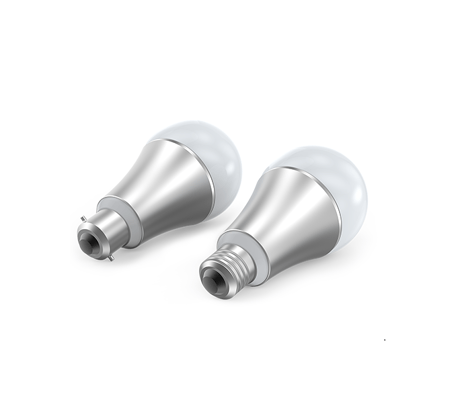
Aeotec LED Bulb is a low-cost Z-Wave LED module which allows control (on/off/dim) with the use of Z-Wave.
Aeotec LED Bulb is a low-cost Z-Wave LED module which allows control (on/off/dim) with the use of Z-Wave. It’s a bulb has a Smart RGB LED, which can be used to add colour to your home. The bulb has 5 main colour channels available for you to adjust: Red, Green, Blue, Warm White and Cold White. You can configure its colour according to your favour. The LED Bulb is also a security Z-Wave device and supports the Over The Air (OTA) feature for the product’s firmware upgrade.


20 - Set the bulbs state after it is re-powered on
Set the bulbs state after it is re-powered on.Size: 1 byte
Default: 1
Minimum: 0
Maximum: 0
Possible values
| From | To | Desription |
|---|---|---|
| 0 | 0 | The last state before re-power on. |
| 1 | 1 | Always On. |
| 2 | 2 | Always Off. |
32 - Enable/disable to send out a report when the color is changed.
Enable/disable to send out a report when the color is changed.Size: 1 byte
Default: 0
Minimum: 0
Maximum: 0
Possible values
| From | To | Desription |
|---|---|---|
| 0 | 0 | Disable |
| 1 | 1 | Hail CC |
33 - Get the Bulb’s color value.
Get the Bulb’s color value. Note: This parameter is a get-only parameter.Size: 4 bytes
Default: 0
Minimum: 0
Maximum: 0
Possible values
| From | To | Desription |
|---|---|---|
| 1 | 255 | Bule color value |
| 256 | 65535 | Green color value |
| 65536 | 16777215 | Red color value |
34 - Enable/disable the function of using External Switch to turn on/off the bulb.
Enable/disable the function of using External Switch to turn on/off the bulb.Size: 1 byte
Default: 0
Minimum: 0
Maximum: 0
Possible values
| From | To | Desription |
|---|---|---|
| 0 | 0 | Disable |
| 1 | 1 | Enable |
35 - Enable/disable the function of using External Switch to changes the bulb’s color.
Enable/disable the function of using External Switch to changes the bulb’s color.Size: 1 byte
Default: 1
Minimum: 0
Maximum: 0
Possible values
| From | To | Desription |
|---|---|---|
| 0 | 0 | Disable |
| 1 | 1 | Enable |
36 - Reboot/save/exit Colorful mode.
Reboot/save/exit Colorful mode. Note: This parameter is a set-only parameter.Size: 1 byte
Default: 0
Minimum: 0
Maximum: 0
Possible values
| From | To | Desription |
|---|---|---|
| 0 | 0 | Un-reboot Colorful mode. |
| 1 | 1 | Reboot Colorful mode. |
| 2 | 2 | Exit Colorful mode. |
| 3 | 3 | Save the current Colorful mode value and then to be exited. |
37 - Colorful mode configuration.
Configure the Colorful mode.Size: 4 bytes
Default: 157483008
Minimum: 0
Maximum: 0
Possible values
| From | To | Desription |
|---|---|---|
| 0 | 31 | Colour Change Speed Level |
| 32 | 255 | Time Base of Color Change Speed |
| 256 | 65535 | Cycle Count |
| 65536 | 16777215 | Brightness |
| 16777215 | 134217727 | Color Display Cycle |
| 134217728 | 1073741823 | Color Change Speed Option |
| 1073741824 | 2147483647 | Color Transition Style |
38 - Change speed
Set the Change speed.Size: 4 bytes
Default: 50332416
Minimum: 0
Maximum: 0
Possible values
| From | To | Desription |
|---|---|---|
| 1 | 255 | Set the pause time of OFF. |
| 256 | 65535 | Set the pause time of ON. |
| 65536 | 16777215 | Set the speed from ON to OFF. |
| 16777216 | 2147483647 | Set the speed from OFF to ON. |
39 - Color index configuration when the bulb is in Multi color mode.
Color index configuration when the bulb is in Multi color mode.Size: 4 bytes
Default: 2003125025
Minimum: 0
Maximum: 0
Possible values
| From | To | Desription |
|---|---|---|
| 1 | 15 | Index 8 |
| 16 | 255 | Index 7 |
| 256 | 4095 | Index 6 |
| 4096 | 65535 | Index 5 |
| 65536 | 1048575 | Index 4 |
| 1048576 | 16777215 | Index 3 |
| 16777216 | 268435455 | Index 2 |
| 268435456 | 2147483647 | Index 1 |
80 - To set whcih notification can be sent to the associated devices (Group 1) when the state of LED Bulb is changed.
To set whcih notification can be sent to the associated devices (Group 1) when the state of LED Bulb is changed.Size: 1 byte
Default: 1
Minimum: 0
Maximum: 0
Possible values
| From | To | Desription |
|---|---|---|
| 0 | 0 | Nothing |
| 1 | 1 | Hail CC |
| 2 | 2 | Basic CC report. |
112 - Set the Dimmer mode.
Set the Dimmer mode.Size: 1 byte
Default: 0
Minimum: 0
Maximum: 0
Possible values
| From | To | Desription |
|---|---|---|
| 0 | 0 | Parabolic curve mode |
| 1 | 1 | Index curve mode |
| 2 | 2 | (Parabolic + Index)/2 mode |
| 3 | 3 | Linear mode |
252 - Enable/disable Lock Configuration
Enable/disable to lock Configuration parameters.Size: 1 byte
Default: 0
Minimum: 0
Maximum: 0
Possible values
| From | To | Desription |
|---|---|---|
| 0 | 0 | Disable |
| 1 | 1 | Enable |
255 - Reset the Bulb
Reset the Bulb to factory default.Size: 4 bytes
Default: 0
Minimum: 0
Maximum: 0
Possible values
| From | To | Desription |
|---|---|---|
| 0 | 0 | Reset all configuration parameters to factory default settings |
| 1431655765 | 1431655765 | Reset the bulb to factory default. |
Turn the primary controller of Z-Wave network into inclusion mode, press the external switch of LED Bulb to turn it off and then press the external switch again to turn it on.
Turn the primary controller of Z-Wave network into exclusion mode, press the external switch of LED Bulb to turn off and then press the external switch again to turn on it, repeat the operation 3 times.
Turn the controller of Z-Wave network into exclusion mode, press the external switch of LED Bulb to turn off and then press the external switch again to turn on it, repeat the operation 3 times. After the LED Bulb is excluded from network, it will be reset to factory default state. Use this procedure only in the event that your primary network controller is missing or inoperable.
Support ""Over the Air Firmware Updating"" and “Z-Wave Security”.
| Type | Value(s) |
|---|