Leak Intelligence, LLC
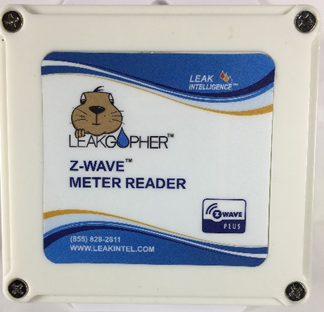
Leak Gopher Meter Reader
LGRM-1
Whole Home Meter - Simple
HW: 255 FW: 1.03
ZM5202
6.51.07
0x0173 (371)
0x0003 (3)
0x0003 (3)
ZC10-16085163
2016-06-24 14:58:15.5208
N/A
Enhanced 232 Slave
Always On Slave
Z-Wave Water Meter Reader with Pulse Count scale for any size meter.
The Leak Gopher Meter Reader is a critical component to protect your home from costly damage due to a water leak. A burst pipe can result many thousands of dollars in repair costs and the Leak Gopher Meter Reader can inform you of the leak in time to prevent damage.


1 - DEBOUNCE
DEBOUNCE applies a filter the meter pulse to ensure the meter count is incremented only once with each pulse. The default should work for most meters. If the meter pulses are more than 100/second, then a lower DEBOUNCE value should be used. If the pulse count is incrementing by more than 1 with each pulse, then the DEBOUNCE parameter should be increased. Note that increasing the DEBOUNCE value lowers the maximum pulse rate that can be accumulated. For example, a DEBOUNCE of 100 means any pulse of less than 100ms (1/10th of second) will be filtered out an not counted so the maximum pulse rate that can be accumulated is 5 pulses/sec.Size: 1 byte
Default: 10
Minimum: 0
Maximum: 0
Possible values
| From | To | Desription |
|---|---|---|
| 1 | 255 | 100ms |
2 - RATE COUNT
Pulse counts are automatically sent to the Association Group 1 NodeID every time the pulse count is incremented by value of this parameter. The maximum rate of reports is once per minute so the pulse count can increment by more than this number. A Pulse Rate of 0 turns off the automatic reporting feature and the system controller has to poll to get the current pulse count.Size: 1 byte
Default: 10
Minimum: 0
Maximum: 0
Possible values
| From | To | Desription |
|---|---|---|
| 1 | 255 | Pulse Counts |
| 0 | 0 | disabled |
3 - RATE TIME
Pulse counts are automatically sent to the Association Group 1 NodeID every 1/10th of an hour times this parameter. A value of 0 turns off the automatic reporting feature and the system controller has to poll to get the current pulse count. Pulse counts are reported via the Z-Wave Meter Command Class and are sent to the NodeID configured in Association group 1. If BOTH Rate Count and Rate Time are zero, the home automation system has to poll the meter value using a METER_GET command. If either Rate Count or Rate Time are non-zero, then METER_REPORTs are automatically sent when either condition triggers. Rate Count is ideal to quickly determine if there was a sudden increase in water flow for example if a pipe has burst. As soon as the pulse count has incremented by the Rate Count value, a meter report will be sent to the Lifeline. The Rate Time parameter is ideal for determining if there is a slow leak in the system where the rate count is slowly incrementing 24 hours per day. Note that small leaks are limited by the minimum flow rate of the water meter. Typically Rate Time is set to 20 so that a report is sent every two hours at a minimum if this feature is desired. Note that the default for Rate Time is 0 which disables this mode.Size: 1 byte
Default: 0
Minimum: 0
Maximum: 0
Possible values
| From | To | Desription |
|---|---|---|
| 0 | 0 | disabled |
| 1 | 255 | 1/10ths of an hour |
How to Add the Leak Gopher Meter Reader to your Z-Wave Controller - Plug the wall cube power adapter (included) into the receptacle on the bottom of the Leak Gopher marked “12 VDC”. Plug the wall cube into a 110 VAC outlet. This provides power to the Leak Gopher. - Configure the Z-Wave Controller to Include/Add a device. - When the Z-Wave Controller is ready to include/add a device, it will display a message like “waiting to add device”. Press Include/Add button on the front of the device. - The Include/Exclude button is the Z-Wave logo located on the front of the Leak Gopher Meter Reader. - Press the Include/Remove button. Depending on your controller you may have to press the button 3 times. - The Z-Wave Controller will acknowledge that the Leak Gopher Meter Reader has been added to the Z-Wave network. - Your Leak Gopher Meter Reader is ready to use.
How to Remove the Leak Gopher Meter Reader from your Z-Wave Controller - Plug the wall cube power adapter (included) into the receptacle on the bottom of the Leak Gopher Meter Reader marked “12 VDC”. Plug the wall cube into a 110 VAC outlet. This provides power to the Leak Gopher Meter Reader. - Configure the Z-Wave Controller to Exclude a device. - When the Z-Wave Controller is ready to exclude a device, it will display a message like “waiting to exclude device. Press exclude button on the device” - The Include/Exclude button is the Z-Wave logo located on the front of the Leak Gopher Meter Reader. - Press the Include/Remove button. Depending on your controller you may have to press the button 3 times. - The Z-Wave Controller will acknowledge that the Leak Gopher Meter Reader has been excluded from the Z-Wave network. - Your Leak Gopher Meter Reader is excluded from this controller.
How to reset the Leak Gopher Meter Reader - If the exclusion process above is not working or the Z-Wave controller that was originally joined to is lost or not available, the following process can be used to factory reset the device to the same state it has when shipped new. - To reset the Leak Gopher Meter Reader Z-Wave radio and routing tables, press and hold the Include/Exclude button located on the front of the Leak Gopher Meter Reader for 15 seconds.
| Type | Value(s) |
|---|
| Meter type |
|---|
| Water Meter Consumption |