Enerwave Green Automation
In-wall Smart Meter Dimmer Switch
ZW500DM
Light Dimmer Switch
HW: 1 FW: 5.10
ZM5202
6.51.07
0x011A (282)
0x0111 (273)
0x0201 (513)
ZC10-16065122
2016-06-27 22:16:41.1356
N/A
Routing Slave
Always On Slave
Wireless Home Automation Control Device,In-wall Smart Meter Dimmer Switch,with Measures energy usage of the wired load.
The ZW500DM Dimmer Switch is a perfect wireless manual and remote on /off/ dim brightness control replacement of regular switch, controlling incandescent, dimmable LED and CFL. This ZW500DM dimmer switch is fully compatible with other Z-Wave certified devices, provides programmable function creating a perfect ambiance such as scenes,association,schedule event,etc. Also it can be added to most Z-Wave compliant controllers. This ZW500DM dimmer works with ZW3K 3-Way Auxiliary Switch that reducing energy consumption, enhancing the value of technology of your home, condominiums and apartment. The ZW500DM Smart Meter Dimmer Switch enables you to measure the energy usage of your appliance. When added to a Z-Wave network, the ZW500DM reports real time data to your gateway or controller. It can also display actual consumption (in W) and the accumulated power used (in kWh) in the user interface of the gateway/remote. Please use the gateway installation manual for specific instructions on measuring the power.
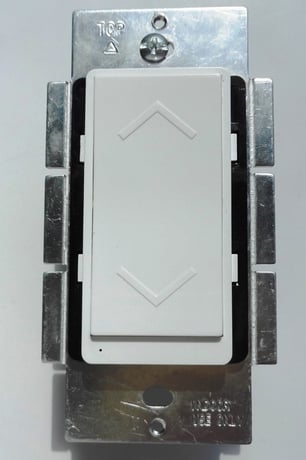
Product Picture


1 - LEDdirect
synchronization of load power and LED indicatorSize: 1 byte
Default: 0
Minimum: 0
Maximum: 0
Possible values
| From | To | Desription |
|---|---|---|
| 0 | 0 | Power on, LED off |
| 1 | 1 | Power on, LED on |
When the primary controller is in the adding mode, flicks the paddle 3 times in the 1.5 second. The primary controller will verify the adding, assign a node ID number for the module .
When the primary controller is in the removing mode, flicks the paddle 3 times in the 1.5 second. The primary controller will verify the removing, remove the module from the current Z-Wave network, and the LED will blink when the module is on power
Flicks the program button 3 times in the 1.5 second then press once and hold for 2 second.the device will send a device reset locally notification to controller. Then clear all of information for the network, and restore factory defaults, and reset the module. Use this procedure only in the event that the network primary controller is missing or otherwise inoperable.
| Type | Value(s) |
|---|
| Meter type |
|---|
| Electric Meter Consumption |