Yale Locks & Hardware
nexTouch Wireless Push Button with Z-Wave
NTB610-ZW2
Door Lock - Keypad
HW: 255 FW: 1.67:15.00
ZM5101
6.51.07
0x0129 (297)
0x8001 (32769)
0x0B00 (2816)
ZC10-16095224
2016-09-07 12:55:51.6098
N/A
Enhanced 232 Slave
Listening Sleeping Slave
Yes
nexTouch is a commercial Grade 1 lever lock designed for small business applications. Integrate nexTouch into your new or existing Z-Wave automation or alarm system.
Yale nexTouch™ provides small business owners a wireless access management solution with the security of commercial grade locks and the convenience and cost-efficiency of wireless installation. The nexTouch product is a keypad access lock designed to meet most small business applications, both interior and exterior. The lock can be paired with a Z-Wave system for easy integration into new and existing alarm and automation platforms. Yale nexTouch offers many benefits for the small business owner, including easy management of employee access rights and attendance, seeing to unattended deliveries, monitoring of business hours, managing remote locations, and increased security. Lock features may vary based on the chosen integration system, but typically include accommodation of up to 500 users, real-time notifications, audit trail, scheduling of access rights and remote access. To meet small business security needs Yale nexTouch locks are ANSI/BHMA Grade 1 certified, UL listed for use on fire doors and windstorm listed. The product is designed for standard commercial doors, ideal for employee, delivery or back entrances. The lock is available with a backlit push button or touchscreen keypad, the latter offering low battery and tamper alarm indicators on the device.
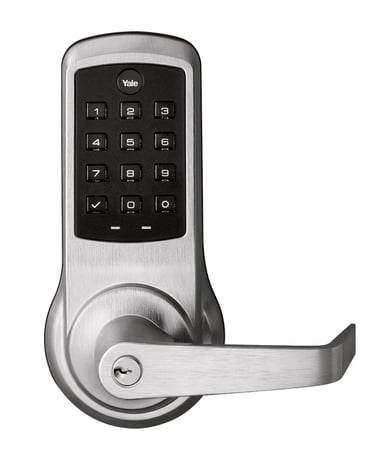
Product Picture


1 - Silent Mode on/off
Level control, 1, 2, 3 default is 1. Levels are 1 and 3 for models with no spoken prompts default is 1 or highSize: 1 byte
Default: 1
Minimum: 0
Maximum: 0
Possible values
| From | To | Desription |
|---|---|---|
| 1 | 3 | Level |
2 - Auto Relock On/Off
0x00 = OFF, 0xFF = ON default is 0x00 or OFFSize: 1 byte
Default: 0
Minimum: 0
Maximum: 0
Possible values
| From | To | Desription |
|---|---|---|
| 0 | 0 | Auto Relock Off |
| -128 | -128 | Auto Relock On |
3 - Auto Relock Time
10 to 127 seconds default is 5 secondsSize: 1 byte
Default: 5
Minimum: 0
Maximum: 0
Possible values
| From | To | Desription |
|---|---|---|
| 10 | 127 | Seconds |
4 - Wrong Code Entry Limit
3 to 10 default is 5 timesSize: 1 byte
Default: 5
Minimum: 0
Maximum: 0
Possible values
| From | To | Desription |
|---|---|---|
| 3 | 10 | Times |
5 - Language
Set the lock language. Default is 1= EnglishSize: 1 byte
Default: 1
Minimum: 0
Maximum: 0
Possible values
| From | To | Desription |
|---|---|---|
| 1 | 1 | English Language |
| 2 | 2 | Spanish Language |
| 3 | 3 | French Language |
7 - Shut Down Time (after wrong code entries)
10 to 127 seconds default is 60 secondsSize: 1 byte
Default: 60
Minimum: 0
Maximum: 0
Possible values
| From | To | Desription |
|---|---|---|
| 10 | 127 | Seconds |
8 - Operating Mode
This sets the operating mode for the lock.Size: 1 byte
Default: 0
Minimum: 0
Maximum: 0
Possible values
| From | To | Desription |
|---|---|---|
| 0 | 0 | Normal Mode (Default) |
| 1 | 1 | Vacation Mode (Keypad Locked Out) |
| 2 | 2 | Privacy Mode (Keypad Locked, RF Unlock Functional) |
11 - One Touch Locking
0x00 = OFF, 0xFF = ON default is 0xFF or ON.Size: 1 byte
Default: 0
Minimum: 0
Maximum: 0
Possible values
| From | To | Desription |
|---|---|---|
| 0 | 0 | One Touch Locking Off |
| -128 | -128 | One Touch Locking On |
12 - Privacy Button
0x00 = OFF, 0xFF = ON default is 0x00 or OFFSize: 1 byte
Default: 0
Minimum: 0
Maximum: 0
Possible values
| From | To | Desription |
|---|---|---|
| 0 | 0 | Privacy Button Off |
| -128 | -128 | Privacy Button On |
15 - Reset to Factory Defaults
01 = Lock will execute Reset To Factory. 02 = Reserved for future use (Lock will currently execute Reset To Factory same as 01). No default value Please use this procedure only when the network primary controller is missing or otherwise inoperableSize: 1 byte
Default: 0
Minimum: 0
Maximum: 0
Possible values
| From | To | Desription |
|---|---|---|
| 0 | 0 | Reset to Factory Off |
| -128 | -128 | Reset to Factory On |
18 - Door Propped Timer
10 to 127 second. This value is represented as seconds X 10. (ie a value of 4 would mean a door propped timer of 40 seconds) Set to 0x00 to disable Door Propped Alarm. Default = 0x00 (off)Size: 1 byte
Default: 0
Minimum: 0
Maximum: 0
Possible values
| From | To | Desription |
|---|---|---|
| 20 | 127 | Seconds |
19 - DPS Alarm
0x00 = OFF, 0xFF = ON Default is 0x00 or off. Used to enable/disable door condition alarms for locks that support a door position sensor. Any lock that does not support DPS will always report 0x00.Size: 1 byte
Default: 0
Minimum: 0
Maximum: 0
Possible values
| From | To | Desription |
|---|---|---|
| 0 | 0 | DPS Alarm Off |
| -128 | -128 | DPS Alarm On |
1. Enter the 4-8 digit master PIN code followed by the gear key. 2. Press the 7 key followed by the gear key. 3. Press the 1 key followed by the gear key.
1. Enter the 4-8 digit master PIN code followed by the gear key. 2. Press the 7 key followed by the gear key. 3. Press the 3 key followed by the gear key.
Please use this procedure only when the network primary controller is missing or otherwise inoperable. 1. Remove the inside lever with the lever removal tool. 2. Remove battery cover using hex wrench provided with lock. 3. Remove four (4) AA batteries. 4. Remove the 10-32 x 3/4"" pan head screw from the center of the battery housing into the barrel nut of the outside assembly. 5. Remove inside escutcheon. Cables may stay connected. 6. Reinstall batteries 7. On the back of the PC board, push and hold the Reset Button with the lever removal tool for 3 seconds. 8. While continuing the press the reset button, temporarily remove one AA battery. 9. Reinstall the battery 10. Release reset button and wait 15 seconds. Speaker will announce ""Welcome to Yale"" 11. Reassemble escutcheon
| Type | Value(s) |
|---|