Yale Locks & Hardware
Yale Real Living Push Button Assure Lock with Z-Wave
YRD216-ZW2
Door Lock Keypad
HW: 1 FW: 1.63:02.02
ZM5101
6.51.07
0x0129 (297)
0x8004 (32772)
0x0600 (1536)
ZC10-16095227
2016-09-07 16:30:49.3466
N/A
Enhanced 232 Slave
Listening Sleeping Slave
Yes
Lock and unlock your door with ease using the push button keypad. Integrate your Yale lock into your Z-Wave home automation or security system for ultimate convenience.
Never worry about carrying around or losing your keys again. Unlock and lock your home with ease from the backlit push button keypad. Create unique pin codes for friends and family and remove codes whenever you need to. This Yale Real Living lock features Z-Wave technology and seamlessly integrates into 50+ home automation and security systems. When added to most Z-Wave automation systems, lock and unlock your door, create pin codes, view access history and receive notifications from anywhere. The lock is tamper resistant, easy to install and even easier to use!
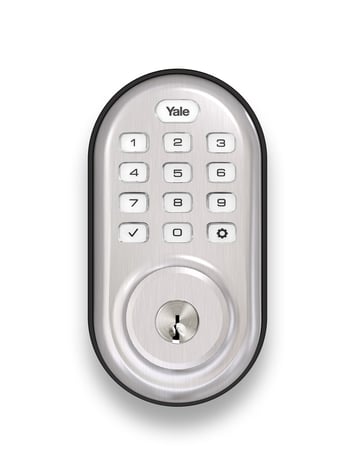
Product Picture


1 - Silent Mode on/off
Level control, 1, 2, 3 default is 1. Levels are 1 and 3 for models with no spoken prompts default is 1 or highSize: 1 byte
Default: 1
Minimum: 0
Maximum: 0
Possible values
| From | To | Desription |
|---|---|---|
| 1 | 3 | Level |
2 - Auto Relock On/Off
0x00 = OFF, 0xFF = ON default is 0x00 or OFFSize: 1 byte
Default: 0
Minimum: 0
Maximum: 0
Possible values
| From | To | Desription |
|---|---|---|
| 0 | 0 | Auto Relock Off |
| -128 | -128 | Auto Relock On |
3 - Auto Relock Time
10 to 127 seconds default is 30 secondsSize: 1 byte
Default: 30
Minimum: 0
Maximum: 0
Possible values
| From | To | Desription |
|---|---|---|
| 10 | 127 | Seconds |
4 - Wrong Code Entry Limit
3 to 10 default is 5 timesSize: 1 byte
Default: 5
Minimum: 0
Maximum: 0
Possible values
| From | To | Desription |
|---|---|---|
| 3 | 10 | Times |
5 - Language
Set the lock language. Default is 1= EnglishSize: 1 byte
Default: 1
Minimum: 0
Maximum: 0
Possible values
| From | To | Desription |
|---|---|---|
| 1 | 1 | English Language |
| 2 | 2 | Spanish Language |
| 3 | 3 | French Language |
7 - Shut Down Time (after wrong code entries)
10 to 127 seconds default is 60 secondsSize: 1 byte
Default: 60
Minimum: 0
Maximum: 0
Possible values
| From | To | Desription |
|---|---|---|
| 10 | 127 | Seconds |
8 - Operating Mode
This sets the operating mode for the lock.Size: 1 byte
Default: 0
Minimum: 0
Maximum: 0
Possible values
| From | To | Desription |
|---|---|---|
| 0 | 0 | Normal Mode (Default) |
| 1 | 1 | Vacation Mode (Keypad Locked Out) |
| 2 | 2 | Privacy Mode (Keypad Locked, RF Unlock Functional) |
11 - One Touch Locking
0x00 = OFF, 0xFF = ON default is 0xFF or ON.Size: 1 byte
Default: 0
Minimum: 0
Maximum: 0
Possible values
| From | To | Desription |
|---|---|---|
| 0 | 0 | One Touch Locking Off |
| -128 | -128 | One Touch Locking On |
12 - Privacy Button
0x00 = OFF, 0xFF = ON default is 0x00 or OFFSize: 1 byte
Default: 0
Minimum: 0
Maximum: 0
Possible values
| From | To | Desription |
|---|---|---|
| 0 | 0 | Privacy Button Off |
| -128 | -128 | Privacy Button On |
13 - Lock Status LED
0x00 = OFF, 0xFF = ON default is 0x00 or OFFSize: 1 byte
Default: 0
Minimum: 0
Maximum: 0
Possible values
| From | To | Desription |
|---|---|---|
| 0 | 0 | LED Off |
| -128 | -128 | LED On |
15 - Reset to Factory Defaults
01 = Lock will execute Reset To Factory. 02 = Reserved for future use (Lock will currently execute Reset To Factory same as 01). No default value Please use this procedure only when the network primary controller is missing or otherwise inoperableSize: 1 byte
Default: 0
Minimum: 0
Maximum: 0
Possible values
| From | To | Desription |
|---|---|---|
| 0 | 0 | Reset to Factory Off |
| -128 | -128 | Reset to Factory On |
1. Enter the 4-8 digit master PIN code followed by the gear key. 2. Press the 7 key followed by the gear key. 3. Press the 1 key followed by the gear key.
1. Enter the 4-8 digit master PIN code followed by the gear key. 2. Press the 7 key followed by the gear key. 3. Press the 3 key followed by the gear key.
Please use this procedure only when the network primary controller is missing or otherwise inoperable. 1. Remove the inside lever with the lever removal tool. 2. Remove battery cover using hex wrench provided with lock. 3. Remove four (4) AA batteries. 4. Remove the 10-32 x 3/4"" pan head screw from the center of the battery housing into the barrel nut of the outside assembly. 5. Remove inside escutcheon. Cables may stay connected. 6. Reinstall batteries 7. On the back of the PC board, push and hold the Reset Button with the lever removal tool for 3 seconds. 8. While continuing the press the reset button, temporarily remove one AA battery. 9. Reinstall the battery 10. Release reset button and wait 15 seconds. Speaker will announce ""Welcome to Yale"" 11. Reassemble escutcheon
| Type | Value(s) |
|---|