GE
In-Wall Smart Motion Switch
26931/ZW4006
On/Off Power Switch
HW: 255 FW: 5.56
ZM5101
6.51.06
0x0063 (99)
0x494D (18765)
0x3032 (12338)
ZC10-16105294
2016-10-27 15:59:35.968622
N/A
Enhanced 232 Slave
Always On Slave
Transform any home into a smart home with the GE In-Wall Smart Motion Switch.
Transform any home into a smart home with the GE In-Wall Smart Motion Switch. This Z-Wave device replaces you current light switch using your existing wiring and provides Z-Wave wireless control of overhead lighting. The switch enables wireless control of On/OFF functions of incandescent, LED, xenon, halogen and fluorescent lighting. Not only does it act as a switch but the GE In-Wall Smart Motion Switch has a built in PIR sensor which can control the local and be set in occupancy or vacancy mode.
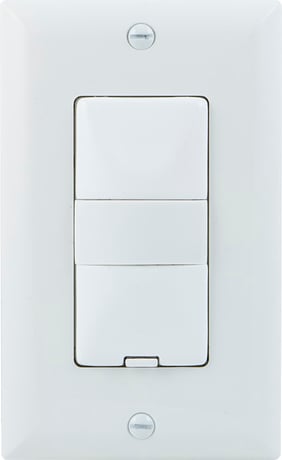
Product Picture


1 - Timeout Duration
0=Test(5S) 1=1 minute 5=5 minutes 15=15 minutes 30=30 minutes 0xFF=Disable timeoutSize: 1 byte
Default: 5
Minimum: 0
Maximum: 0
Possible values
| From | To | Desription |
|---|---|---|
| 0 | 0 | Test (5s) |
| 1 | 1 | 1 minute |
| 5 | 5 | 5 minutes |
| 15 | 15 | 15 minutes |
| 30 | 30 | 30 minutes |
| 255 | 255 | Disable timeout |
2 - Change brightness of associated light bulb(s)
0xFF = last dimming levelSize: 1 byte
Default: 255
Minimum: 0
Maximum: 0
Possible values
| From | To | Desription |
|---|---|---|
| 0 | 99 | Dim Level |
| 255 | 255 | Default |
3 - Operation Mode
1 – Manual 2 – Vacancy 3 – OccupancySize: 1 byte
Default: 3
Minimum: 0
Maximum: 0
Possible values
| From | To | Desription |
|---|---|---|
| 1 | 1 | Manual |
| 2 | 2 | Vacancy |
| 3 | 3 | Occupancy |
4 - Enable/Disable Association Mode
0 – disabled 1 – enabled 5 devices max: Group 1 – 5 devices lifeline Group 2 – 5 lighting devices Group 3 – 5 lighting devicesSize: 1 byte
Default: 1
Minimum: 0
Maximum: 0
Possible values
| From | To | Desription |
|---|---|---|
| 0 | 0 | Disabled |
| 1 | 1 | Enabled |
5 - Invert Switch
In a 3-way configuration, invert the connected Add-On Switch buttons 0 – disabled 1 – enabledSize: 1 byte
Default: 0
Minimum: 0
Maximum: 0
Possible values
| From | To | Desription |
|---|---|---|
| 0 | 0 | Disabled |
| 1 | 1 | Enabled |
6 - Enable/Disable Motion Sensor
0 – disabled 1 – enabledSize: 1 byte
Default: 1
Minimum: 0
Maximum: 0
Possible values
| From | To | Desription |
|---|---|---|
| 0 | 0 | Disable |
| 1 | 1 | Enable |
13 - Motion Sensor Sensitivity
1 – High 2 – Medium 3 – LowSize: 1 byte
Default: 2
Minimum: 0
Maximum: 0
Possible values
| From | To | Desription |
|---|---|---|
| 1 | 1 | High |
| 2 | 2 | Medium |
| 3 | 3 | Low |
14 - Enable/Disable Light Sensing
0 – disabled 1 – enabledSize: 1 byte
Default: 1
Minimum: 0
Maximum: 0
Possible values
| From | To | Desription |
|---|---|---|
| 0 | 0 | Disabled |
| 1 | 1 | Enabled |
15 - Reset Cycle
0 – disable 1 – 10 secs 2 – 20 secs 3 – 30 secs 4 – 45 secs … 110 – 27 mins 15 secs (+15 seconds each adition, max. 27 mins 15secs)Size: 1 byte
Default: 2
Minimum: 0
Maximum: 0
Possible values
| From | To | Desription |
|---|---|---|
| 0 | 0 | Disable |
| 1 | 1 | 10 secs |
| 2 | 2 | 20 secs |
| 3 | 3 | 30 secs |
| 4 | 4 | 45 secs |
| 110 | 110 | 27 mins |
19 - Exclusion Mode
0 = press any button on the switch 1 = press and release “ X” button, then press and release “ ON “ buttonSize: 1 byte
Default: 0
Minimum: 0
Maximum: 0
Possible values
| From | To | Desription |
|---|---|---|
| 0 | 0 | Normal exclusion |
| 1 | 1 | Alternate exclusion |
1. Follow the instructions for your Z-Wave certified controller to include the smart switch to the Z-Wave network. 2. Once the controller is ready to include your smart switch, press and release the top or bottom button on the smart switch to include it in the network.
1. Follow the instructions for your Z-Wave certified controller to exclude a device from the Z-Wave network. 2. Once the controller is ready to exclude your device, press and release the top or bottom button on the smart switch to exclude it from the network.
Press and release the top button ten times. Note: This should only be used in the event your network’s primary controller is missing or otherwise inoperable.
| Type | Value(s) |
|---|
| Sensor type |
|---|
| General Purpose |