devolo
Home Control Smart Metering Plug
MT 02792
On/Off Power Switch
HW: 1 FW: 1.13
ZM5202
6.51.08
0x0175 (373)
0x0001 (1)
0x0012 (18)
ZC10-16125365
2016-12-23 18:30:12.997754
N/A
Enhanced 232 Slave
Always On Slave
The devolo switch and meter socket makes more out of your mains supply. The discreet adapter can be plugged into any power outlet in the house and enhances every connected device with useful functions.
The devolo Home Control Smart Metering Plug is an intelligent wall socket that adds useful additional functions to all wall sockets present in the household. This enables connected devices to be switched on and off based on time control, either using rules configured in the Z-Wave-compatible control unit or using the corresponding app. In addition, the devolo Home Control Smart Metering Plug has an energy consumption measurement feature.
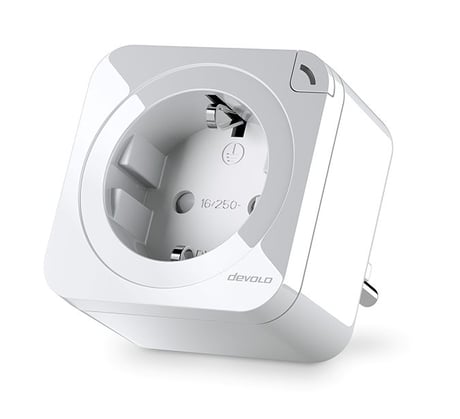
Product Picture


1 - Watt Meter Report Period
If 1 hour is set (target value =720), the Home Control Smart Metering Plug reports its power consumption at the current time every hour to the Node ID of Group 1. The maximum reporting period is 45 hours (5s*32767/3600=45hr).Size: 2 bytes
Default: 720
Minimum: 0
Maximum: 0
Possible values
| From | To | Desription |
|---|---|---|
| 1 | 32767 | Report Period in Unit 5s |
2 - KWh Report Period
If 1 hour is set (target value =6), the Home Control Smart Metering Plug reports its accumulated power consumption every hour to the Node ID of Group 1. The maximum reporting period is 227.55 days (10s*32767/1440=227.55 days).Size: 2 bytes
Default: 6
Minimum: 0
Maximum: 0
Possible values
| From | To | Desription |
|---|---|---|
| 1 | 32767 | Report Period in Unit 10min |
3 - Threshold of current for Load caution
If the current load exceeds the defined value, the Home Control Smart Metering Plug sends a meter message to the Node ID of Group 1.Size: 2 bytes
Default: 1300
Minimum: 0
Maximum: 0
Possible values
| From | To | Desription |
|---|---|---|
| 10 | 1300 | Threshold in Unit 0.01A |
4 - Threshold of KWh for Load caution
If the kW load exceeds the defined value (default value: 10,000, for an elevated accumulated power consumption), the Home Control Smart Metering Plug sends a meter message to the Node ID 1.Size: 2 bytes
Default: 10000
Minimum: 0
Maximum: 0
Possible values
| From | To | Desription |
|---|---|---|
| 1 | 10000 | Threshold in Unit 1 KWh |
5 - Restore switch state mode
If the Home Control Smart Metering Plug is disconnected from the mains power supply and then reconnected to the mains power supply, depending on the configuration, it will trigger the Switch OFF, set the Last Switch State or set the Switch ON. The default setting is always the last switch state.Size: 1 byte
Default: 1
Minimum: 0
Maximum: 0
Possible values
| From | To | Desription |
|---|---|---|
| 0 | 0 | Switch off |
| 1 | 1 | Last switch state |
| 2 | 2 | Switch on |
6 - Mode of Switch OFF function
If Switch ON/OFF is set to 0, both the Switch OFF command and the ON/OFF button are disabled. The default setting is the enable switching.Size: 1 byte
Default: 1
Minimum: 0
Maximum: 0
Possible values
| From | To | Desription |
|---|---|---|
| 0 | 0 | Disable |
| 1 | 1 | Enable |
7 - LED indication mode
1 Display device status When the Home Control Smart Metering Plug is switched on, the LED is on; when the Home Control Smart Metering Plug is switched off, the LED is off. In the default setting, the device status is displayed. 2 Show nighttime mode: When the Home Control Smart Metering Plug is switched on, the LED is off; when the Home Control Smart Metering Plug is switched off, the LED is on. 3 One-flash mode: If the device status changes, the LED flashes briefly (1 sec.) and then goes out.Size: 1 byte
Default: 1
Minimum: 0
Maximum: 0
Possible values
| From | To | Desription |
|---|---|---|
| 1 | 1 | Show switch state |
| 2 | 2 | Show night mode |
| 3 | 3 | One flash mode |
8 - Auto off timer
If the Home Control Smart Metering Plug switches to ON, the auto-off timer starts counting down. After the timer is set to zero, the device shuts off automatically. If the auto-off timer function is set to 0, it is disabled.Size: 2 bytes
Default: 0
Minimum: 0
Maximum: 0
Possible values
| From | To | Desription |
|---|---|---|
| 0 | 0 | Disable auto off function |
| 1 | 32767 | Auto-off time in Unit 1s |
9 - RF off command mode
If the command Switch OFF BASIC_SET 、BINARY_SWITCH_SET 、SWITCH_ALL_OFF is received, this can be interpreted in four different ways: 0. Switch OFF: The Home Control Smart Metering Plug switches itself off (default setting). 1. Ignore: The command Switch OFF is ignored. 2. Switch device: The Home Control Smart Metering Plug switches to the opposite state. 3. Switch ON: The Home Control Smart Metering Plug switches itself on.Size: 1 byte
Default: 0
Minimum: 0
Maximum: 0
Possible values
| From | To | Desription |
|---|---|---|
| 0 | 0 | Switch off |
| 1 | 1 | Ignore |
| 2 | 2 | Switch toggle |
| 3 | 3 | Switch on |
The Home Control Smart Metering Plug can be included using two different procedures: Variant A: Auto Inclusion with the control unit 1. In the Z-Wave-compatible control unit, start the procedure for adding a new device automatically. 2. Plug the Home Control Smart Metering Plug into an available power socket. The Auto Inclusion is run. During the 2-minute timeout of the Auto Inclusion, Node Information Frames are sent within a few seconds. In the auto inclusion, it is not necessary to press the ON/OFF button. Variant B: Manual Inclusion with the control unit If the time frame (2 minutes) of the Auto Inclusion procedure is exceeded, you can also include the Home Control Smart Metering Plug with the control unit manually. 1. In the Z-Wave -compatible control unit, start the procedure for adding a new device (inclusion). 2. Press the button of the connected Smart Metering Plug 3x within 1.2 seconds to start the inclusion process with the Z-Wave-compatible control unit.
1. Put the Z-Wave® controller in Exclusion mode. 2. Press the ON/OFF button 3x within 1.2 seconds to put the device into Exclusion mode. (indicated by white LED: 0.5 sec. ON, 0.5 sec. OFF) 3. Node ID is now removed. (After the removal, the device starts again with Auto Inclusion mode.)
Press the ON/OFF button for at least 10 sec. to reset the device to the factory defaults. After the reboot, the device starts Auto Inclusion again.
| Type | Value(s) |
|---|
| Meter type |
|---|
| Electric Meter Consumption |