Dome
Dome Z-Wave Plus Siren
DMS01
Siren
HW: 48 FW: 2.65
ZM5202
6.51.08
0x021F (543)
0x0003 (3)
0x0088 (136)
ZC10-17015372
2016-12-30 21:09:14.138966
N/A
Routing Slave
Listening Sleeping Slave
Yes
Dome™ Wireless Z-Wave Plus Siren, Battery Powered with Ten Selectable Tones and Volume Level • Loud alarm sound (up to 105dB) with flashing LED’s when triggered. • Additional audible chime notification (i.e. door opens, door bell, warnings). Choose from ten unique sounds and three volume levels (advanced settings subject to Z-Wave Hub compatibility). • Mounts anywhere- it’s wireless and 100% battery powered with 3-year battery life (2 CR123A Batteries Included). Up to 150-foot range • Z-Wave Plus Certified. Requires a Z-Wave Certified Hub to operate • Tested to work with SmartThings, Vera, Staples Connect, HomeSeer, Nexia, Piper, URC, Harmony. Not supported by Wink, DSC, ADT Pulse, 2Gig, Napco, Interlogix, Honeywell (Dome is not associated with listed brands)
The Dome™ Home Automation DMS01 Siren offers ten user selectable sounds with three volume levels (at up to 105dB) and adjustable siren timeout (30/60/300 seconds or infinite). It includes a functionality of an alarm siren, doorbell and an audible chime notification when door/window opens (advanced settings subject to Z-Wave Hub compatibility). Additional visual notification is provided by built-in flashing LED’s when triggered. One of a kind device on the market with 100% battery operation allowing for easy installation anywhere in your home. There is a 3-year battery life, so you can always be confident that your siren has power. Extra-long Z-Wave wireless range (up to 150 ft) allows you to place it where it’s needed without worrying if the signal is reaching your Z-Wave Hub. Dome™ DMS01 Siren comes with a 1-year limited warranty. Measurements in inches: 2.625 x 2.625 x 1.125. Dome™ Home Automation Z-Wave devices give your family peace of mind and security you can count on. With Dome™, you’re always connected and always covered.
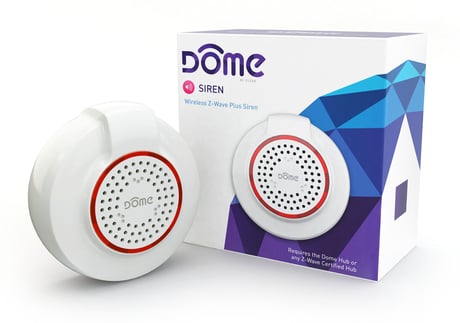
Product Picture


1 - Primary Notification Volume Level
This parameter sets the volume of the Siren (primary) sound. There are three possible volume levels available.Size: 1 byte
Default: 2
Minimum: 0
Maximum: 0
Possible values
| From | To | Desription |
|---|---|---|
| 1 | 1 | Low Volume |
| 2 | 2 | Medium Volume |
| 3 | 3 | High Volume |
2 - Primary Notification Length
This parameter defines the length of the Alarm/primary notification.Size: 1 byte
Default: 2
Minimum: 0
Maximum: 0
Possible values
| From | To | Desription |
|---|---|---|
| 1 | 1 | 30 Sec |
| 2 | 2 | 1 Min |
| 3 | 3 | 5 Min |
| -1 | -1 | Plays until battery dies |
3 - Secondary Notification Length
This parameter defines the length of the Chime/secondary notification.Size: 1 byte
Default: 1
Minimum: 0
Maximum: 0
Possible values
| From | To | Desription |
|---|---|---|
| 0 | 0 | Does Not Stop |
| 1 | 127 | Chime Duration (in Minutes) |
| -128 | -2 | Chime Duration (in Minutes; -128=128 min, -2=254 min) |
| -1 | -1 | Chime Will Not Play |
4 - Secondary Notification Volume Level
This parameter sets the volume of the Chime (secondary) sound. There are three possible volume levels available.Size: 1 byte
Default: 2
Minimum: 0
Maximum: 0
Possible values
| From | To | Desription |
|---|---|---|
| 1 | 1 | Low Volume |
| 2 | 2 | Medium Volume |
| 3 | 3 | High Volume |
5 - Primary Notification Sound
The Siren offers ten different sounds to use as the Siren (primary) notification. This parameter sets the Siren (primary) notification sound.Size: 1 byte
Default: 9
Minimum: 0
Maximum: 0
Possible values
| From | To | Desription |
|---|---|---|
| 1 | 10 | Tone Index Number |
6 - Secondary Notification Sound
If Parameter 7 is set to 02, the Siren will play a secondary chime sound instead of the main alarm. The Siren offers ten different sounds to use as the Chime (secondary) notification. This parameter sets the Chime (secondary) notification sound.Size: 1 byte
Default: 10
Minimum: 0
Maximum: 0
Possible values
| From | To | Desription |
|---|---|---|
| 1 | 10 | Tone Index Number |
7 - Toggle Secondary Chime
This Parameter toggles between the Primary and Secondary notification sound to be played when the Siren receives a BINARY_SWITCH_SET(FF) command.Size: 1 byte
Default: 1
Minimum: 0
Maximum: 0
Possible values
| From | To | Desription |
|---|---|---|
| 1 | 1 | Primary Notification Will Play |
| 2 | 2 | Secondary Notification Will Play |
Follow the instructions for your Z-Wave certified Controller to enter inclusion mode. When prompted by the Controller: 1. For proper inclusion, bring the Siren to the final location where it will be used. * 2. Remove the Back Plate of the Siren. 3. Remove the Battery Tabs. 4. Press the Connect Button quickly 3 times in a row. The LED Ring will flash five times indicating inclusion. *For non Z-Wave Plus networks, please consult the owner’s manual for your primary controller to determine the best method and location for adding the Siren to your Z-Wave network.
Follow the instructions for your Z-Wave certified Controller to enter exclusion mode. When prompted by the Controller: 1. Remove the Back Plate of the Siren. 2. Press the Connect Button quickly 3 times in a row. The LED Ring will flash five times indicating exclusion/disconnection.
To disconnect from the Z-Wave Network and restore factory default settings: 1. Open the Back Plate and make sure the Siren is powered. 1. Hold the Connect Button for 10 seconds until the LED Ring blinks once, then release the button. Only do this if the controller is missing or otherwise unreachable!
Use the Binary Switch command class to trigger the main siren, or the Indicator. Set command to trigger one of ten different secondary chime notifications (indicator.set accepts values from 01~0A.)
| Type | Value(s) |
|---|