D-Link Corporation
mydlink™ Motion Sensor
DCH-Z122
Notification Sensor
HW: 1 FW: 1.28:01.22
SD3502
6.51.09
0x0108 (264)
0x0002 (2)
0x0035 (53)
ZC10-16115324
2016-11-30 07:35:22.689424
N/A
Routing Slave
Reporting Sleeping Slave
Yes
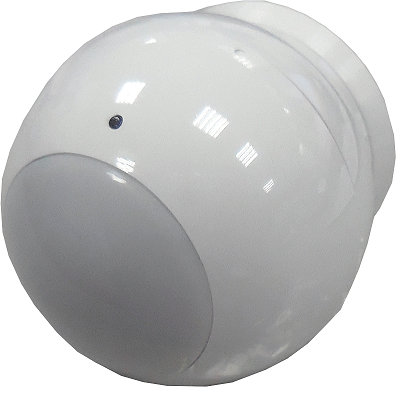
The PIR sensor DCH-Z122 has PIR sensor function.
The PIR sensor DCH-Z122 has PIR sensor function,based on Z-Wave™ technology.


2 - Basic Set Level
Setting the BASIC command value to turn on the light. -1(0xFF) means turn on the light. For dimmer equipment 1 to 100 means the light strength. 0 means turn off the light. Caution: The range is from 0x00 to 0xFF using hexadecimal notation.Size: 1 byte
Default: -1
Minimum: 0
Maximum: 0
Possible values
| From | To | Desription |
|---|---|---|
| -128 | 127 | Basic command value to turn on the light. |
3 - PIR Sensitivity
PIR sensitivity setting. 0 means disable the PIR motion. 1 means the lowest sensitivity. 99 means the highest sensitivity. High sensitivity means can detected long distance,but if there is more noise signal in the environment, it will re-trigger too frequency.Size: 1 byte
Default: 80
Minimum: 0
Maximum: 0
Possible values
| From | To | Desription |
|---|---|---|
| 0 | 99 | PIR sensitivity setting. |
6 - Multi-Sensor Function Switch
Multisensor function switch.Using bit to control.Size: 1 byte
Default: 5
Minimum: 0
Maximum: 0
Possible values
| From | To | Desription |
|---|---|---|
| 16 | 16 | Disable delay 5 seconds to turn off the light,when door/window closed.(1:Disable, 0:Enable) |
| 32 | 32 | Disable auto turn off the light,after door/window opened to turn on the light.(1:Disable, 0:Enable) |
| 8 | 8 | When Bit2 is 0(Enable), Are the device and the lighting in the same room? 0:In the same room(Default), 1:In the different room. |
7 - Customer Function
Size: 1 byte
Default: 4
Minimum: 0
Maximum: 0
Possible values
| From | To | Desription |
|---|---|---|
| 2 | 2 | Enable sending motion OFF report.(0:Disable, 1:Enable) |
| 4 | 4 | Enable PIR suoer sensitivity mode. |
| 16 | 16 | Notification Type,0:Using Notification Report. 1: Using Sensor Binary Report. |
| 32 | 32 | Disable Multi CC in auto report.(1:Disable, 0:Enable) |
| 64 | 64 | Disable to report battery state when the device triggered.(1:Disable, 0:Enable) |
8 - PIR Re-Detect Interval Time
In the normal mode, after the PIR motion detected, setting the re-detect time. 8 seconds per tick,default tick is 3(24 seconds). Setting the suitable value to prevent received the trigger signal too frequently. Also can save the battery energy.Size: 1 byte
Default: 3
Minimum: 0
Maximum: 0
Possible values
| From | To | Desription |
|---|---|---|
| 1 | 127 | Re-detect time |
9 - Turn Off Light Time
After turn on the light,setting the delay time to turn off the lighting when the PIR motion to turn off the lighting when the PIR motion is not detected.8 seconds per tick,default tick is 4(32 seconds). 0 means never send turn off light command.Size: 1 byte
Default: 4
Minimum: 0
Maximum: 0
Possible values
| From | To | Desription |
|---|---|---|
| 0 | 127 | Delay time to turn off the lighting when the PIR motion is not detected. |
10 - Auto Report Battery Time
The Interval time for auto report the battery level. 0 means turn off auto report battery. The default value is 12.The tick time can setting by the configuration NO.20.Size: 1 byte
Default: 12
Minimum: 0
Maximum: 0
Possible values
| From | To | Desription |
|---|---|---|
| 0 | 127 | The interval time for auto report the battery level. |
20 - Auto Report Tick Interval
The interval time for auto report each tick. Setting this configuration will effect configuration NO.10. The unit is 1 minute. Caution 1:Setting to 0 means turn off all auto report function. Caution 2:The range is from 0x00 to 0xFF using hexadecimal notation.Size: 1 byte
Default: 30
Minimum: 0
Maximum: 0
Possible values
| From | To | Desription |
|---|---|---|
| -128 | 127 | The interval time for auto report each tick. |
There is a button on DCH-Z122. 1. Have Z-Wave™ Controller entered inclusion mode. 2. Pressing button once to enter the inclusion mode. 3. After add successful, the device will wake to receive the setting command from Z-Wave™ Controller about 20 seconds.
There is a button on DCH-Z122. 1. Have Z-Wave™ Controller entered exclusion mode. 2. Pressing button once to enter the exclusion mode.
There is a button on DCH-Z122. Press the button once, the device will awake 10 seconds.
There is a button on DCH-Z122. 1. Pressing button for about 5 seconds. 2. IDs are excluded and all settings will reset to factory default. Notice: Use this procedure only in the event that the primary controller is lost or otherwise inoperable.
| Type | Value(s) |
|---|
| Sensor type |
|---|
| General Purpose |