Good Way Technology, Co., Ltd
Door/Window Sensor
TS2001
Notification Sensor
HW: 255 FW: 2.14
ZM5101
6.51.09
0x0068 (104)
0x0003 (3)
0x0009 (9)
ZC10-17015396
2016-12-10 18:41:43.032118
N/A
Enhanced 232 Slave
Reporting Sleeping Slave
The door/window sensor TS2001 has door/window sensor function,based on Z-Wave technology.
The Door/Window Sensor is a wireless, battery powered, Z-Wave compatible reed sensor. Each time the sensor’s body and a magnet separate, a radio signal is sent. In addition, the Door/Window Sensor supports one potential-free input and self-power adapter of DC 9V~30V. The Door/Window Sensor is designed for use with home automation systems, alarm and surveillance systems and everywhere else where information related to opening/closing of doors, garage, gates.
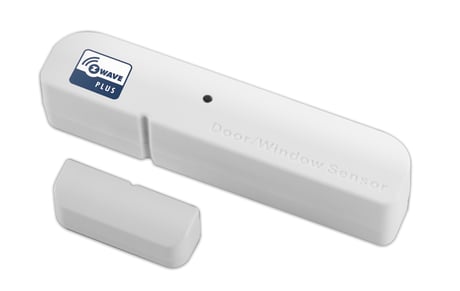
Product Picture


1 - Battery Report delay time
The interval time of sending Battery Report when the battery runs out of electricity.Size: 1 byte
Default: 3
Minimum: 0
Maximum: 0
Possible values
| From | To | Desription |
|---|---|---|
| 1 | 30 | minute |
2 - External Sensor Define
Set the configuration of 2 external sensors. 0 (00b): S1 NO, S2 NO 1 (01b):S1 NO,S2 NC 2 (10b):S1 NC,S2 NO 3 (11b):S1 NC,S2 NCSize: 1 byte
Default: 0
Minimum: 0
Maximum: 0
Possible values
| From | To | Desription |
|---|---|---|
| 0 | 3 | External Sensor Define |
To manually include the device, press Tamper three times repeatedly to perform the actions. LED Status:Blue LED solid light
To manually exclude the device, press Tamper three times repeatedly to perform the actions. LED Status:Blue LED 1 sec. flashes 3 times
The Z-Wave Window/Door Sensor stays in sleep status for the majority of time in order to conserve battery power. However, it can be woken up at specified intervals by setting WAKE_UP_INTERVAL_SET command.
The Device Reset Locally Notification Command is used to advertise that the device will be reset to default. In Wake up time, Press tamp key 2 times, then the third long press 5s, then device will clear the data back to the factory default. Please use this procedure only when the network primary controller is missing or otherwise inoperable.
| Type | Value(s) |
|---|
| Sensor type |
|---|
| General Purpose |