Good Way Technology, Co., Ltd
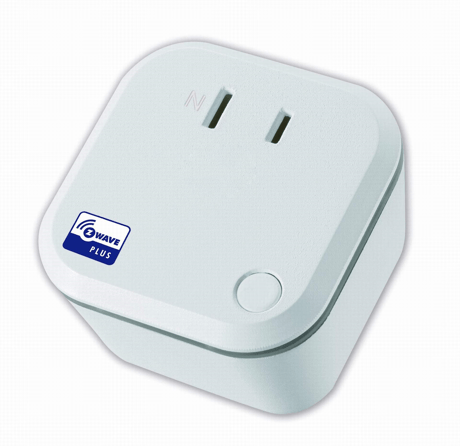
Smart Meter Switch
TD13320
On/Off Power Switch
HW: 255 FW: 2.14
ZM5101
6.51.09
0x0068 (104)
0x0003 (3)
0x0006 (6)
ZC10-17025434
2016-12-20 07:02:57.886307
N/A
Enhanced 232 Slave
Always On Slave
Smart Meter switch allows controlling two independent loads both via Z-Wave wirelessly and locally utilizing a traditional wall switch.
Smart Meter switch allows controlling two independent loads both via Z-Wave wirelessly and locally utilizing a traditional wall switch. The switch is no longer directly connected to the load but acts as input device for the in wall switch that is controlling the load. And this device can calculate the total power consumption in time periods of day, month and year. Display the values of the measurements on the remote site.


1 - Meter Report Time
How often to send a meter report(minute). Available configuration value: 5-1092: 5 minutes to 1092 minutes.Size: 2 bytes
Default: 30
Minimum: 0
Maximum: 0
Possible values
| From | To | Desription |
|---|---|---|
| 5 | 1092 | How often to send a meter report(minute). |
2 - Night light mode
Sets the night light mode. Available configuration value: 0: Turn off the night light 1: Turn on the night lightSize: 1 byte
Default: 0
Minimum: 0
Maximum: 0
Possible values
| From | To | Desription |
|---|---|---|
| 0 | 1 | Sets the night light mode |
3 - Night light color value
Sets the night light color value. Available configuration value: 0: none color 1: Red 2: Orange 3: Green 4: Blue 5: Indigo 6: Pink 7: Light PinkSize: 1 byte
Default: 0
Minimum: 0
Maximum: 0
Possible values
| From | To | Desription |
|---|---|---|
| 0 | 7 | Sets the night light color value |
If you want to manually include the device, press the button for 3 times to include the device. LED Status: Blue LED Solid light.
If you want to manually exclude the device, press the button for 3 times to exclude the device. LED Status: Green LED 1 sec. flashes 1 times
The Device Reset Locally Notification Command is used to advertise that the device will be reset to default. Press the button 3 times in 2 sec., and hold it for more than 3 sec. Please use this procedure only when the network primary controller is missing or otherwise inoperable.
| Type | Value(s) |
|---|
| Meter type |
|---|
| Electric Meter Consumption |