devolo
Home Control Key-
MT:2653
Remote Control - Simple
HW: 1 FW: 1.01
ZM5202
6.51.03
0x0175 (373)
0x0001 (1)
0x0301 (769)
ZC10-17015376
2016-12-30 21:46:30.553702
N/A
Portable Controller
Portable Controller
Yes
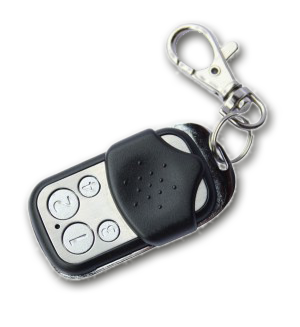
The smart home controller for your pocket.
The smart home controller for your pocket. · Four freely programmable function keys. · Activate any Home Control components or scenarios with the push of a button. · As compact as a small car key. · Control your smart home from up to 100 metres (328 ft.) away.


1 - Button 1 and 3 pair mode
In separate mode button 1 works with group A, button 3 with groups C. Click is On, Hold is dimming Up, Double click is Off, Click-Hold is dimming Down. In pair button 1/3 are Up/Down correspondingly. Click is On/Off, Hold is dimming Up/Down. Single clicks works with group A, double click with group C.Size: 1 byte
Default: 1
Minimum: 0
Maximum: 0
Possible values
| From | To | Desription |
|---|---|---|
| 0 | 0 | seperately |
| 1 | 1 | In pair without double clicks |
| 2 | 2 | In pair with double clicks |
2 - Button 2 and 4 pair mode
In separate mode button 2 works with control group B, button 4 with control group D. Click is On, Hold is dimming Up, Double click is Off, Click-Hold is dimming Down. In pair button B/D are Up/Down correspondingly. Click is On/Off, Hold is dimming Up/Down. Single clicks works with group B, double click with group D.Size: 1 byte
Default: 1
Minimum: 0
Maximum: 0
Possible values
| From | To | Desription |
|---|---|---|
| 0 | 0 | seperately |
| 1 | 1 | In pair without double clicks |
| 2 | 2 | In pair with double clicks |
11 - Command to Control Group A
This parameter defines the command to be sent to devices of control group A when the related button is pressedSize: 1 byte
Default: 8
Minimum: 0
Maximum: 0
Possible values
| From | To | Desription |
|---|---|---|
| 0 | 0 | Disabled |
| 1 | 1 | Switch On/Off and Dim (send Basic Set and Switch Multilevel) |
| 2 | 2 | Switch On/Off only (send Basic Set) |
| 3 | 3 | Switch All |
| 4 | 4 | Send Scenes |
| 5 | 5 | Send Preconfigured Scenes |
| 7 | 7 | Control DoorLock |
| 8 | 8 | Central Scene to Gateway |
12 - Command to Control Group B
This parameter defines the command to be sent to devices of control group B when the related button is pressedSize: 1 byte
Default: 8
Minimum: 0
Maximum: 0
Possible values
| From | To | Desription |
|---|---|---|
| 0 | 0 | Disabled |
| 1 | 1 | Switch On/Off and Dim (send Basic Set and Switch Multilevel) |
| 2 | 2 | Switch On/Off only (send Basic Set) |
| 3 | 3 | Switch All |
| 4 | 4 | Send Scenes |
| 5 | 5 | Send Preconfigured Scenes |
| 7 | 7 | Control DoorLock |
| 8 | 8 | Central Scene to Gateway |
13 - Command to Control Group C
This parameter defines the command to be sent to devices of control group C when the related button is pressedSize: 1 byte
Default: 8
Minimum: 0
Maximum: 0
Possible values
| From | To | Desription |
|---|---|---|
| 0 | 0 | Disabled |
| 1 | 1 | Switch On/Off and Dim (send Basic Set and Switch Multilevel) |
| 2 | 2 | Switch On/Off only (send Basic Set) |
| 3 | 3 | Switch All |
| 4 | 4 | Send Scenes |
| 5 | 5 | Send Preconfigured Scenes |
| 7 | 7 | Control DoorLock |
| 8 | 8 | Central Scene to Gateway |
14 - Command to Control Group D
This parameter defines the command to be sent to devices of control group D when the related button is pressedSize: 1 byte
Default: 8
Minimum: 0
Maximum: 0
Possible values
| From | To | Desription |
|---|---|---|
| 0 | 0 | Disabled |
| 1 | 1 | Switch On/Off and Dim (send Basic Set and Switch Multilevel) |
| 2 | 2 | Switch On/Off only (send Basic Set) |
| 3 | 3 | Switch All |
| 4 | 4 | Send Scenes |
| 5 | 5 | Send Preconfigured Scenes |
| 7 | 7 | Control DoorLock |
| 8 | 8 | Central Scene to Gateway |
21 - Send the following Switch All commands
Size: 1 byte
Default: 1
Minimum: 0
Maximum: 0
Possible values
| From | To | Desription |
|---|---|---|
| -1 | -1 | Switch all on and off |
| 1 | 1 | Switch off only |
| 2 | 2 | Switch on only |
22 - Invert buttons
Size: 1 byte
Default: 0
Minimum: 0
Maximum: 0
Possible values
| From | To | Desription |
|---|---|---|
| 0 | 0 | No |
| 1 | 1 | Yes |
25 - Blocks wakeup even when wakeup interval is set
Size: 1 byte
Default: 1
Minimum: 0
Maximum: 0
Possible values
| From | To | Desription |
|---|---|---|
| 0 | 0 | Wakeup is blocked |
| 1 | 1 | Wakeup is not blocked |
30 - Send unsolicited Battery Report on Wake Up
Size: 1 byte
Default: 0
Minimum: 0
Maximum: 0
Possible values
| From | To | Desription |
|---|---|---|
| 0 | 0 | No |
| 1 | 1 | To same node as wake up notification |
| 2 | 2 | Broadcast |
When in factory default push Button 1 (secure) or Button 2 (normal) for one second to enter learn mode. The learn mode is indicated by a blinking LEDs red/green. Learn mode will only activate when device is in factory reset state.
Enter management mode by push all four buttons together for one second - green led blinks slowly), then hit button 2 .
Enter management mode by push all four buttons together for one second - green led blinks slowly), then hit button 3 followed by keeping button 4 pushed down for 10 seconds. The first five seconds the green LED still blinks followed by a long red, shot green sequence. Once LEDs go off, reset was executed. Please use this procedure only if the device is secondary controller and the primary controller is missing or otherwise inoperable.
When in factory default push Button 3 (secure) or Button 4 (normal) for one second to enter inclusion mode. The inclusion mode is indicated by a blinking green LED. From second device on you need to enter management mode push all four buttons together for one second - green led blinks slowly), hit button 3 ( enter primary controller functions - green led blinks faster) and then button 1 (secure) or button 2 (normal).
Enter management mode by push all four buttons together for one second - green led blinks slowly), hit button 3 ( enter primary controller functions - green led blinks faster) and then button 3 again.
| Type | Value(s) |
|---|