Popp
Strike Lock Control
12501.0
Door Lock - Keypad
HW: 1 FW: 1.04
ZM5202
6.51.09
0x0154 (340)
0x0005 (5)
0x0001 (1)
ZC10-17035482
2017-03-14 16:20:35.953571
N/A
Enhanced 232 Slave
Listening Sleeping Slave
Yes
This device controls a Strike Lock.
An electric strike is an access control device used to lock and release doors. Electric strikes are installed in or on the doorframe and work in conjunction with mechanical door lock, on the principle of electronically controlling the rotation of the keeper allowing for door opening without manual retraction of the mechanical door lock. This product combines a 16 mm thick strike lock (that will fit into almost all door formats) with a Z-Wave plus empowered wireless control. The lock mechanics and the Z-Wave control are operated by a 9V block battery or an external 8-12V AC / 8-24V DC transformer. The Z-Wave control accepts commands to open or close the strike. Depending on a configuration parameter the door will be looked automatically after a certain time even if no ‘close’ command was sent. The device can be used standalone and within every conventional Intercom system controlling strike locks.
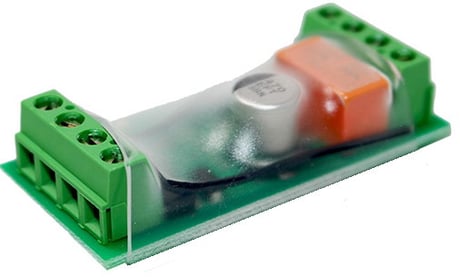
Product Picture


1 - Value of OPEN-Command
This parameter defines the value of the BASIC Set command issued into association group 2 when the dry contact opens.Size: 1 byte
Default: 0
Minimum: 0
Maximum: 0
Possible values
| From | To | Desription |
|---|---|---|
| 0 | 99 | Command Value |
2 - Value of CLOSE-command
This parameter defines the value of the BASIC Set command issued into association group 2 when the dry contact closes.Size: 1 byte
Default: 99
Minimum: 0
Maximum: 0
Possible values
| From | To | Desription |
|---|---|---|
| 0 | 99 | Command Value |
5 - Force FliRS Mode
Size: 1 byte
Default: 0
Minimum: 0
Maximum: 0
Possible values
| From | To | Desription |
|---|---|---|
| 0 | 0 | Depends on Power in Inclusion Moment |
| 1 | 1 | Force FLiRS Mode |
Pressing the Z-Wave button for one second includes the device. It is not allowed to operate the device in a non-secure environment. This means that the including controller must support Secure Command Class.
A single click on the button will exclude the device.
To do a factory reset press the Z-Wave button on the bottom of the device for at least 10 seconds. This procedure should only be used when the primary controller is missing or inoperable.
| Type | Value(s) |
|---|